
Adware.NDotNet is an adware program that associates non-existent domain names with sponsored content. #Removal Tool #Remove Adware.NDotNet #Adware.NDotNet remover #Adware.NDotNet #Removal #Remover


Adware.NDotNet Removal Tool is a simple application with a pretty self-explanatory name - it lets you remove the Adware.NDotNet adware program from your computer in a simple manner.
Adware.NDotNet is an adware component that works as a Browser Helper Object. It makes associations between non-existent domain names and sponsored content, thus redirecting the user to a sponsored website whenever he attempts to write a keyword in the address bar.
This is a portable utility, so installing Adware.NDotNet Removal Tool is not necessary. You can drop the EXE file anywhere on the hard drive and run it immediately.
It is also possible to save the compact program to a USB flash drive or similar device, from where you can run it on any workstation seamlessly.
An important factor is that portable apps do not work with the Windows Registry, thus it doesn't increase the risk of system failure. Plus, files do not remain behind on the hard disk after program removal.
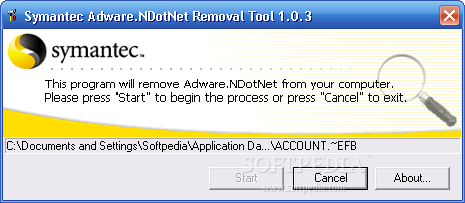
In order to run Adware.NDotNet Removal Tool, you must have administrative rights. The interface of the app is based on a small, standard window with three buttons, where you can immediately start the scanning procedure. There are no other notable options available through this program. Once found, the Adware.NDotNet adware tool is immediately deleted from the system.
The program is very light on the system resources, requiring a minimum amount of CPU and memory. We have not come across any problems in our tests, since the utility did not hang, crash or pop up error dialogs. Although it has limited functionality, Adware.NDotNet Removal Tool offers the simplest solution possible to removing the Adware.NDotNet adware program from the computer.
Adware.NDotNet Removal Tool 1.0.3
add to watchlist add to download basket send us an update REPORT- runs on:
- Windows All
- file size:
- 164 KB
- filename:
- FxNdotN.exe
- main category:
- Antivirus
- developer:
- visit homepage
Bitdefender Antivirus Free

ShareX

Microsoft Teams

IrfanView

Windows Sandbox Launcher

Zoom Client

Context Menu Manager

7-Zip

4k Video Downloader

calibre

- 7-Zip
- 4k Video Downloader
- calibre
- Bitdefender Antivirus Free
- ShareX
- Microsoft Teams
- IrfanView
- Windows Sandbox Launcher
- Zoom Client
- Context Menu Manager