WINDOWS CATEGORIES:


NEWS ARCHIVE >>
SOFTPEDIA REVIEWS >>

WEEKLY HIGHLIGHTS

DVD Cloner45
Spyware Doctor40
1Click DVD Copy40
Apollo DVD Copy40
ABC Amber BlackBer...45
Protected Music Co...40

7-DAY TOP DOWNLOAD

#
Program
Avira AntiVir
Personal - Free
Antivirus 9.0.0.415

185,490
Windows Live
Messenger 2009
14.0.8089.726

173,510
Avira Antivir Virus
Definition File
Update November 19,
2009

148,843
FreeZ Online TV 1.31
139,276
Nexus Radio 4.2
124,658
Microsoft Office
2010 14.0.4536.1000
Beta / 2007

78,554
Y! Multi Messenger
8.x and 9.x

77,547
Windows Live
Messenger
8.5.1302.1018

62,155
RemoveWGA 1.2
50,176
DVD Shrink 3.2.0.15
49,385

WEEK'S BEST

  • Faststone Image Vi...
  • Vuze (formerly Azu...
  • Softpedia Wallpape...
  • Softpedia Wallpape...
  • Softpedia Wallpape...
  • RSSOwl 2.0 Final
  • Internet Explorer ...
  • Online Armor ++ 4....
  • cFosSpeed 5.01 Bui...
  • SONY Vegas Pro 9.0...
  • Firefox 3.6 Beta 3...
  • Nokia Photos 1.6.434
  • Windows Server 200...
  • Skype Portable 4.1...
  • Google Chrome Port...
  • PCMark Vantage Bas...
  • Kaspersky Anti-Vir...
  • Microsoft Virtual ...
  • Messenger Plus! Li...
  • WinX DVD Author [F...
  • SoftPerfect Networ...
  • System Mechanic Pr...
  • Ad Muncher 4.8 Bui...
  • Windows 7 Upgrade ...
  • Pidgin 2.6.3
  • OpenOffice.org 3.2...
  • VirtualDub 1.9.7 B...
  • Maxthon [Softpedia...
  • Spyware Doctor 7.0...
  • SUPERAntiSpyware 4...
  • Home / Windows / Antivirus
     Report spyware

    W32.Downadup Removal Tool 1.0.3

    Download button

    Downloads: 37,087  Add to download basket  Tell us about an update
    User Rating:
    Rated by:
    Good (3.2/5)
    21 user(s)
    Developer:

    License / Price:

    Size / OS:

    Last Updated:

    Category:
    Symantec | More programs
    Freeware / FREE
    2.2 MB / Windows All
    January 16th, 2009, 17:57 GMT
    C: \ Antivirus

     Read user reviews (0)  Add a review  Refer to a friend  Subscribe


    W32.Downadup Removal Tool description


    Freeware removal tool that will scan and clean a computer infected with the W32.Downadup virus / W32.Downadup.B virus

    This tool is designed to remove the infections of W32.Downadup and W32.Downadup.B.

    If you are on a network or have a full-time connection to the Internet, such as a DSL or cable modem, disconnect the computer from the network and Internet. Disable or password-protect file sharing, or set the shared files to Read Only, before reconnecting the computers to the network or to the Internet.

    Because this worm spreads by using shared folders on networked computers, and also network exploitable vulnerability, to ensure that the worm does not re-infect the computer after it has been removed, Symantec suggests sharing with Read Only access or by using strong password protection

    If you are using the W32.Downadup Removal Tool to remove the infection from a network, please first make sure that all the shares have been disabled or set to Read Only.

    As this worm spreads through removable media, do not plug in external drives or writeable devices to the affected computer until it is confirmed to be clean. If this must be done, ensure that autorun is turned off and enable read-only mode on the device if this feature is available

    Usage:
    · Close all the running programs.
    · If you are on a network or if you have a full-time connection to the Internet, disconnect the computer from the network and the Internet.
    · If you are running Windows Me or XP, turn off System Restore
    · Double-click the FixDownadup.exe file to start the removal tool.
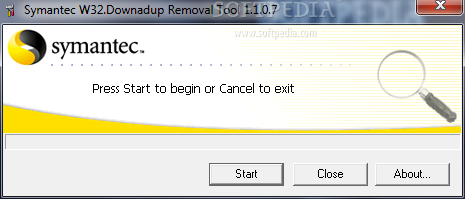
    · Click Start to begin the process, and then allow the tool to run.
    Note: If you have any problems when you run the tool, or it does nor appear to remove the threat, restart the computer in Safe mode and run the tool again.
    · Restart the computer.
    · Run the removal tool again to ensure that the system is clean.
    · If you are running Windows Me/XP, then reenable System Restore
    · Ensure that user accounts have strong passwords that are not in the list used by the worm.
    · If you are on a network or if you have a full-time connection to the Internet, reconnect the computer to the network or to the Internet connection

    Switches
    The following switches are designed for use by network administrators:
    /HELP, /H, /?
    Displays the help message.
    /NOFIXREG
    Disables the registry repair (We do not recommend using this switch).
    /SILENT, /S
    Enables the silent mode.
    /LOG=[PATH NAME]
    Creates a log file where [PATH NAME] is the location in which to store the tool's output. By default, this switch creates the log file, FixDownadup.log, in the same folder from which the removal tool was executed.
    /MAPPED
    Scans the mapped network drives. (We do not recommend using this switch. See the following Note.)
    /START
    Forces the tool to immediately start scanning.
    /EXCLUDE=[PATH]
    Excludes the specified [PATH] from scanning. (We do not recommend using this switch. See the following Note.)
    /NOCANCEL
    Disables the cancel feature of the removal tool.
    /NOFILESCAN
    Prevents the scanning of the file system.
    /NOVULNCHECK
    Disables checking for unpatched files.

    Requirements:

    · You must have administrative rights to run this tool on Windows NT 4.0, Windows 2000, or Windows XP

     Softpedia guarantees that W32.Downadup Removal Tool 1.0.3 is 100% FREE, which means it does not contain any form of malware, including spyware, viruses, trojans and backdoors. [read more >]


    TAGS:

    W32.Downadup Remover | Detect W32.Downadup | Removal Tool | Downadup | Kido | Conficker


    HTML code for linking to this page:


    Go to top

    Windows tabGames tabDrivers tabMac tabLinux tabScripts tabMobile tabHandheld tabGadgets tabNews tab

    SUBMIT PROGRAM   |   ADVERTISE   |   GET HELP   |   SEND US FEEDBACK   |   RSS FEEDS   |   ENTER NEWS SITE   |   ENGLISH BOARD   |   ROMANIAN FORUM