
Burn audio CDs using various types of audio files, with this user-friendly application that can be used even by complete novices. #Burn CD #CD-Text #Audio CD #CD #Audio #Burn
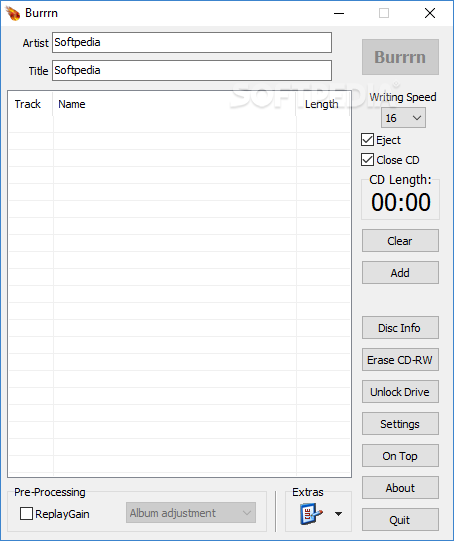
If you are not a record producer you will probably need an easy to use program that does not occupy a lot of space on your hard drive and, more importantly, is free to use. If you desire all the things mentioned above you can try Burrrn.
The software is designed to burn audio CDs and has a compact interface that is easy to understand use even by a beginner user. All you have to do is add multiple audio files, name your disc, select a writing speed and click the burn button. But before you burn the disc you can take advantage of a few extra features such as erasing a rewritable CD or normalize the tracks on an album.
Burn supports a lot of media formats ( WAV, MP3, MPC, OGG, AAC, MP4, APE, FLAC, OFR, WV, TTA, M#U, PLS and FPL play lists and CUE sheets) and can add all of them to a single album. It does not really matter if the volume of each file is different because the program can pre-process the files with ReplayGain and normalize the audio.
If you want to change the name of the tune that will be displayed by the CD player you can edit each label. For the advanced user the application offers the option to customize the decoders by changing the command lines for each file type. You can also view and edit CUE sheets when trying to extract a song from a single audio file that was ripped from a CD.
To make it available for different users the developer translated the GUI in over 20 languages that are included in the installer.
Burrrn 1.14 Beta 2
add to watchlist add to download basket send us an update REPORT- portable version
- Portable Burrrn
- runs on:
- Windows All
- file size:
- 2 MB
- filename:
- burrrn_package.exe
- main category:
- CD / DVD / Blu-ray Tools
- developer:
Bitdefender Antivirus Free

Zoom Client

7-Zip

Microsoft Teams

4k Video Downloader

Windows Sandbox Launcher

ShareX

IrfanView

calibre

Context Menu Manager

- IrfanView
- calibre
- Context Menu Manager
- Bitdefender Antivirus Free
- Zoom Client
- 7-Zip
- Microsoft Teams
- 4k Video Downloader
- Windows Sandbox Launcher
- ShareX