
Create ISO files from any folder and its subfolders using this lightweight and simple application that features a very intuitive GUI. #Create ISO #Folder to ISO #ISO generator #Folder2ISO #Create #Generate

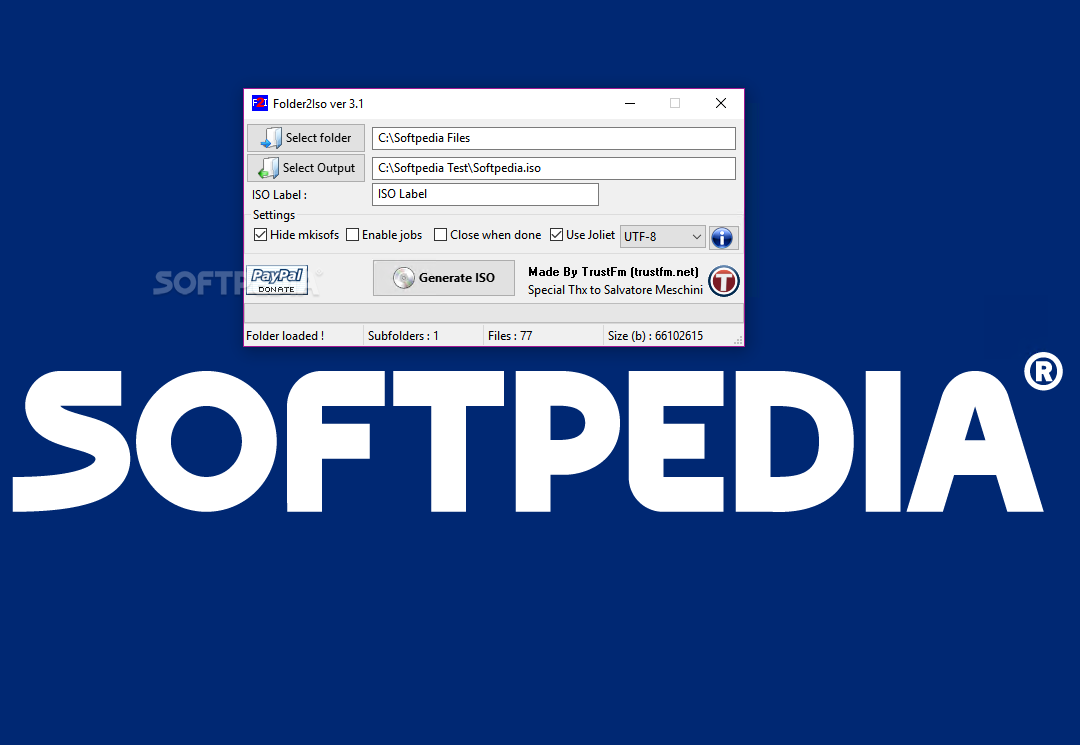
Folder2Iso is a very simple yet useful application that creates an ISO file out of any folder on your computer.
The program may come in very handy for users who wish to burn movies or other files on their computers with ease, using just a separate tool that's able to burn ISO files on CDs and DVDs.
Folder2Iso impresses thanks to its simplicity. Although most users expect a rather complicated approach, with tons of features that could make the whole procedure a lot more difficult, everything's pretty simple.
The interface is minimal and even if it doesn't include a help file, it takes just a few minutes to figure out how to use the program.
Users are prompted to select the folder they wish to convert into an ISO file and select the output location, which means they need to provide the directory for saving the result.
Users are required to provide the label of the ISO and choose the Charset, which is the only thing that may get you in trouble when using Folder2Iso.
If you're not sure which one to choose, it's recommended to click on the question mark next to the Charset drop-down menu and read the provided information; this way you can select the best option for you.
After that just hit the “Generate ISO” button and wait. Usually, Folder2Iso gets the job done in just a few seconds, but this also depends on the overall size of the folder and the number of included files. Still, the computer isn't stressed up at all and everything works like a charm.
All of the above lead us to a very simple conclusion: if you need a tool to convert a folder into an ISO image, make sure to put Folder2Iso on top of the list.
What's new in Folder2Iso 3.1:
- Updated : mkisofs to the newest version [3.02a06-win32-bin]
- Changed : Settings file
- Tested and Ported : Windows 10
Folder2Iso 3.1
add to watchlist add to download basket send us an update REPORT- runs on:
-
Windows 10 32/64 bit
Windows 8 32/64 bit
Windows 7 32/64 bit
Windows Vista 32/64 bit
Windows XP - file size:
- 2.6 MB
- filename:
- Folder2Iso31.exe
- main category:
- CD / DVD / Blu-ray Tools
- developer:
- visit homepage
Microsoft Teams

4k Video Downloader

Windows Sandbox Launcher

7-Zip

Bitdefender Antivirus Free

Zoom Client

Context Menu Manager

ShareX

IrfanView

calibre

- ShareX
- IrfanView
- calibre
- Microsoft Teams
- 4k Video Downloader
- Windows Sandbox Launcher
- 7-Zip
- Bitdefender Antivirus Free
- Zoom Client
- Context Menu Manager