
Simple and portable piece of software that helps you create a virtual CD drive on your hard disk, so you can access it with double-clicks. #Create virtual CD #Copy CD-ROM to hard disk #ISO image #Virtual #CD #Drive

When you have a lot of CDs that you use on a daily basis, finding their cases, inserting them into the CD drive, and waiting for them to load can become irritating.
What you need is a software application that will create a virtual CD drive on your hard disk, so you can access it by just double clicking your mouse. It's the simplest solution at this point.
If you’re thinking of an advanced burning software utility (such as Nero) to accomplish the job, the time and effort spend installing it alone is not worth it. For such simple commands, you just need a small and optimized application, like Virtual CD-ROM Control Panel.
Since this is a portable program, it is important to mention that it doesn’t leave any traces in the Windows Registry.
You can copy it on any USB flash drive or other devices, and take it with you whenever you need to create a virtual CD drive on the breeze, without having to go through installation steps.
It’s tiny, portable and easy to use. It allows you to copy the entire contents found on a CD, and load them on your local disk, without the need of the physical disc.
Compared to Nero, for instance, Virtual CD-ROM Control Panel is much smaller, so it takes little time to load, whereas Nero requires a larger amount of CPU resources.
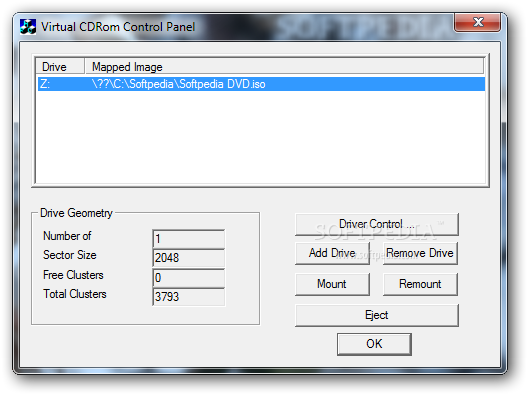
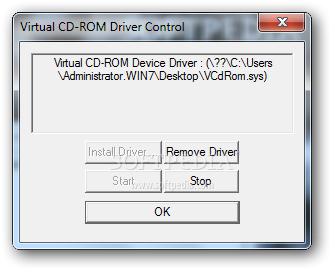
Usage cannot be categorized as simple. First-time users need to follow the exact instructions from the Readme file. Proper configuration of the software program includes installing a driver shipped in the installation package, while the rest of the process is not rocket science.
The user interface is as standard as it can get, but on the upside, all of the functions are in plain sight. You can add or remove a drive, mount or remount a CD, and eject it. We've tested Virtual CD-ROM Control Panel on Windows 7 (32-bit) and it seems to perform properly.
In conclusion, if you’re looking for a simple solution to create a virtual CD drive, this one accomplishes the job without taking a toll on system resources.
Download Hubs
Virtual CD-ROM Control Panel is part of these download collections: Virtual Drives
Virtual CD-ROM Control Panel 2.0.11
 Softpedia Editor's Pick
add to watchlist
add to download basket
send us an update
REPORT
Softpedia Editor's Pick
add to watchlist
add to download basket
send us an update
REPORT
- runs on:
-
Windows 7
Windows Vista
Windows XP - file size:
- 59 KB
- filename:
- winxpvirtualcdcontrolpanel_21.exe
- main category:
- CD / DVD / Blu-ray Tools
- developer:
- visit homepage
Bitdefender Antivirus Free

4k Video Downloader

Windows Sandbox Launcher

paint.net

Microsoft Teams

IrfanView

Zoom Client

7-Zip

calibre

ShareX

- 7-Zip
- calibre
- ShareX
- Bitdefender Antivirus Free
- 4k Video Downloader
- Windows Sandbox Launcher
- paint.net
- Microsoft Teams
- IrfanView
- Zoom Client