
A DVD cutting program, that lets you extract part of a VOB file and save it as a new file. #Dvd chopper #Dvd cut #Dvd editor #Chopper #Editor #Vobsub

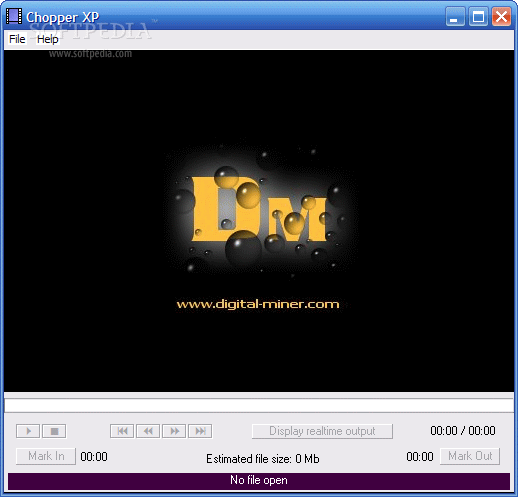
Extracting a certain part of your favorite DVD sounds like an easy job but if you don't have just the right tool, it cannot be carried out successfully. An application like Chopper XP can lend you a hand in this regard thanks to a nice interface and a simple approach of the task.
This utility serves as a very simple and quick way of opening a VOB file and extracting a certain part of it. Of course, the application enables you to save the video as a separate file and open it individually as well.
In case you're working with VOB files on a regular basis, Chopper XP has the option to be associated with this particular extension, so you can open files on the fly, just by double-clicking them.
The whole procedure has been designed to be very fast and easy and after our test, we can safely confirm that this mission was definitely accomplished. In case loading a VOB file directly doesn't work, you can try the 'Manual Extract' function that will do the trick.
The extraction process requires only a couple of clicks. Just set the beginning and the end points of the part you wish to cut and you're ready to go. Chopper XP will also display some useful details, including the remaining time until the job is done and the estimated size, so you'll always be up to date with the current state of the project.
Chopper XP worked quite well under Windows 7, but there are many reports from users claiming that it still has some problems under Windows Vista.
Overall, Chopper XP remains a pretty decent solution to work with VOB files. It is really easy to use and will get the job done fairly fast and it preserves the original quality for the extracted videos.
What's new in Chopper XP 2.7:
- Can now display video for any DVD.
- Option to associate with Vob files.
- Positions are accurate upto 1 second in the Display realtime output mode.
Chopper XP 2.7
add to watchlist add to download basket send us an update REPORT- runs on:
-
Windows XP
Windows 2K - file size:
- 1.6 MB
- filename:
- chopperxp.zip
- main category:
- CD / DVD / Blu-ray Tools
- developer:
- visit homepage
IrfanView

Zoom Client

ShareX

calibre

Bitdefender Antivirus Free

Microsoft Teams

4k Video Downloader

Windows Sandbox Launcher

paint.net

7-Zip

- Windows Sandbox Launcher
- paint.net
- 7-Zip
- IrfanView
- Zoom Client
- ShareX
- calibre
- Bitdefender Antivirus Free
- Microsoft Teams
- 4k Video Downloader