
Straightforward and reliable piece of software designed to help you create ISO images from CD or DVD content without requiring advanced computer knowledge. #ISO Creator #ISO file #CD drive #ISO #Creator #Create

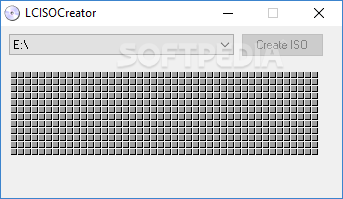
If you're still looking for an application to create ISO files using your CDs and DVDs without assaulting you with tons of configuration settings, a reliable choice is LC ISO Creator.
This application is basically the easiest way to create an ISO file we've ever seen, as it is totally focuses on this particular purpose.
The interface is minimal and since the only purpose of LC ISO Creator is to create an ISO file out of your CD or DVD, you shouldn't spend too much time in the main window.
The application prompts you to select the disk you wish to use and that's it. Press the “Create ISO” button and let it do its magic.
Although simplicity is usually a good thing, too much of it may scare away some of the users. There are no options included in the application, so you're not allowed to configure anything about it.
A good thing is that LC ISO Creator works pretty fast so creating an ISO file usually takes just a few minutes. Turning a regular 700 MB CD into an ISO image took just three minutes during our test, so it's pretty obvious that it gets the job done as fast as possible.
On the upside, there's clearly the fact that it makes things so easy but, at the same time, the same simplicity can very well become a disadvantage. A few options wouldn't hurt anyone, especially related to compression.
Overall however, LC ISO Creator is the easiest way to create an ISO file, there's no doubt about it; it just needs a few minutes to get the job done.
LC ISO Creator 1.1
add to watchlist add to download basket send us an update REPORT- runs on:
- Windows All
- file size:
- 23 KB
- filename:
- LCISOCreator.zip
- main category:
- CD / DVD / Blu-ray Tools
- developer:
Microsoft Teams

calibre

IrfanView

7-Zip

4k Video Downloader

ShareX

Windows Sandbox Launcher

Zoom Client

paint.net

Bitdefender Antivirus Free

- Zoom Client
- paint.net
- Bitdefender Antivirus Free
- Microsoft Teams
- calibre
- IrfanView
- 7-Zip
- 4k Video Downloader
- ShareX
- Windows Sandbox Launcher