|
|
|
User Rating: Rated by: |
Good (3.4/5) 13 user(s) |
|
|
|
|
Softpedia Editor's Review for Paragon CD-ROM Emulator Personal Edition
|
A CD-ROM Emulator that works with many CD-apps simultaneously
Written by Sorin Cirneala on February 19th, 2013
Paragon CD-ROM Emulator Personal Edition is a practical application that allows you to create virtual disc drives and attach them to your computer. It is designed for the users that want to use CD images for using or installing a certain software package.
If some of your programs or games require access to the installation CD while they are running, this app can help you improve efficiency. As it is faster to access the information from the hard drive than to read it from the CD or DVD, creating and mounting an image is recommended.
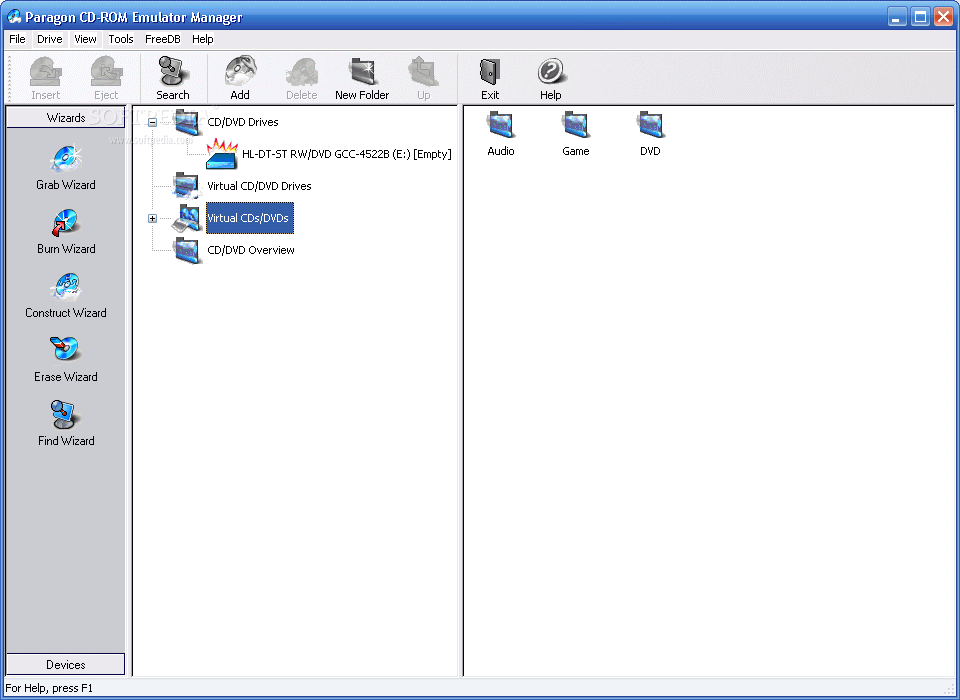
This tool is also able to organize the virtual images in different folders in order to quickly find the one that you need. You just need to create a folder structure with the categories and specify the path to the ISO files.
Before using the virtual disc drive, you need to create an image of the CD or DVD that you want to emulate. The Grab Wizard enables you to create an ISO9660 compatible image of any game or audio disc. It also supports DVDs and multisession data discs.
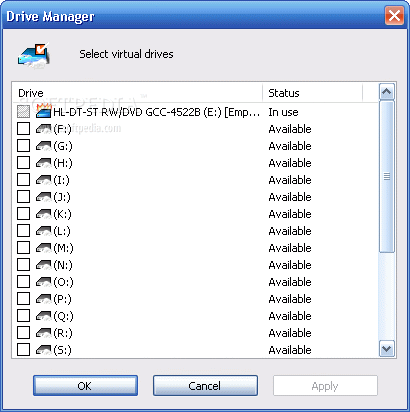
The image collection can include all the images stored on your hard drive or on removable storage devices. In order to load an image you need to use the Drive Manager and specify the drive letters that can be used for the virtual drives.
If you need to make some changes to the disc image you can use the Construct Wizard to edit the ISO file. The wizards included in the application are designed to guide you through all the steps required for a certain modification.
Overall, Paragon CD-ROM Emulator is a useful tool for the users that work with multiple disc images on a daily basis. Unfortunately, it is not actively supported and does not work on the latest operating systems such as Windows 7 or 8.
|
Paragon CD-ROM Emulator Personal Edition description
|
Here are some key features of "Paragon CD-ROM Emulator Personal Edition":
· Creates CD images on the hard drive (or network drive) and emulates "Virtual CD-ROM drives". Many applications require presence of original CD in CDROM drive. CD Emulator emulates virtual CDROM drive allowing to run application from the hard drive.
· Up to 23 virtual CD drives at the same time, allowing you to run several CD and DVD programs simultaneously.
· Unlimited number of virtual CDs.
· Automatic recognition of title, album, and artist for audio CDs. FreeDB database is supported.
· Play the virtual audio CD in background and use your favorite CD application.
· Supports up to 99 audio tracks per virtual CD.
· CD Emulator supports Data (ISO9660), Audio (CDDA, MP3), VCD, DVD, DVD-Video, mixed-mode CDs, Multisession CD
· Compression for images.
· CDI, ISO and CloneCD image formats are possible for emulation
· Information about tracks of virtual CDs are presented in the interface dynamically
· Possibilities to rename images and to write comments for the images.
· Easy-to use, simple and intuitive interface
· Shell extensions and Quick Start for convenience
· Supports normal CD and DVD and CD RAW sub-channel reading methods, ignoring bad blocks
· Possibility to select any available codec for the audio tracks
· Possibility to play the virtual audio CD by easy build-in player
· Ability to split image file into several parts (CDI format)
· Virtual CDs can be organized in folders.
· Easy way to find and to add existing images in the database of virtual CDs
· Choosing driver letter for virtual drives.
· Dynamic adding and removing virtual drives without rebooting. Drive Manager enables easy changes of the number of virtual drives.
· "Autoinsert" feature: on each startup of operating system all virtual drives will have those images inserted, which were in them upon previous restart/shutdown.
· Reusing images: already created images can be moved to another location (even to another computer) and then be added in CD Emulator database of images again.
· Different icons in interface for each type of CD/DVD images: Data CD, Audio CD, Video CD, DVD, DVD-Video. Possibility to change the icons for every image.
· Option "Mount for current user/Mount at system startup" in drive properties gives you extra flexibility in configuring system.
· ISO Builder ? select files or whole directories and create ISO9660 compatible image.
· "Auto run" settings? define whether virtual drive should "AutoRun" CD when image inserted or not.
· Hot keys? define special keys to load specific CD Image automatically.
· Easy Built-in burner includes: test mode, possibility to write raw and subchannel data, create multisession disks, Track-At-Once/Session-At-Once writing methods. Supports ISO format
· Built-in eraser for CD/DVD (fast and full methods supported)
· Exclusive access to network images
· Supported platforms: Windows 98/ME/2000/XP (exluding Server editions)
· Eliminates the CD change cycle once and for all. If a CD change is necessary it just requires a simple and fast Drag & Drop operation.
Requirements:
· Pentium or better
· 16 MB of RAM (32 MB recommended)
· CD/DVD Drive for image creation
· In addition, you need hard disk space for virtual CD or DVD files
· Supported image formats: ISO, CDI, CloneCD
· Supported removable media: CD-R, CD-RW, DVD-R, DVD R, DVD-RW, DVD RW
|
|