
Mount ISO, NRG, MDS/MDF, IMG, CUE, and CCD images from the context menu of Windows Explorer, picking a new drive letter beforehand. #ISO emulator #Emulate ISO #Virtual emulator #Emulator #Emulator #ISO

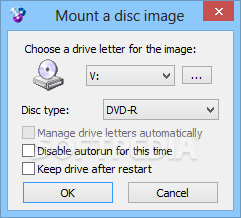
WinCDEmu is a lightweight Windows application that allows users to mount ISO images just by double clicking on the files in Windows Explorer.
As compared to many similar programs, WinCDEmu does the whole job a lot simpler, turning the whole mounting and unmounting process just a matter of clicks.
The interface of the application is just minimal and the ace up its sleeve is definitely the way it handles ISO file.
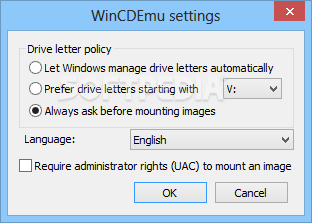
The main window for example lets you adjust the so-called “Driver letter policy” which is nothing more than the way the program assigns new driver letter every time you open an ISO image. By default, WinCDEmu always asks before mounting images, letting you pick a new drive letter on the fly.
You can set up the app to require administrator privileges to mount an image, which is useful especially on Windows Vista and 7.
As said, it's enough to double click an ISO file to mount a new image, and another double click should complete the unmounting process in no time. You can right click the specific drive icon and hit the “Eject” button to perform this task.
Of course, WinCDEmu remains friendly with computer resources all the time and works okay on all Windows versions. Plus, it supports multiple image formats beside ISO, including NRG, MDS/MDF, IMG, CUE and CCD.
WinCDEmu may come in handy to many users out there, especially because it makes it so easy to mount an ISO image without having to open the main interface of the application every time.
Download Hubs
WinCDEmu is part of these download collections: Virtual Drives
WinCDEmu 4.1
add to watchlist add to download basket send us an update REPORT- portable version
- Portable WinCDEmu
- runs on:
-
Windows 10 32/64 bit
Windows 2008 32/64 bit
Windows 2003
Windows 8 32/64 bit
Windows 7 32/64 bit
Windows Vista 32/64 bit
Windows XP 32/64 bit - file size:
- 1.6 MB
- filename:
- WinCDEmu-4.1.exe
- main category:
- CD / DVD / Blu-ray Tools
- developer:
- visit homepage
Context Menu Manager

Zoom Client

Windows Sandbox Launcher

Microsoft Teams

Bitdefender Antivirus Free

IrfanView

7-Zip

calibre

ShareX

4k Video Downloader

- calibre
- ShareX
- 4k Video Downloader
- Context Menu Manager
- Zoom Client
- Windows Sandbox Launcher
- Microsoft Teams
- Bitdefender Antivirus Free
- IrfanView
- 7-Zip