
Use this lightweight and incredibly easy to use software application to extract any file encased in a RAR archive fast and at the cost of minimum resources. #Extract file #RAR archieve #Open RAR #Extract #Extractor #Archieve

An abundance of archiving tools mate it to the top of the list, with various features to come in handy in any situation. When it comes to extracting files, you might only need a simple utility like UnRar, a tiny application that allows you to extract content from archived files (in the RAR format). You don't need a compression tool for this kind of task.
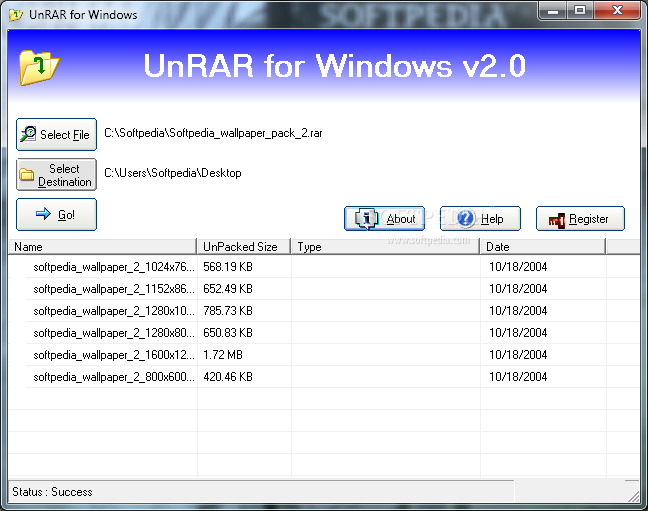
The user interface of the program is plain and simple. All you have to do is select a file by either using the file browser or the "drag and drop" method, select your output destination and initiate the decompression process.
In the file list, you can view the name, unpacked size, type and date of each file, as well as archive comments.
You can also use UnRAR to extract files from password-protected archives, or if they are multi-part RAR files. In the latter case, you simply have to select the file with the lowest part number. Evidently, this means that all parts must be placed in the same root.
The program is able to complete a task in very little time, while using a low amount of system CPU and memory. We haven't encountered any problems from this point of view.
However, if a task fails due to various reasons (e.g. you input the wrong password), UnRar doesn't pop up any kind of error. Nonetheless, you can view this information in the status bar.
UnRAR also comes with a well-drawn help file. The program is very easy to use by rookies. On the other hand, power users could find UnRar a little disappointing, since it doesn't include any kind of advanced features.
UnRar represents a straightforward solution for unpacking RAR files and the software didn't freeze or crash during our tests. We recommend it, especially to first-time users, mostly if no compression needs to be done, seeing how it gets tasks finished fast.
UnRar 2.0.4
add to watchlist add to download basket send us an update REPORT- runs on:
- Windows All
- file size:
- 815 KB
- filename:
- unrarw20.exe
- main category:
- Compression tools
- developer:
- visit homepage
Zoom Client

calibre

IrfanView

paint.net

7-Zip

Bitdefender Antivirus Free

Microsoft Teams

Windows Sandbox Launcher

4k Video Downloader

ShareX

- Windows Sandbox Launcher
- 4k Video Downloader
- ShareX
- Zoom Client
- calibre
- IrfanView
- paint.net
- 7-Zip
- Bitdefender Antivirus Free
- Microsoft Teams