
Keeps your local computer up-to-date with the exact current time by synchronizing the PC clock with the US National Institute of Standards and Technology (NIST) servers. #Synk clock #Clock synchronization #Time synchronizer #Clock #Sync #Synchronize


Atomic Clock Sync is a reliable utility that synchronizes the PC clock with the US National Institute of Standards and Technology (NIST) servers, thus providing the best possible time accuracy.
The interface is clean and pretty straightforward, with all the features organized in nifty tabs listed at the top of the main window.
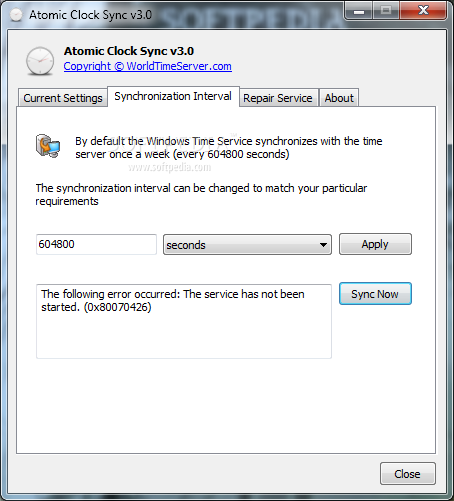
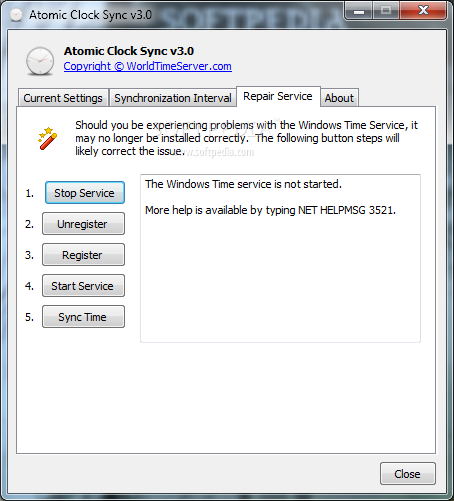
You can thus view the “Current Settings,” choose the “Synchronization Interval” and “Repair Service” in case there's something wrong with the Windows Time Service.
The first screen comes with a pretty intuitive name and provides information such as local time, daylight time zone name, date and bias. From the second tab, you are able to choose the synchronization interval to automatically adjust the time using the NIST servers.
By default, the application performs the synchronization once a week, but that can be easily changed to as often as you like. In case the Windows Time Service doesn't work as it is supposed to, Atomic Clock Sync has dedicated tools to register/unregister and stop/start the service.
Everything works like a charm on all Windows versions and it takes just a second or two until the program adjusts the time. Windows 7 users may need to run the tool with administrator privileges and set an exception in the Windows firewall in order to allow it connect to the NIST servers.
Overall, Atomic Clock Sync does a great job and remains light on computer resources all the time. It can automatically synchronize the time and, what's more, it’s simple and easy to handle.
Download Hubs
Atomic Clock Sync is part of these download collections: Clock Synchronizer
What's new in Atomic Clock Sync 3.5:
- Updated for 64bit versions of Windows and Windows 8
Atomic Clock Sync 3.5
add to watchlist add to download basket send us an update REPORT- runs on:
-
Windows 2003
Windows 8 32/64 bit
Windows 7 32/64 bit
Windows Vista 32/64 bit
Windows XP
Windows 2K - file size:
- 890 KB
- filename:
- atomic.exe
- main category:
- Desktop Enhancements
- developer:
- visit homepage
4k Video Downloader

Bitdefender Antivirus Free

Zoom Client

ShareX

paint.net

Microsoft Teams

calibre

7-Zip

Windows Sandbox Launcher

IrfanView

- 7-Zip
- Windows Sandbox Launcher
- IrfanView
- 4k Video Downloader
- Bitdefender Antivirus Free
- Zoom Client
- ShareX
- paint.net
- Microsoft Teams
- calibre