
A SNTP client - Simple Network Time Protocol - for synchronizing your computer's time with an NTP server.. #Synchronize time #NTP server #Sync PC clock #Synchronize #Sync #Synchronizer

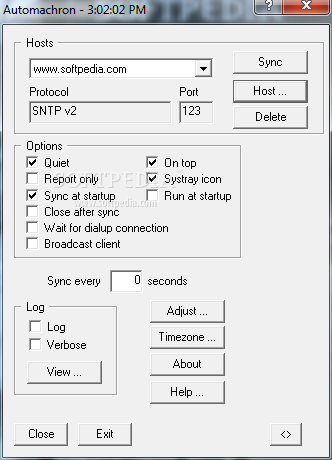
Automachron is a tiny and straightforward software program that synchronizes your computer's time with the one from an NTP server (Network Time Protocol).
This is a portable application, so Automachron does not come with an installation package; you can save it to a USB flash drive or similar external device, store it on any computer and directly run its executable file.
You can adjust the time of any computer. More importantly, files are not left behind after program removal, and the Windows Registry does not receive updates.
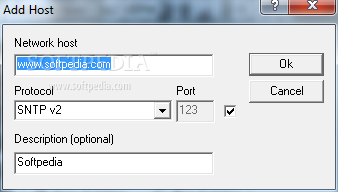
The interface of the tool consists of a standard window and an intuitive layout. You can add a new host by typing its address and description, as well as by selecting a port and protocol (e.g. SNTP v2, TIME/TCP, TIME/UDP). It is possible to add as many hosts as you want.
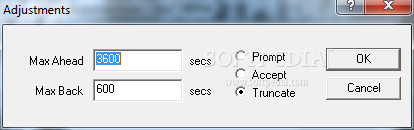
Automachron can be scheduled to synchronize the computer time at a user-defined time interval. Other features of the program let you manually adjust time and switch to a different time zone. Automachron may be enabled to update time silently in the background, stay on top of other windows, synchronize time at Windows startup and close afterward, as well as to wait for a dialup connection.
The simple-to-use application requires a very low amount of system resources, so it shouldn't put a strain on the computer's resources. We haven't experienced any difficulties during our testing, since Automachron did not freeze, crash or pop up error dialogs. However, the tool has not been updated for a very long time.
What's new in Automachron 5.000:
- No longer attempts to lookup address for dotted ip address
- Changed log format, time logged as microseconds rather than seconds / microsecond
- Help now loads http://oneguycoding.com/automachron
Automachron 5.000
add to watchlist add to download basket send us an update REPORT- runs on:
- Windows All
- file size:
- 83 KB
- filename:
- achron5.zip
- main category:
- Desktop Enhancements
- developer:
4k Video Downloader

Zoom Client

calibre

Bitdefender Antivirus Free

Windows Sandbox Launcher

IrfanView

Microsoft Teams

7-Zip

paint.net

ShareX

- 7-Zip
- paint.net
- ShareX
- 4k Video Downloader
- Zoom Client
- calibre
- Bitdefender Antivirus Free
- Windows Sandbox Launcher
- IrfanView
- Microsoft Teams