
A simple yet powerful tool that helps you restore your icons' position on the screen, while allowing you to save multiple icon configurations. #Icon Arrangement #Restore Configuration #Desktop Icon #Icon #Restore #Rearrange

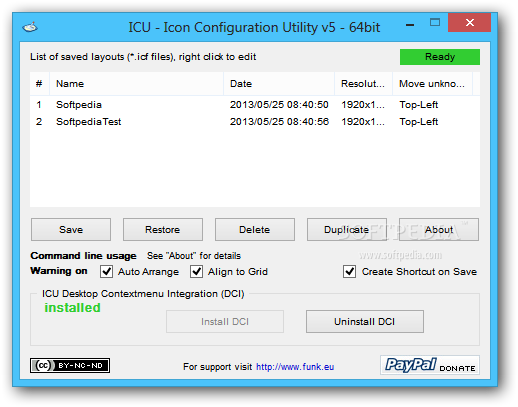
Icon Configuration Utility is a lightweight desktop enhancement utility that helps you save the icons’ configuration and restore it whenever the system automatically rearranges your icons.
Since this is a portable program, it is important to mention that it doesn’t leave any traces in the Windows Registry.
You can copy it on any USB flash drive or other devices, and take it with you whenever you need to save a particular icon configuration on the breeze, without having to go through installation steps.
Icon Configuration Utility sports a clean and intuitive layout that offers only a few configuration settings to tinker with.
The program lets you save the icons’ position on the screen by specifying a name for the current configuration session.
What’s more, you are allowed to restore the icons’ position with just one click, delete or duplicate the selected configuration, as well as view details about it, such as name, date, resolution, and desktop position.
Last but not least, you can make the utility display warning notifications when the icons are automatically rearranged. The application doesn’t come packed with many dedicated parameters, and even rookies can master the entire process with minimum effort.
During our testing we have noticed that Icon Configuration Utility accomplishes a task very quickly and without errors throughout the entire process. As it would be expected from such a small utility, it remains light on system resources, so it doesn’t hamper computer performance, nor interfere with other programs’ functionality.
To sum things up, Icon Configuration Utility offers a simple yet efficient software solution for helping you restore the icons’ position on the desktop.
Icon Configuration Utility 6.0
add to watchlist add to download basket send us an update REPORT- PRICE: Free
- runs on:
-
Windows 8 32/64 bit
Windows 7 32/64 bit
Windows Vista 32/64 bit
Windows XP 32/64 bit - file size:
- 1.5 MB
- filename:
- ICU_v6_-_Exe.zip

- main category:
- Desktop Enhancements
- developer:
- visit homepage
Microsoft Teams

paint.net

Bitdefender Antivirus Free

ShareX

Zoom Client

Windows Sandbox Launcher

calibre

IrfanView

7-Zip

4k Video Downloader

- IrfanView
- 7-Zip
- 4k Video Downloader
- Microsoft Teams
- paint.net
- Bitdefender Antivirus Free
- ShareX
- Zoom Client
- Windows Sandbox Launcher
- calibre