
An easy-to-use screensaver changer. #Screensaver Changer #Screensaver Player #Screensaver Scheduler #Screensaver #Change #Changer

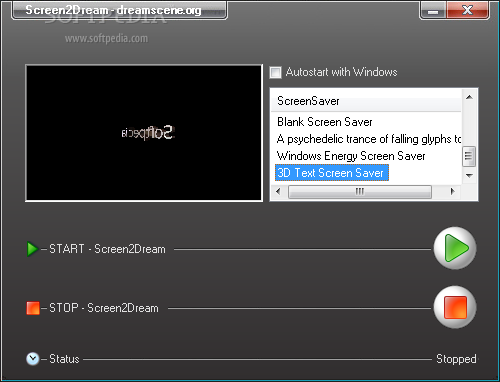
Screen2Dream is a small and portable utility that applies your favorite screensaver as the background of your desktop. It can be seamlessly handled, regardless of the user's skill level.
Since installation is not a prerequisite, you can just save the executable file anywhere on the desktop and run it directly.
Otherwise, you can store Screen2Dream on a USB flash drive and run it on any computer. You don't have to worry about making changes to the system inadvertently, as Screen2Dream does not work with Registry entries and does not create DLL files in the system folder.
The interface of the tiny tool is represented by a standard window with a well-defined layout, where you can select one of the available screensavers to set as wallpaper, and press the Start button. You can make the app run at system startup automatically.
Since your desktop icons are not displayed when a screensaver is active, you can simply access Screen2Dream's icon in the system tray area and launch a desktop item from there. Luckily, the app can hide in the system tray.
The simple app needs a low-to-moderate amount of CPU and system memory, has a good response time and works well, without causing the operating system to hang, crash or pop up error dialogs; we haven't encountered any issues throughout our testing. In conclusion, Screen2Dream is a tool worthy to take into consideration when you want to personalize your desktop.
Screen2Dream 1.0.8.416
add to watchlist add to download basket send us an update REPORT- runs on:
-
Windows Vista
Windows XP - file size:
- 192 KB
- filename:
- Screen2Dream.zip
- main category:
- Desktop Enhancements
- developer:
- visit homepage
ShareX

7-Zip

4k Video Downloader

calibre

IrfanView

Windows Sandbox Launcher

Zoom Client

Bitdefender Antivirus Free

Microsoft Teams

Context Menu Manager

- Bitdefender Antivirus Free
- Microsoft Teams
- Context Menu Manager
- ShareX
- 7-Zip
- 4k Video Downloader
- calibre
- IrfanView
- Windows Sandbox Launcher
- Zoom Client