
A simple-to-use application for launching the screensaver and for powering off your monitor, with support for keyboard shortcuts. #Launch screensaver #Screensaver control #Screensaver launcher #Screensaver #Controller #Activate

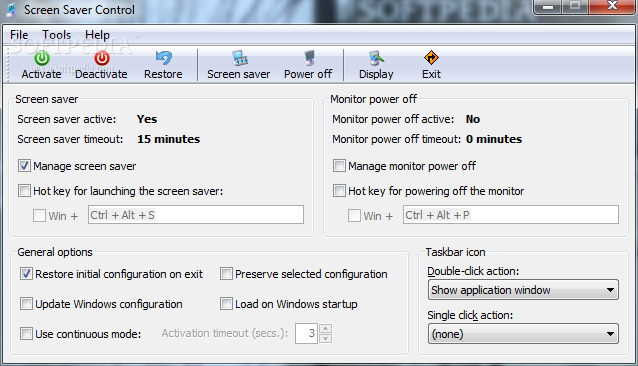
With the help of Screen Saver Control you can seamlessly set up configuration details for the screensaver activation and monitor power-off.
After a brief and uneventful setup procedure, you are welcomed by a standard window with a well-organized layout, representing Screen Saver Control's interface.
Deactivating the screensaver or restoring its status is done with the simple click of a button, and this rule applies to powering off the monitor as well. You can establish hotkeys for triggering these two actions.
As far as program settings go, you can restore the initial configuration on exit, update Windows configuration, preserve the selected configuration, use continuous mode and establish the activation timeout, as well as make the tool run at system startup automatically.
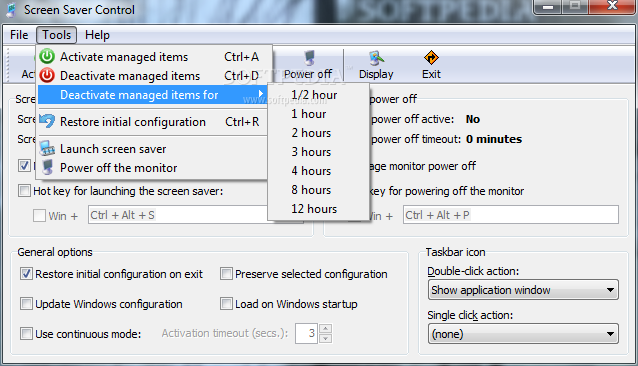
You can set the single-click and double-click action for the taskbar icon (e.g. show application window, activate managed items), access the Windows display properties area, deactivate managed items for a specific time frame (ranging from a half an hour to 12 hours), as well as restore settings to their default values.
Screen Saver Control is very low-demanding when it comes to the CPU and RAM, therefore it doesn't burden the computer's overall performance. No error dialogs have been shown throughout our evaluation, and the utility did not freeze or crash.
Thanks to its intuitive layout and overall simplicity, even less experienced users can figure out how to work with it. Moreover, if you would like to skip installation and run the program on any workstation directly from a USB flash disk, feel free to check out the portable edition of Screen Saver Control.
What's new in Screen Saver Control 1.61:
- Fixed a bug that made the power off options fail in some situations, especially in Windows Vista and Windows 7.
Screen Saver Control 1.61
add to watchlist add to download basket send us an update REPORT- runs on:
- Windows All
- file size:
- 328 KB
- filename:
- ScreenSaverControlSetup.exe
- main category:
- Desktop Enhancements
- developer:
- visit homepage
4k Video Downloader

ShareX

Context Menu Manager

Zoom Client

Bitdefender Antivirus Free

Windows Sandbox Launcher

Microsoft Teams

calibre

IrfanView

7-Zip

- calibre
- IrfanView
- 7-Zip
- 4k Video Downloader
- ShareX
- Context Menu Manager
- Zoom Client
- Bitdefender Antivirus Free
- Windows Sandbox Launcher
- Microsoft Teams