
Multi-tabbed file searcher and replacer with filters for size and date range, support for browsing file content, exclusions by file type, and context menu integration. #Search file #Replace file #File searcher #Search #Replace #Searcher

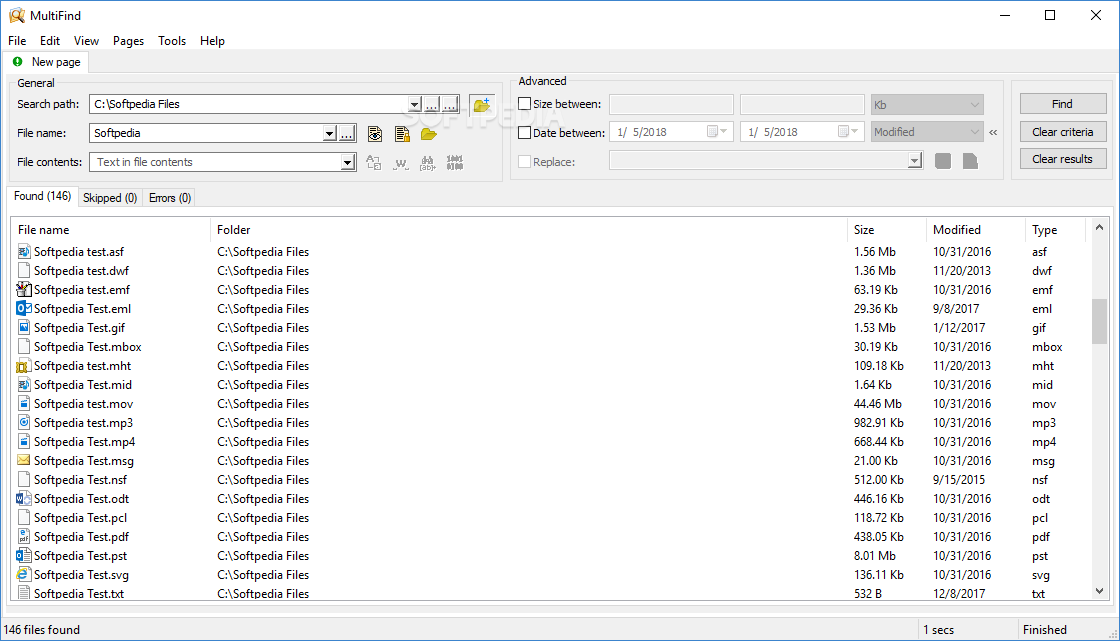
MultiFind is a file searching utility that can look for specific items in your computer and even replace user-defined strings.
The GUI may seem a bit cluttered at the first sight, but it's all just a matter of time until you get used to it.
Features are nicely organized in the main window, as it groups not only the search criteria, but also dedicated panels to show the results. Tabs are being used to display the found files, skipped and errors.
You can launch a new search by typing in the file name, a text string, an unicode string, a regular expression, binary data, file size or file date. You can even replace text just like you normally do in a text editor.
The results panel displays the file name, folder, size, modified date and type of each item. Right-clicking any of these items opens the standard Windows Context Menu.
There are only a few options available and many of them concern the results panel, but you're also allowed to define which file formats you want MultiFind to automatically skip when searching for new items.
MultiFind works impressively fast, but a moderate CPU usage is very likely to occur whenever you're performing a search in a larger group of folders. It runs okay on every Windows version and only requires standard user privileges.
Overall, MultiFind has a great mix of useful features and intuitive design. It doesn't sport the same impressive search options as other apps in this particular software category, but it sets itself apart with the help of a very user-friendly approach.
What's new in MultiFind 1.51:
- New features:
- Save search results between relaunches.
- Button to clear all history lists.
- Button to clear results on the current tab page.
MultiFind 1.51
add to watchlist add to download basket send us an update REPORT- runs on:
-
Windows 10 32/64 bit
Windows 8 32/64 bit
Windows 7 32/64 bit
Windows Vista 32/64 bit
Windows XP 32/64 bit
Windows 2K - file size:
- 508 KB
- filename:
- MultiFind_v1.51.exe
- main category:
- File managers
- developer:
4k Video Downloader

calibre

IrfanView

ShareX

7-Zip

Bitdefender Antivirus Free

Microsoft Teams

Windows Sandbox Launcher

Zoom Client

Context Menu Manager

- Windows Sandbox Launcher
- Zoom Client
- Context Menu Manager
- 4k Video Downloader
- calibre
- IrfanView
- ShareX
- 7-Zip
- Bitdefender Antivirus Free
- Microsoft Teams