Search Perform an advanced search query SOFTPEDIA
 
SOFTPEDIA
Updated one minute ago
HomeSubmit a program for being reviewedAdvertise on our websiteGet help on surfing our websitesSend us your feedbackGet information about our XML/RSS backend and how to use itBrowse the news archiveVisit our discussion forumVizitati forumul in limba romana


Program Finder NormalFreeware onlyShareware only

iPod shuffle Manager 1.00 Report spyware 

Click to download iPod shuffle Manager
View more iPod shuffle Manager screenshots (1)
 Downloads: 5,539
Rating: Good (3.4/5) | Rated by: 32 user(s)
Add to download basket     Send us update information
 Developer: Heikki Ylinen | More programs by this producer
 License: Freeware  
 Size / OS: 11 KB, Windows All
 Last Updated: January 15th, 2007, 08:44 GMT
 Category: C: \ IPOD TOOLS \ Multimedia IPOD tools
 Read user reviews (2) Add a review Refer to friend Subscribe
    Download iPod shuffle Manager

iPod shuffle Manager description
iPod shuffle Manager allows you to use your iPod shuffle like a regular memory stick

If you are a Windows user tired of having to use iTunes to move tracks to your iPod shuffle, try out this small piece of software. It allows you to use your iPod shuffle like a regular memory stick.

You can simply copy your tracks to the iPod shuffle as-is using Windows Explorer (or any other file manager). You may copy files from any computer. Simply run this little utility, which will update the internal database of the iPod shuffle to allow playing the tracks placed on it.

iPod shuffle Manager is something that I have been using myselft since 2005 when I bought my first iPod shuffle. Although there is already a similar program called iPod shuffle Database Builder, I decided to make my software publicly available after receiving some requests to do so. People seem to be interested in the graphical user interface, which is not available in the iPod shuffle Database Builder.

Installation
First
, I must warn you that when you use iPod shuffle Manager with your iPod shuffle, you cannot use iTunes to update it. But that is just what you want, isn't it — to prevent iTunes from messing up your tracks ever again. Also, note that iPod shuffle Manager works only with iPod shuffle (both first and second generation), not with any other iPod models.

OK, now that you have been warned, follow these steps.
· Plug in your iPod shuffle.
· Wipe out everything on the iPod shuffle, including the hidden iPod_Control directory. You can do this by deleting the files manually, by formatting the drive in Windows Explorer or by running the iPod shuffle reset utility by Apple.
· Download the iPodShuffleManager and copy it onto the iPod shuffle. You can place it in the root or in any directory

And that's it. You are now ready to copy your favorite tracks to the iPod shuffle and run the program.

If you want to switch back to using iTunes for some reason, simply wipe out everything on the iPod and initialize it with iTunes. Be sure to wipe out the iPod_Control directory, otherwise iTunes refuses to properly recognize the iPod.

Here are some key features of "iPod shuffle Manager":

· No iTunes required, not even for initializing the iPod shuffle
· Update the iPod database on any Windows machine that supports Unicode
· Full Unicode support, no file renaming necessary
· Full directory support, simply copy your album directories as-is
· Allows marking tracks as bookmarkable audiotracks
· Supports dismounting the iPod to show battery charge status
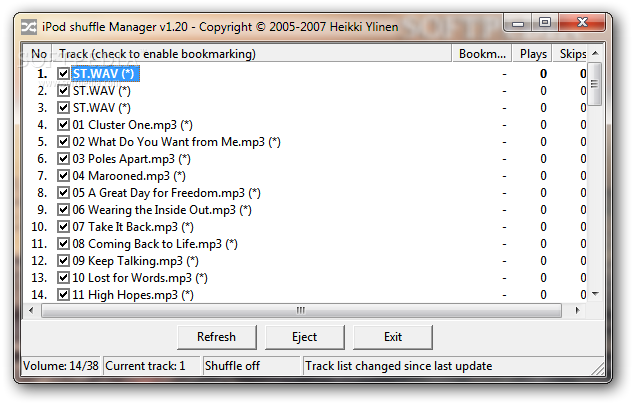
· Illustrative graphical user interface


Related downloads IT News Popular downloads New additions   Latest reviews  
YamiPod 1.7 Final
A freeware application to efficiently manage your iPod.
Floola 3.0.0
A freeware application to efficiently manage your iPod or your Motorola mobile phone
IPOD Manager 1.0.0.3
This software is designed to be an easy-to-use manager of your iPod device.
iPod shuffle Reset Utility 1.0.1.65
iPod shuffle Reset Utility - restores First Generation iPod shuffle
Aimersoft DVD to iPod Converter 1.1.58
Convert DVD to iPod video MP4 (MPEG-4) H.264
IPodExtras 1.0
IPodExtras is an application that helps you manage contacts on the IPod
iPod shuffle 1.0
iPod shuffle - a brand new set of iPod-related icons
CopyTrans Manager 0.704 Beta
A small utility that enables you to manage your iPod without any other heavy, slow or complicated application
ReOrganize 2.3.1.0
With ReOrganize!, you can freely move track by track or sort them all with just one click
DiskAid 1.21
Will enable you to use the iPhone or iPod Touch as an external Disk

go to top Use the following code to link to this page:


Welcome!
Hello, Guest

Login if you have a Softpedia.com account.

Otherwise, register for one.

Main categories:
  • Antivirus
  • Compression tools
  • CD/DVD Tools
  • Office tools
  • Programming
  • Authoring tools
  • File managers
  • Desktop Enhancements
  • Internet
  • Network Tools
  • IPOD TOOLS
  • Mobile Phone Tools
  • Multimedia
  • Tweak
  • System
  • Security
  • Others
  • Science / CAD
  • UNIX
  • Windows Widgets
  • PORTABLE SOFTWARE

  • Week's best:
  • DAEMON Tools Lite 4....
  • UBCD4WIN 3.2.0
  • Adobe Reader 9.0.0 /...
  • Total Commander Ulti...
  • System Mechanic 8.0....
  • Adobe Acrobat Profes...
  • iPhone PC Suite 1.0....
  • Firefox 3.0 Final / ...
  • Portable Firefox 3.0...
  • MPlayer for Windows ...
  • Vista Codec Package ...
  • Windows Live Messeng...
  • WinBubble 1.73
  • Kaspersky Anti-Virus...
  • Malware Removal Tool...
  • WinRAR 3.80 Beta 2 /...
  • Royale Noir Theme fo...
  • IBM Lotus Symphony 1...
  • Adobe Dreamweaver 10...
  • Adobe Fireworks 10.0...
  • BitDefender Total Se...
  • McAfee Total Protect...
  • Ad-Aware 2008 7.1.0....
  • Adobe Flash Player 1...
  • Intel Chipset Softwa...
  • Uxtheme Multi-patche...
  • SRS Audio Sandbox 1....
  • SP3 UxTheme Patcher ...
  • PECompact 2.87 Beta ...
  • Sony Vegas Movie Stu...
  • Daniusoft Media Conv...
  • © 2001 - 2008 Softpedia. All rights reserved.
    Softpedia™ and Softpedia™ logo are registered trademarks of SoftNews NET SRL.
    Copyright Information | Privacy Policy | Terms of Use | Contact Softpedia | Update your software | Archive