
Simple command-line utility that converts Outlook Express messages to MBOXO, MBOXRD or EML format, quickly and with minimum effort. #DBX to MBOX #DBX Converter #Convert DBX #DBX2MBOX #DBX #MBOX

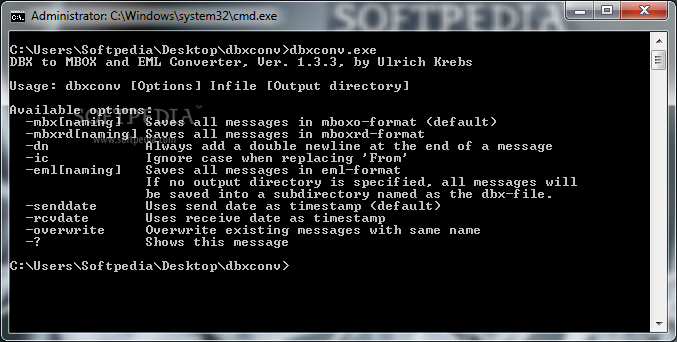
DbxConv is a simple command-line utility which is able to extract messages from Outlook Express and convert it to the standard MBOX or EML format.
While most users prefer working with graphical interfaces, some of them stick to apps that can be launched in a Command Prompt dialog, since a simple task like format conversion can be accomplished in only a few steps.
Another advantage of command-line tools is that they do not require installation, so the program files can be saved to any location on the hard drive, from where you can run the executable.
Moreover, you can copy DbxConv to a USB flash disk or similar storage unit, in order to run it on any computer with minimum effort. What's more, the utility does not add new entries to the Windows registry, Start menu, or any other area of the hard drive.
At initialization, you can view a list of available options and the usage pattern. It is possible to save all messages to MBOXO, MBOXRD or EML format, as well as make the tool always add a double newline at the end of a message and to ignore the case when replacing the "From" field. Plus, it can apply the send and receive dates as timestamps, and overwrite existing messages.
As expected from a command-line utility, DbxConv is very light on system resources, running on low CPU and RAM. It has a good response time and carries out a task rapidly and error-free. We have not come across any issues throughout our evaluation. DbxConv offers a simple solution for MBOX and EML conversions.
DbxConv 1.3.3
add to watchlist add to download basket send us an update REPORT- runs on:
- Windows All
- file size:
- 74 KB
- filename:
- dbxconv.zip
- main category:
- Internet
- developer:
- visit homepage
Context Menu Manager

Microsoft Teams

4k Video Downloader

Bitdefender Antivirus Free

IrfanView

7-Zip

Windows Sandbox Launcher

Zoom Client

calibre

ShareX

- Zoom Client
- calibre
- ShareX
- Context Menu Manager
- Microsoft Teams
- 4k Video Downloader
- Bitdefender Antivirus Free
- IrfanView
- 7-Zip
- Windows Sandbox Launcher