Search Perform an advanced search query SOFTPEDIA
 
SOFTPEDIA
Updated one minute ago
HomeSubmit a program for being reviewedAdvertise on our websiteGet help on surfing our websitesSend us your feedbackGet information about our XML/RSS backend and how to use itBrowse the news archiveVisit our discussion forumVizitati forumul in limba romana


Program Finder NormalFreeware onlyShareware only

Outlook Express Backup 6.5.121 Report spyware 

Click to download Outlook Express Backup
View more Outlook Express Backup screenshots (9)
 Downloads: 5,271
Rating: Good (3.2/5) | Rated by: 57 user(s)
Add to download basket     Send us update information
 Developer: Genie-Soft | More programs by this producer
 License: Trial , 29.95 $ to buy 
 Size / OS: 3.58 MB, Windows All
 Last Updated: July 18th, 2007, 13:22 GMT
 Category: C: \ Internet \ E-mail \ Mail Utilities
 Read user reviews (0) Add a review Refer to friend Subscribe
    Download Outlook Express Backup

Outlook Express Backup description
Backing up multiple Identities in Microsoft Outlook Express

Outlook Express Backup supports backing up multiple Identities in Microsoft Outlook Express. Genie Outlook Express Backup uses a wizard-like style of backup and restore that makes it so easy to use and enables all kind of users from backing up their own data.

It offers the user an increased backup speed compared to the backups that he used to perform, as Genie Outlook Express Backup employs an advanced On-The-Fly Compression that enables the user from transforming up to 1GB of data into a 650MB backup file that can be stored on a CD in a fast orderly manner.

The automatic media spanning is a feature that makes Genie Outlook Express Backup more adaptable to your requirements. Genie Outlook Express Backup enables you from operating up to 2GB in a single Backup Job.

During your restore your data process through Genie Outlook Express Backup, it enables you from previewing your to-be-restored data before restoring it.
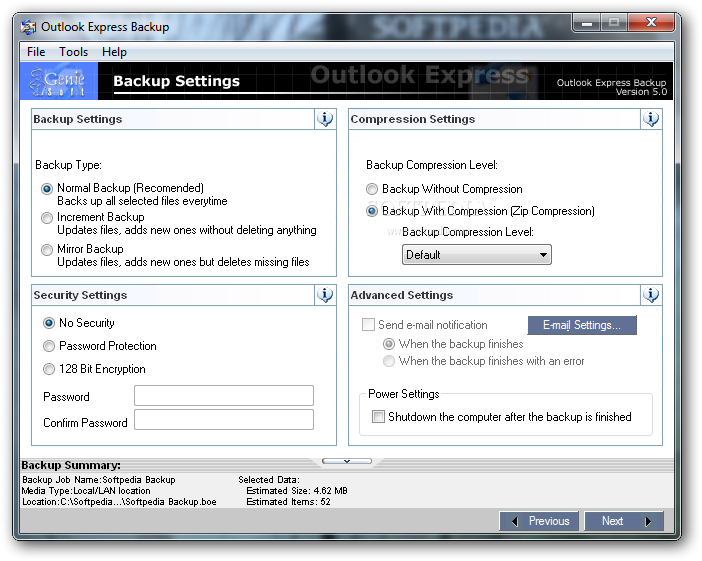
Genie Outlook Express Backup offers three handy ways for backing up your data that you will choose from according to your need (Normal, Increment and Mirror Backup).

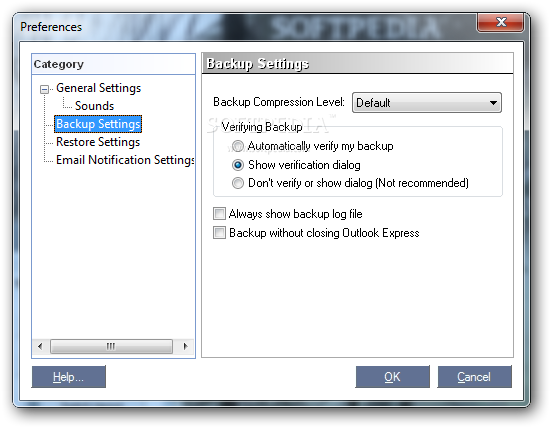
Right after the backup, Genie Outlook Express Backup will initiate a validation scheme that will ensure that the backup process was a success.
An automatic backup scheduler that enables you from starting the backup. Outlook Express Backup also increases the level of security on your data by enabling you from activating password protection on your backed up data.

Here are some key features
of "Outlook Express Backup":


· It supports backing up the data of all the identities in Microsoft Outlook Express in the same backup file!
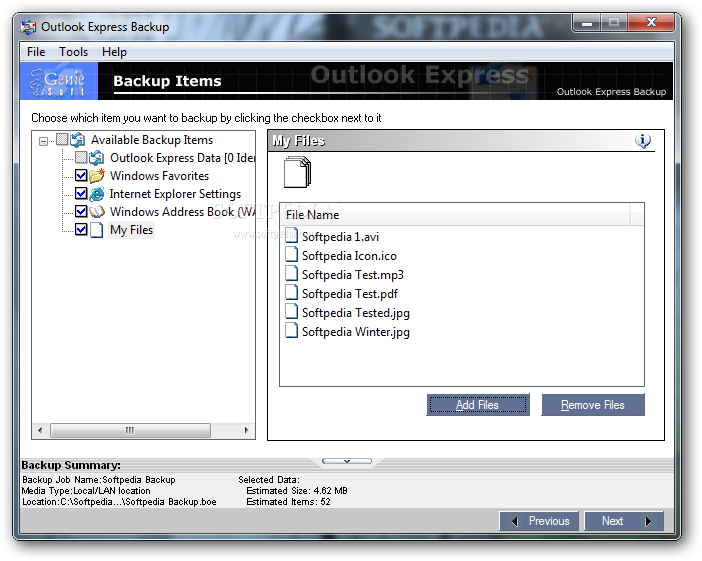
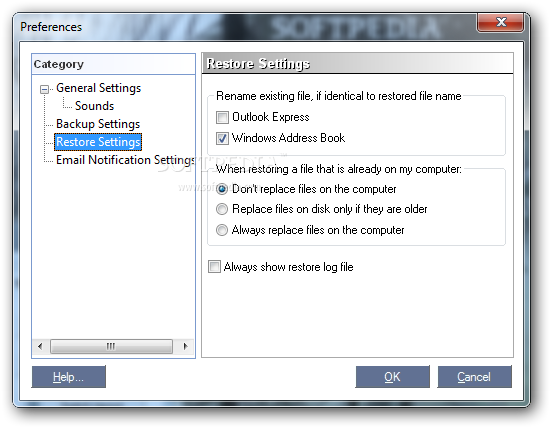
· It backs up all your Microsoft Outlook Express files plus your Favorites and Windows Address Book.
· Backup your data as an executable EXE file.
· You can view the emails inside the backup file without the need to restore them.
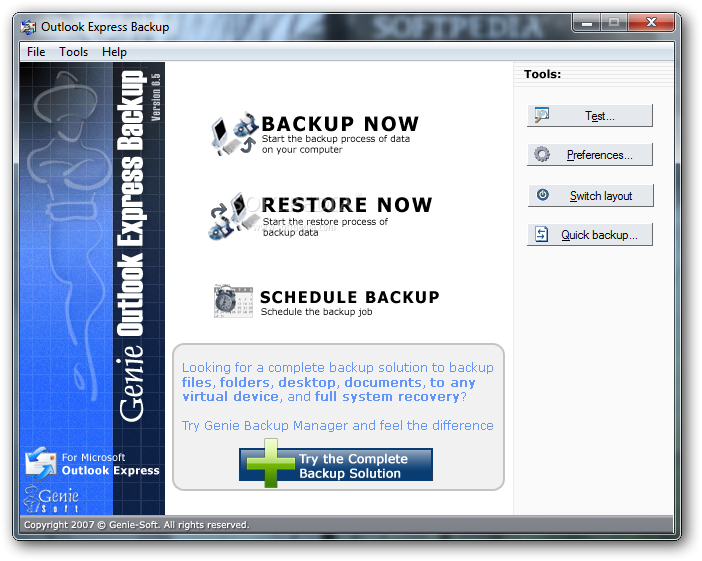
· Genie Outlook Express Backup uses a wizard-like style of backup and restore that makes it so easy to use and enables all kind of users from backing up their own data.
· It offers the user an increased backup speed compared to the backups that he used to perform, as Genie Outlook Express Backup employs an advanced On-The-Fly Compression that enables the user from transforming up to 1GB of data into a 650MB backup file that can be stored on a CD in a fast orderly manner.
· The automatic media spanning is a feature that makes Genie Outlook Express Backup more adaptable to your requirements.
· Genie Outlook Express Backup enables you from operating up to 2GB in a single Backup Job.
· It supports versions 5 and 6 of Outlook Express where it automatically detects the version.
· Backup with timestamps.
· While restoring your data through Genie Outlook Express Backup , it enables you from previewing your to-be-restored data before restoring it.
· Genie Outlook Express Backup offers three handy ways for backing up your data that you will choose from according to your need (Normal, Increment and Mirror Backup).
· All the existing mail attachments are saved and restored with the message folders.
· You can backup/restore all of your e-mail messages, or just selected folders.
· Right after the backup, Genie Outlook Express Backup will initiate a validation scheme that will ensure that the backup process was a success.
· An automatic backup scheduler that enables you from starting the backup process at anytime without you being physically there.
· Genie Outlook Express Backup offers you a simple, low-cost and effective solution for the once-troublesome problem of data protection.
· It also increases the level of security on your data by enabling you from activating password protection on your backed up data.
· When you try to restore your backed up data to a machine that already has Outlook Express operational and consisting of e-mail messages inside it, Genie Outlook Express Backup can synchronize between the already existing e-mail on the machine and the restored data.
· Genie Outlook Express Backup is user friendly enough to allow regular users and non-professional operatives from performing backup operations that used to be done by professionals in the past.
· Backup and restore log in Html format


Requirements:

· Pentium processor or above
· 64 MB RAM
· 8 MB free disk space
· Internet Explorer 4.0.2 or later
· Microsoft Outlook Express 5.0 or 6.0


Limitations:

· 15-day trial


What's New in This Release:

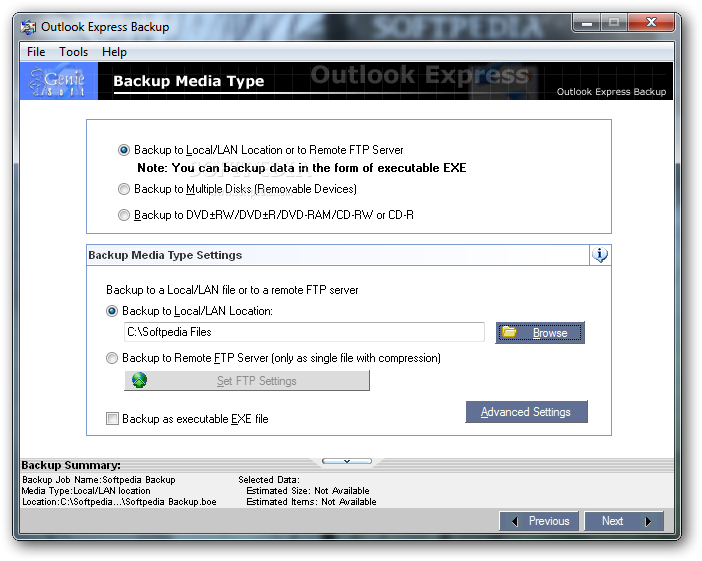
· Backup to remote FTP server - Outlook Express Backup 6.5 supports backup to remote FTP servers. This is a new invaluable feature that not only insures protection for data by storing it on remote locations but also allows users to access that data from different locations later on, which serves as a great tool for migrating and synchronizing e-mail data between distant machines.
· Easy and Normal backup layouts - Outlook Express Backup 6.5 gives its users the choice between two backup wizard layouts; the Easy 2-step layout, and the Normal 4-step layout, thus becoming more intuitive and catering for all users ranging from below average to advanced.
· 128 bit encryption - Emails can contain highly classified business data, or it can simply be personal material that you deem for eyes only, in either case Outlook Express Backup 6.5 now enables you to protect that data using the highly secure 128 bit encryption algorithm.
· Backup with or without compression - Backup with compression is useful and tidy, but backup without compression is fast and sometimes comes in handy. Outlook Express Backup 6.5 lets you choose between the two.
· Backup Summary window - Now, you can monitor the size of your data on the fly as you're selecting it.
· Backup Internet Explorer settings and cookies!
· Support for multiple schedules - With Outlook Express Backup 6.5, you can create multiple backup schedules, to make sure your data is being protected on a regular basis even when you're away.
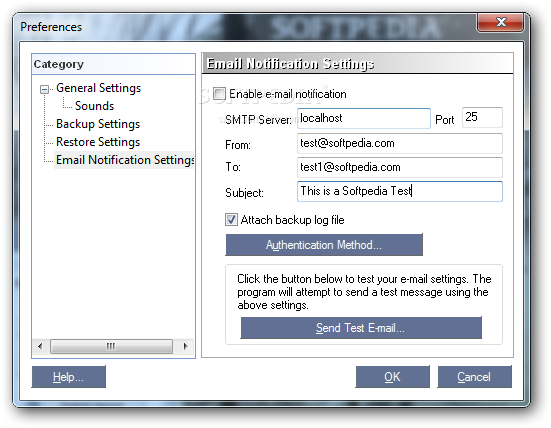
· Email notification (with support for SMTP authentication methods) - If you started a backup job and couldn't stick around to monitor it or scheduled a backup to start when you're away, don't sweat it, set Outlook Express Backup to send yourself a notification email when the backup is complete.
· Support for multiple schedules - With Outlook Express Backup 6.5, you can create multiple backup schedules, to make sure your data is being protected on a regular basis even when you're away.
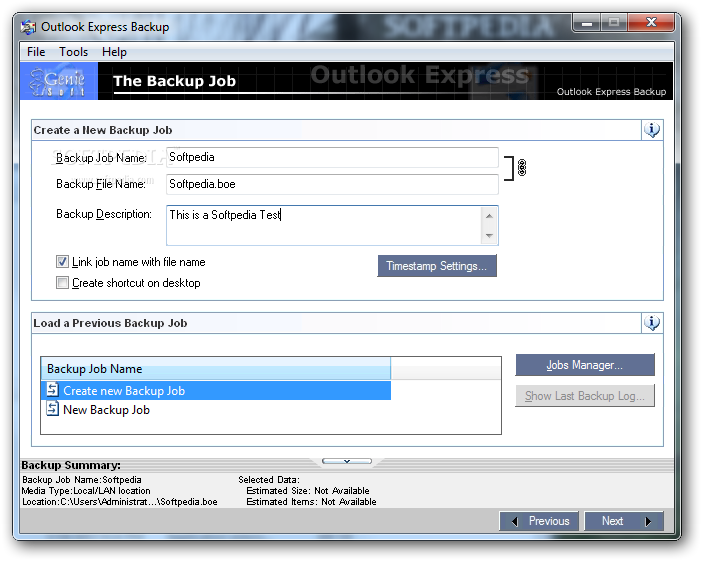
· Adding Jobs Manager Dialog - We've added a dialogue window for managing your backup jobs. You can rename, remove, and organize your jobs and also preview the backup log file.
· Timestamps dialog box - We've added a timestamps dialog for backup jobs, which includes options for purging old backup files by number of backups or by date, thus preventing your backup files from accumulating and taking up too much space.
· Quick Backup button - Now the user can perform a one-step quick backup of previously defined backup jobs from the main menu without going through the whole backup wizard process.
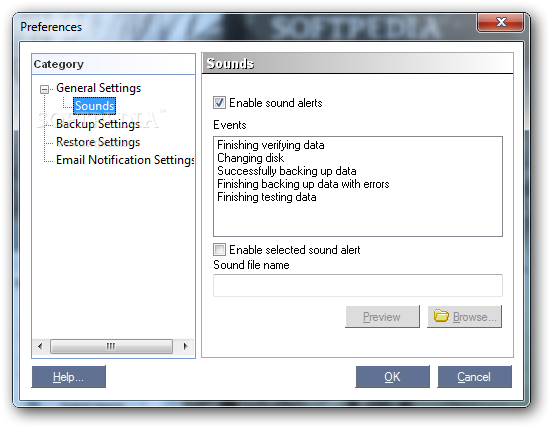
· Added sounds for various backup events - We've added alarm sounds to notify you upon finishing backup whether with or without errors and when you need to insert a new disk in the case of spanning data over multiple disk volumes.
· Backup later - You can now create, configure, and save a backup job so as to perform the backup in a different session.
· Auto insert DVD/CD detection
· Backup Jobs Shortcuts - The ability to create shortcuts for backup jobs on the desktop for added speed and accessibility
· Added enhancements to the restore procedure... [ read full changelog ]


Softpedia guarantees that Outlook Express Backup 6.5.121 is 100% CLEAN, which means it does not contain any form of malware, including but not limited to: spyware, viruses, trojans and backdoors.

This software product was tested thoroughly and was found absolutely clean, therefore it can be installed with no concern by any computer user.

However, it should be noted that this product will be retested periodically and the award may be withdrawn, so you should check back on this page from time to time. (click here for more information)


Related downloads IT News Popular downloads New additions   Latest reviews  
OutBack Plus 6.1.6
OutBack Plus - Backup and Restore Utility for Microsoft Outlook
Outlook Express BackUp Expert 1.40
Backup and restore email, accounts, address book, templates for Outlook Express
Outlook Express Backup Plus 2.8
Outlook Express Backup Plus is the most popular backup software
Outlook Express Backup Plus 2.7
Outlook Express Backup is a program which can backup and restore Outlook Express Data
Acubix PicoBackup for Outlook Express 2.1
Acubix PicoBackup for Outlook Express - is an Outlook Express emails backup utility that is easy-to-use and feature packed.
Compact Outlook Express Backup 2.7
The easy way to save Outlook Express message base, e-mail accounts, signatures.
Outlook Express Backup Tiger 1.3.1
A Wizard-like utility to backup your Outlook Express data
MOBackup 3.0
MOBackup - Backup for Microsoft Outlook
OutlookBackupPro 1.0 Build 1026
This application helps you easily backup your Outlook 2003 and Outlook 2007 data and settings
Icesun Outlook Express Backup 1.50
Backup and restore your Outlook Express data.

go to top Use the following code to link to this page:


Welcome!
Hello, Guest

Login if you have a Softpedia.com account.

Otherwise, register for one.

Main categories:
  • Antivirus
  • Compression tools
  • CD/DVD Tools
  • Office tools
  • Programming
  • Authoring tools
  • File managers
  • Desktop Enhancements
  • Internet
  • Network Tools
  • IPOD TOOLS
  • Mobile Phone Tools
  • Multimedia
  • Tweak
  • System
  • Security
  • Others
  • Science / CAD
  • UNIX
  • Windows Widgets
  • PORTABLE SOFTWARE

  • Week's best:
  • Vista Sidebar 2.5 Bu...
  • FlashGet 2.11.0.1188...
  • Opera 9.52 Build 101...
  • DVDFab Platinum 5.0....
  • Vuze (formely Azureu...
  • The Bat! Professiona...
  • AVG Anti-Virus plus ...
  • Acronis True Image H...
  • Rising Antivirus Fre...
  • DirectX Redistributa...
  • Adobe Flash Player 1...
  • Nero 8 8.3.6.0
  • FileZilla 3.1.1.1
  • AVG Internet Securit...
  • Microsoft Malicious ...
  • Maxthon 2.1.3.2430 F...
  • BitComet 1.04 Beta
  • Deluge 0.9.06 (1.0....
  • Pidgin (formerly Gai...
  • ATi Multimedia Cente...
  • K-Lite Codec Pack Fu...
  • Mozilla Thunderbird ...
  • Corel DVD MovieFacto...
  • Portable Winamp 5.35
  • VirtualDub 1.8.5 Bui...
  • Winamp 5 Full 5.541 ...
  • FFDShow MPEG-4 Video...
  • Hide IP Platinum 1.2...
  • GX::Transcoder 5.0.2...
  • TopSpyAdware Remover
  • © 2001 - 2008 Softpedia. All rights reserved.
    Softpedia™ and Softpedia™ logo are registered trademarks of SoftNews NET SRL.
    Copyright Information | Privacy Policy | Terms of Use | Contact Softpedia | Update your software | Archive