Softpedia
 

WINDOWS CATEGORIES:


GLOBAL PAGES >>
SOFTPEDIA REVIEWS >>
MEET THE EDITORS >>
WEEK'S BEST
  • Sticky Password FR...
  • Parallels Workstat...
  • ESET NOD32 Antivir...
  • BitDefender Total ...
  • WinPatrol 24.6.201...
  • PerfectDisk Free D...
  • Adobe Photoshop CS...
  • PerfectDisk Profes...
  • Windows 8 Consumer...
  • Atlantis Word Proc...
  • Home > Windows > Internet > E-mail > Mail Utilities
     Report malware

    gSyncit 3.5.10 Beta / 3.4.54

    download button

    Downloads: 5,108  Tell us about an update
    User Rating:
    Rated by:
    Good (3.0/5)
    46 user(s)
    Developer:

    License / Price:

    Size / OS:

    Last Updated:

    Category:

    Demo / USD 19.99 buy button
    4.8 MB / Windows All
    [view history]
    C: \ Internet \ E-mail \ Mail Utilities

     Read user reviews (1)  Send to friend   Follow (0 users)

    gSyncit description

    A simple application that keeps Microsoft Outlook, your Google calendar and email in sync.

    gSyncit for Microsoft Outlook is a small and easy-to-use software that will rapidly sync Microsoft Outlook and Google Calendar.

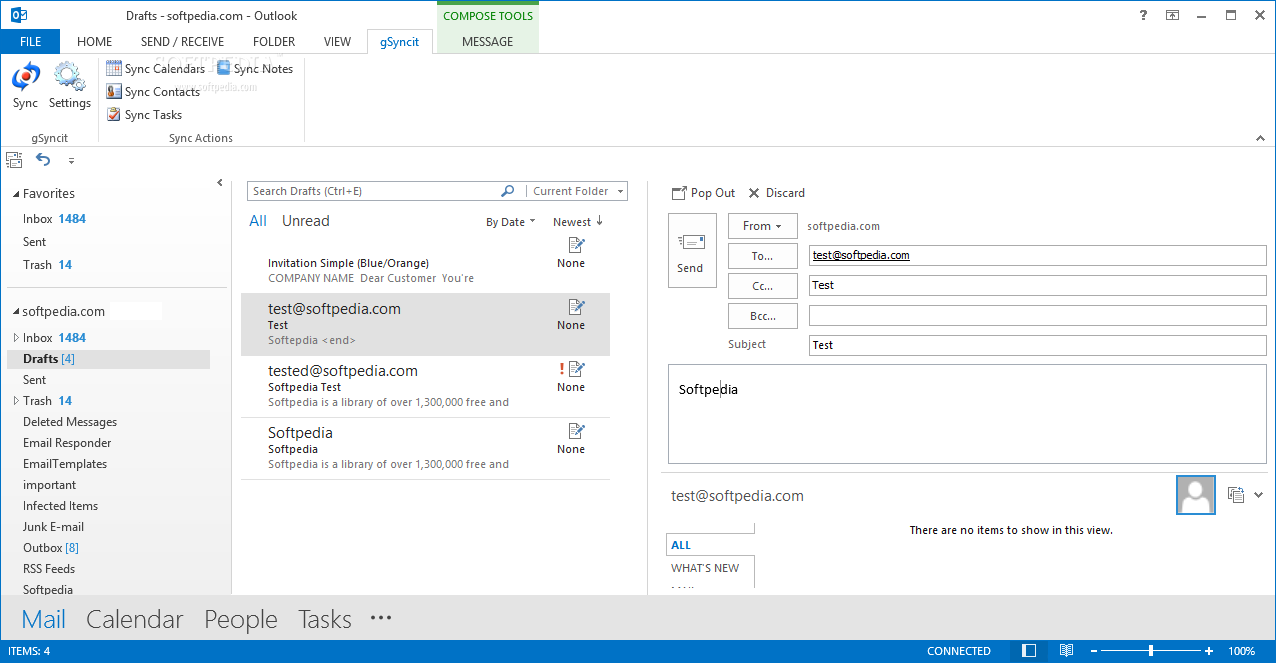
    After installing gSyncit and starting Outlook you'll find a new toolbar available to configure gSyncit and synchronize your calendar.

    You can manually synchronize your calendar or have it automatically sync on a preset interval.

    gSyncit works by updating your Microsoft Outlook calendar with your Google entries and then updating your Google calendar with your Microsoft Outlook entries.

    Here are some key features of "gSyncit":

    · ONE and TWO WAY syncing of Outlook calendars, contacts, notes and tasks.

    · Sync with Google, Dropbox, Simplenote, Toodledo and Evernote

    · MULTIPLE ACCOUNTS: Sync with multiple Google, Toodledo, Dropbox, Evernote, and Simplenote accounts and works with multiple Outlook profiles

    · SYNC MULTIPLE COMPUTERS: Sync multiple computers using Outlook with a single Google account (gSyncit license required for each computer)

    · MATCHING LOGIC: Automatically matches entries to prevent duplicate items when syncing.

    · AUTOMATIC SYNC: Automatically sync items on a regular interval, between certain hours of the day, and/or when Outlook starts/exits.

    · DETAILED CONFIG: Detailed sync options to control how and what you want to sync.

    · FILTERING: Keyword and category filters to control the Outlook contact you want to sync.

    · CATEGORY SYNC: Advanced options to sync Outlook categorizes with Google, Toodledo, Evernote and Simplenote.

    · CONTACT DISTRIBUTION LIST SYNC: Supports the ability to sync selected Outlook distribution lists with Gmail groups. We are not aware of any other Google contact sync application that can support this functionality.

    · OUTLOOK 2010 RIBBON SUPPORT: Supports for using the Outlook 2010 Ribbon interface and animated the gSyncit tray icon when a sync is in progress.


    · GMAIL NOTES SYNC: Supports the ability to sync Gmail notes to Outlook. This is a one-way sync allowing iOS (iPhone, iPod Touch) users to sync notes from their Apple mobile device to Gmail and then finally to Outlook. It is important to note again that this is a one-way sync from Gmail to Outlook.

    · TOODLEDO TASK INTEGRATION: Added support for syncing and managing Outlook tasks with the Toodledo service available via the web and on most mobile devices. Learn more about Toodledo at (http://www.toodledo.com).

    · TOODLEDO NOTES INTEGRATION: Added support for syncing and managing Outlook notes with the Toodledo service available via the web and on most mobile devices. Learn more about Toodledo (http://www.toodledo.com).

    · OUTLOOK CATEGORY/GOOGLE TASK SYNC: Configure the task sync process to synchronize Outlook tasks with different Google task lists using the assigned Outlook category. This feature removes the need to create multiple task sync mappings for different categories.

    · EVERNOTE NOTES INTEGRATION: Syncing and managing Outlook notes with the Evernote service available via the web and on most mobile devices.

    · SIMPENOTES INTEGRATION: Syncing and managing Outlook notes with the Simplenote service available via the web and on most mobile devices.

    · DROPBOX INTEGRATION: Syncing and managing Outlook notes with Dropbox available via the web and on most mobile devices.

    · GOOGLE API'S: Updated to use the latest Google GDATA v1.8 API's for interfacing with Google services. In keeping up with the latest Google service updates we've updated gSyncit to include the latest service interfaces/API's for interfacing with Google "cloud" services.

    · OTHER ENHANCEMENTS: Ability to set the sync process priority, add a secondary reminder when syncing calendar events to the Google calendar.

    Requirements:

    · Microsoft Outlook 2000 or higher
    · Microsoft .Net Framework v2.0 or higher

    Limitations:

    · Users can sync only one calendar, contact, note and task.
    · Nag screen

    What's New in This Release: [ read full changelog ]

    NEW: Pocket Informant Sync:
    · gSyncit now supports syncing notes and tasks (calendar syncing is coming soon) directly with the new Pocket Informant Online service allowing direct sync between Outlook and the up coming Pocket Informant v.2 5 software release. This functionality is only available for Pocket Informant beta customers and will be available to the general public when Pocket Informant v2.5 is released.
    · We have the opportunity to beta test the latest Pocket Informant 2.5 software and the experience has been great. The product is completed re-architected, solid, packed with features, and the calendar views are really slick. Pocket Informant allows organizing events, tasks, and notes by projects, tags, and priority and done in a single well integrated application. This is a valuable and time saving tool for anyone wanting to manage complex schedules with a single application and needs a profession and high quality personal management software for there Android or iPhone mobile...

     Softpedia guarantees that gSyncit 3.5.10 Beta / 3.4.54 is 100% CLEAN, which means it does not contain any form of malware, including spyware, viruses, trojans and backdoors. [read more >]


    TAGS:

    mail synchronizer | sync Outlook | synchronize calendar | calendar | synchronize | sync


    HTML code for linking to this page:


    Go to top

    WindowsGamesDriversMacLinuxScriptsMobileHandheldNews

    SUBMIT PROGRAM   |   ADVERTISE   |   GET HELP   |   SEND US FEEDBACK   |   RSS FEEDS   |   UPDATE YOUR SOFTWARE   |   ROMANIAN FORUM