
Minimal application which enables you to create and edit TORRENT files, using two different methods and without putting a strain on the computer's performance. #Torrent Maker #Torrent creator #Make torrent #Torrent #Make #Create

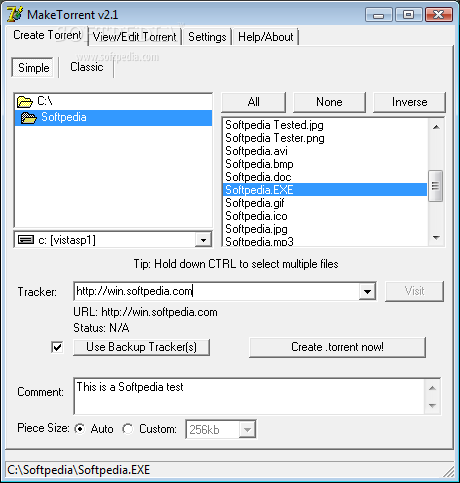
The BitTorrent protocol has evolved so much that almost every single client that's on the market has the ability to create torrent files in a matter of seconds. But there was a time when only dedicated applications could do that and then you needed an application like MakeTorrent to perform that task.
The installation process you are required to go through is a breeze, as it does not come with any unpleasant surprises and it is over in a jiffy.
Finalizing it brings you to a pretty well-organized interface. It consists of a few tabs so that you can easily access all available options and several panes and buttons. Help contents are quite brief, yet due to the UIs’ overall simplicity, both power and novice users can still find their way around it with ease.
MakeTorrent comes with two methods in which you can create a torrent file, namely a simple and a classical one. The first lets you create torrents from multiple items, while the later helps you generate single-file torrents.
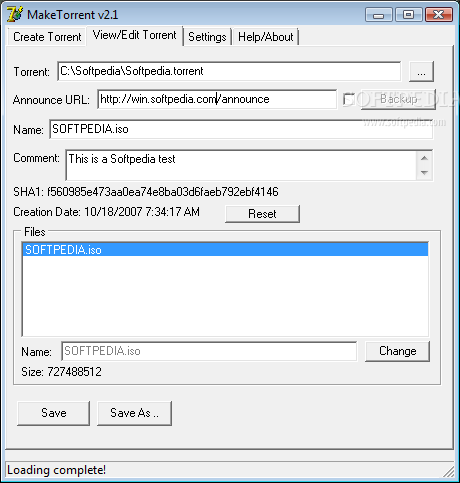
The creation process takes only a few seconds, while you should also know it is possible to edit already-existing items. To be more accurate, you can reset the creating date, add comments and announce URL, and view all containing items and their size.
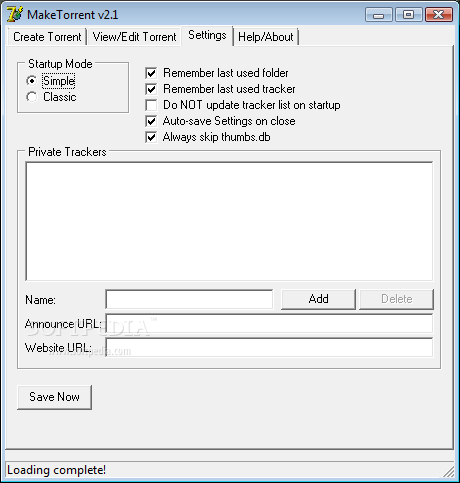
From the settings panel you can easily add your private trackers and save them to the program for later use, while you can also enable it to remember last used directory and tracker, and automatically save settings when exiting.
The amount of resources used is quite insignificant, the response time is good and the interface, although not very easy on the eyes, is quite user-friendly. All things considered, MakeTorrent is a pretty decent piece of software and it is a good choice for people who still do not use one of the popular BitTorrent clients (which are also able to create torrents).
Download Hubs
MakeTorrent is part of these download collections: Torrent Creator, Torrent Makers
What's new in MakeTorrent 2.1:
- Added new setting: auto-ignore thumbs.db (default: enabled)
- New command line parameter: -autosize .. try this if parts of the GUI are cut off
- Moved create torrent button up higher, in the case the above doesn't work.
- Added more piece sizes, up to 16mb (only use if you know what you're doing!)
MakeTorrent 2.1
add to watchlist add to download basket send us an update REPORT- runs on:
- Windows All
- file size:
- 393 KB
- filename:
- maketorrent-2.1.exe
- main category:
- Internet
- developer:
- visit homepage
Bitdefender Antivirus Free

paint.net

Microsoft Teams

Zoom Client

calibre

4k Video Downloader

Windows Sandbox Launcher

7-Zip

IrfanView

ShareX

- 7-Zip
- IrfanView
- ShareX
- Bitdefender Antivirus Free
- paint.net
- Microsoft Teams
- Zoom Client
- calibre
- 4k Video Downloader
- Windows Sandbox Launcher