
With a pretty intuitive interface and high download speeds, this piece of software enables you to grab audio files shared via iTunes and manage them. #Song download #ITunes shared #Download song #Tunes #Songs #Download

First things first – myTunes Redux is no more. It used to be very popular back in 2004-2006 until Apple decided to completely disable it by releasing iTunes 7. Since then, there has not been any release of newer versions and the software became obsolete.
This app is a follow-up of the controversial myTunes released by William Zeller on October 26, 2003. The thing that made it so popular was its purpose, namely being a part of a network that provides access to computers sharing music through iTunes.
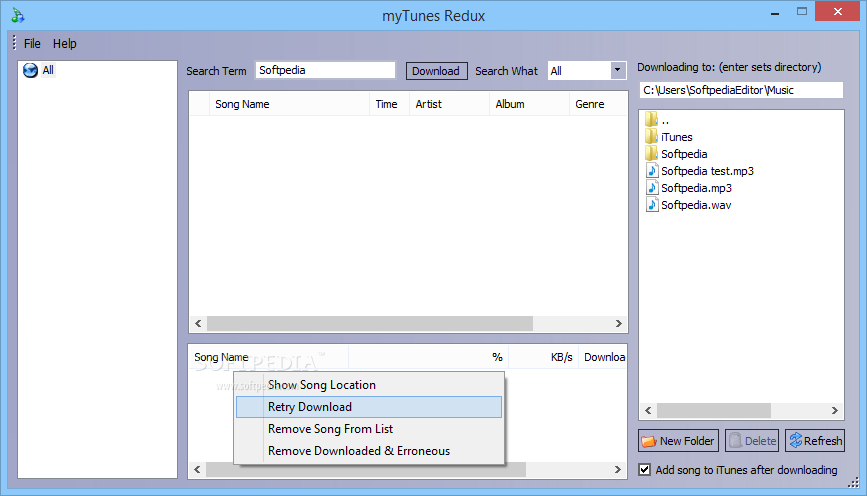
It features a smooth interface where everything sits naturally and makes any operation easily accessible. You have the connected computers on the left side, the center piece presents the shared music while the download locations are situated in the right part of the main window.
Consequently, although no Help contents are enclosed, all user categories can find their way around it, without facing any kind of difficulties.
A search function is incorporated, which enables you to easily look for a particular item, by simply inputting an appropriate keyword. With the help of a drop-down list, you can easily choose if you are looking for a name, artist, album or genre, and thus filter your search.
Results are going to be displayed in the main window along with song name, time, artist, album, genre and library name, while you can also view downloads alongside their respective completion percentage, download speed and estimated time left.
The output folder can be changed with ease, while you can also create a new directory, delete an already existing one and refresh the list. Moreover, it is possible setup myTunes Redux to add songs to iTunes after the download is complete.
The heaviest issue with the utility is that it only allows five users to connect within a given network. Thus, if this number is reached, no other individual can connect to the ones already sharing music.
Tasks are completed in a fair amount of time, without affecting the computer’s performance in any way and without popping up errors, freezing or crashing. Overall myTunes Redux is a pretty efficient piece of software, dedicated to both beginners and highly experienced users through an intuitive GUI.
myTunes Redux 1.0
add to watchlist add to download basket send us an update REPORT- runs on:
- Windows All
- file size:
- 1003 KB
- filename:
- myTunesReduxInstaller.exe
- main category:
- Internet
- developer:
IrfanView

Microsoft Teams

ShareX

Context Menu Manager

4k Video Downloader

calibre

Bitdefender Antivirus Free

7-Zip

Windows Sandbox Launcher

Zoom Client

- 7-Zip
- Windows Sandbox Launcher
- Zoom Client
- IrfanView
- Microsoft Teams
- ShareX
- Context Menu Manager
- 4k Video Downloader
- calibre
- Bitdefender Antivirus Free