Softpedia
 

WINDOWS CATEGORIES:


GLOBAL PAGES >>
SOFTPEDIA REVIEWS >>
MEET THE EDITORS >>

WEEK'S BEST

  • DAEMON Tools Pro (...
  • FlashFXP [ DISCOUN...
  • PowerISO 4.9
  • WebcamMax [DISCOUN...
  • Zemana AntiLogger ...
  • System Mechanic Pr...
  • Glary Utilities Pr...
  • All My Movies [DIS...
  • Ad-Aware Internet ...
  • Atlantis Word Proc...
  • Home > Windows > Internet > News / Newsgroups /Blog Tools
     Report malware

    RSS Aggregator 2.7

    Softpedia Pick Award
    download button

    Part of the Open RSS download hub
    Downloads: 14,589  Tell us about an update
    User Rating:
    Rated by:
    Good (3.4/5)
    32 user(s)
    Developer:

    License / Price:

    Size / OS:

    Last Updated:

    Category:

    Freeware / $0
    2.4 MB / Windows All
    [view history]
    C: \ Internet \ News / Newsgroups /Blog Tools

     Read user reviews (0)  Send to friend   Follow (4 users)

    RSS Aggregator description

    RSS Aggregator - keep track of your favorite RSS feeds

    RSS Aggregator is a software utility that will bring news, journals, broadcasts and information from all around the world direct to your desktop - and all for free!

    There's more. When you install the Aggregator you will also get a free copy of the CITA RSS Builder. A utility that allows you to build your own RSS feeds and load them to your web site. Just run the utility from your Start button and press F1 to see extensive help text about building RSS feeds and the using the Builder.

    RSS is a set of global standards for publishing news and information. RSS newsfeeds are provided by literally thousands of public web sites and the Aggregator can monitor the ones you choose. The Aggregator uses the method you choose to alert you of new articles. It can even give you newsflashes when there is news that is particularly interesting to you.

    Increasingly organisations are using RSS newsfeeds to keep clients, suppliers and their own people informed. The Aggregator can read those newsfeeds too.

    It can even read secure RSS sites that require a user id and password (unlike many other aggregators that allow anyone to read passwords, it stores passwords using secure triple DES encryptionA strong encryption method that is extremely difficult to break.).

    The Aggregator is written using the Microsoft .NET framework which eliminates the risk that it can interfere with other programs on your system.

    The Aggregator detects when you are not connected to the Internet so, if you use a laptop on the move, you will not be pestered with error messages.

    Softpedia's RSS feed (windows software): http://win.softpedia.com/backend.xml

    Here are some key features of "RSS Aggregator":

    · The Aggregator contains no spyware or adware. There are no hidden activities. Nor is there a 'professional' version. You get the full version for free and without any hindrance or restriction. We don't even show a splash screen! The Aggregator comes with context-sensitive help and lets you know if there is a new version available.
    · Support for all the major RSS standards and versions (and flexibility to correctly interpret some feeds that do not adhere to the standards). Flexible support for downloading Podcasts and other types of enclosure - including BitTorrent files.

    Range of alert methods:
    · Alert boxes appear on top of other windows and do not take the focus (you can continue typing an Email, for example, without disruption)
    · Each alert shows you a brief description of all new and changed items in a given channel
    · Alert box size automatically adjusts to the length and number of new and changed items
    · You can specify alert box colours, text size, opacity and screen position
    · You specify what, if any, sound is played when an alert is displayed
    · Simple facility to identify items that are specially important. These are shown as newsflashes which have separately defined colours, text sizes and opacity
    · Special purpose alerts - with separately defined colours, text sizes and opacity - to let you know about enclosures (Podcasts)
    · You can suppress on-screen alerts for any or all channels
    · You can temporarily suppress all alerts from all channels regardless of any other settings
    · Tray icon changes if you have new or changed news items available
    · Automatic detection of Internet availability means the Aggregator runs silently while you are not connected

    Flexible methods for reviewing news items:
    · Headlines shown in the alert boxes
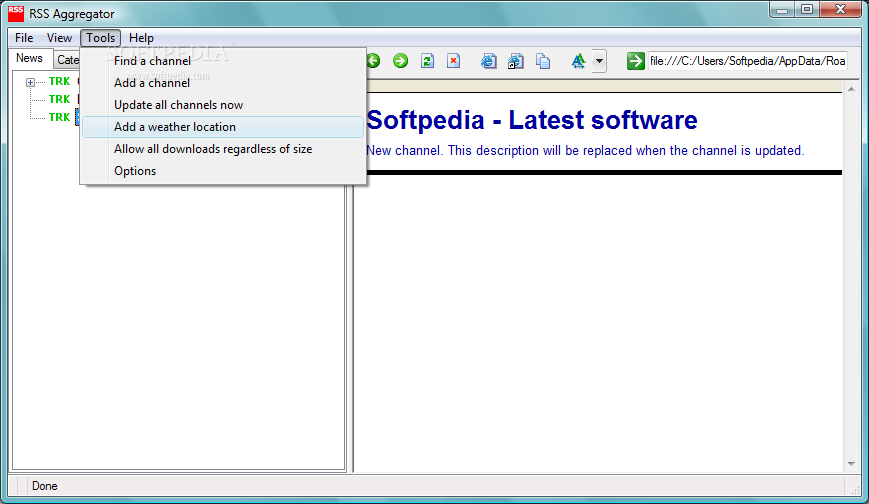
    · Channels and items are shown in a standard tree view; icons show you the status of each channel and item
    · Extensive use of tooltips to display additional information
    · Click a channel to display a summary of news available in a channel; click links in the summary to show detailed news items
    · Click an item to show detail directly
    · Option to show summaries and news items directly from alert boxes
    · Facility to block annoying pop-up adverts
    · Support for mice with Back and Forward buttons
    · You can choose to open any web page in your default web browser so you can review it at your leisure while continuing to receive news alerts

    You control what happens after you review items. If you track an item the Aggregator will alert you to changes. Alternatively you can instruct the Aggregator to ignore changes to the item:
    · You can specify to track or ignore all items directly from an alert box - giving you a fast, simple way to review items during the day
    · 'Not now' buttons allow you to dismiss alerts for later review
    · Ignored items are suppressed from the tree view by default (but you can toggle display of ignored items on and off)
    · You can update status of an item by right-clicking it in the tree view
    · Option to start tracking all news items you read
    · Option to ignore all unread items automatically when you close the main Aggregator window
    · Facility to update a channel immediately
    · Facility to update all channels immediately

    · A download summary screen that lets you review all enclosures (Podcasts) available to you and which gives you control over which ones you download, and when. The summary screen also shows you progress with each download as it happens.

    Built-in support for the weather feed provided by the Weather Channel. We looked into a number of RSS weather feeds but could not find one that worked particularly well with RSS. Having said that, there's nothing to stop you using an RSS feed if you find one you like. Instead, we have integrated the Weather Channel feed into the Aggregator so you can specify:
    · The locations you are interested in tracking. The Weather Channel provides data for all US zip codes plus thousands of cities worldwide
    · Whether you just want current conditions or whether you would like a forecast; and, if so, how many day's forward (up to 10) you want to forecast
    · Whether you want the Aggregator to retrieve weather data for you automatically; and, if so, at which times of day
    · Whether you want the Aggregator to raise an alert when it retrieves weather updates
    · The Aggregator is then able to present you with current conditions and day and night forecasts any time you want.

    Good use of screen 'real estate':
    · During normal use only a tray icon is visible
    · Most of the screens can be resized
    · You can move the split between the tree view and the internal browser on the main screen
    · Option to display or suppress the browser toolbar
    · You control the appearance of the main screen including: font, size and colour of the tree view; and size of text shown in the internal browser

    · Support for finding new feeds and simple facilities for adding them to the Aggregator. It comes with a subscription utility that implements the two standard approaches to automated feed subscription. Click here for more details.

    Set up options allow you to:
    · Specify how often to look for updates
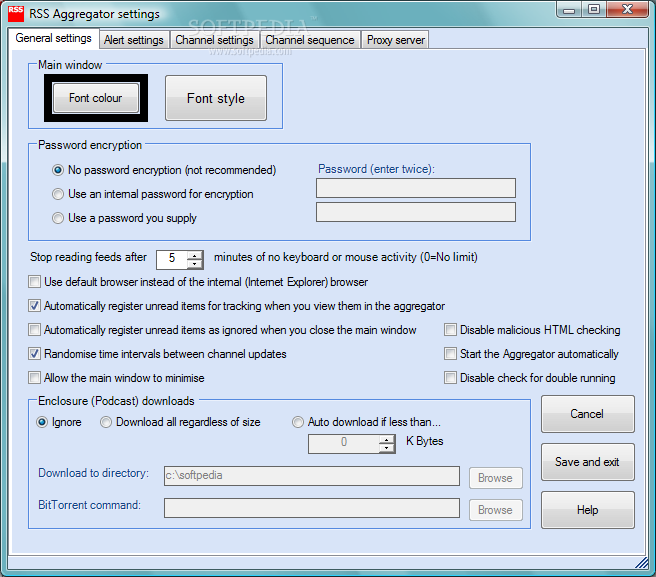
    · Whether or not to randomise update intervals so you don't get all the channels raising alerts simultaneously
    · Determine the order in which channels are displayed
    · Reset a channel
    · Delete a channel altogether

    Support for access to secure feeds protected by user ids, passwords and encryption:
    · Support for both basic HTML access control as well as session-based (cookie-based) access controls
    · Passwords are stored using secure triple-DES encryption
    · You can choose to have passwords encrypted with an internal key - or one that you specify (ensuring people cannot see your passwords even if they have a copy of the Aggregator)

    The Aggregator supports a number of methods to reduce the data transfer overhead when communicating with feed suppliers. This ensures the Aggregator follows accepted good practice and protects you from defensive actions from feed suppliers against 'badly-behaved' Aggregators. For example, suppliers can raise spurious error messages and can send truncated feed data. The supported methods include:
    · Use of 'Etag' and 'Last-Modified' request headers to allow a feed server to use a short message to tell the Aggregator there have been no changes since the last time it looked for updates to the feed.
    · The Aggregators supports data compression. This significantly reduces the data that needs to be sent by servers that also support compression. The Aggregator supports the industry-standard gzip and deflate standards.
    · The Aggregator honours requests from feed suppliers to implement minimum intervals between requesting feed updates. In any case, the Aggregator implements a minimum interval of one hour - widely regarded as an acceptable minimum for feeds in general.
    · The Aggregator identifies periods when you are not using your PC and automatically stops looking for feed updates. It resumes automatically when you start using your PC again. This ensures the information you get when returning to your PC is as up to date as it can be as well as cutting data transfer overhead. You can, of course, alter the inactivity period or disable the feature altogether if you prefer.

    · Channel definitions can be exported and imported using the OPML standard. You can import/export all the available channels or just the ones you select.

    Support for a wide range of installation options:
    · Simple installation using the standard Windows installer
    · Manual installation for maximum flexibility
    · Does not require installation of system objects or DLLs so the Aggregator cannot interfere with other programs
    · Can be installed on 'locked down' PCs
    · Full support for proxy servers; can inheret Windows and Internet Explorer settings or override them
    · Proxy server definitions can be by-passed for individual channels in order to support intranet or development access
    · Can be used from multiple PCs sharing the same data
    · Can be used by multiple users of the same PC each with their own data


    Requirements:

    · Microsoft .Net Framework
    · Internet Explorer 5.01 or later (we have checked that the Aggregator works well with Internet Explorer 7).

    What's New in This Release: [ read full changelog ]

    Windows Vista and, if you use 'limited' user access, Windows XP bar you from making changes to files in the 'Program Files' directories - which is where we used to store your settings file. The Aggregator automatically copies your settings file to one of the 'Application Data' directories created by Microsoft for this kind of data. This means:
    · You should not see warnings or failures as a result of using limited user access
    · If different people use a single PC they will automatically get their own settings and preserve their individual feed status.
    · If you use multiple PCs in the same network and the network supports 'roaming profiles' then you will take your settings and feed status with you from PC to PC.
    · If you back up your settings file, you need to back it up from it's new location (either: C:Documents and Settingsyour user idApplication DataCITARSSA or C:Documents and Settingsyour user idLocal SettingsApplication DataCITARSSA. Note that these folders are 'hidden' by defaul...

     Softpedia guarantees that RSS Aggregator 2.7 is 100% FREE, which means it does not contain any form of malware, including spyware, viruses, trojans and backdoors. [read more >]


    TAGS:

    RSS feed | RSS reader | build RSS | RSS | reader | feed


    HTML code for linking to this page:


    Go to top

    WindowsGamesDriversMacLinuxScriptsMobileHandheldNews

    SUBMIT PROGRAM   |   ADVERTISE   |   GET HELP   |   SEND US FEEDBACK   |   RSS FEEDS   |   UPDATE YOUR SOFTWARE   |   ROMANIAN FORUM