
Compact piece of software designed specifically for helping you optimize network connections and increase download speeds, while offering support for different operating systems and connection types. #Internet connection speed #Increase speed #Edit system registry #Optimizer #Speedup #Tweak

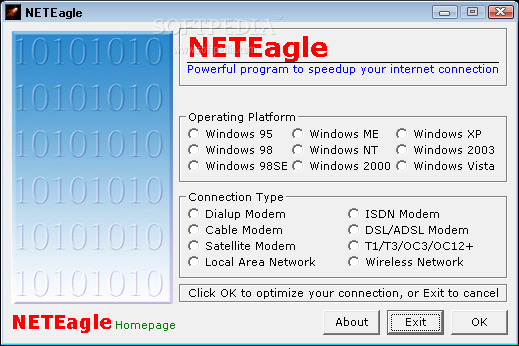
NETEagle is a reliable utility designed to optimize network connections and increase download speeds using specially-developed methods for most Windows versions.
The program can be safely used by rookies and more experienced users alike because it all comes down to just a single window that hosts all the tools it includes.
Pick the operating system and connection type
The whole optimization task is actually a two-click job, so the user is prompted to choose the operating system, which can be anything from Windows 95 to Windows 7, and then the connection type.
This is where the user needs to select the correct connection type, be it dial-up, cable or satellite modem, LAN, ISDN, DSL or wireless network.
NETEagle attempts to modify some Windows settings to improve Internet speed, including transfer rates within ICS and the maximum memory allocation to modem. Plus, it performs a comprehensive DNS lookup optimization and tries to increase HTTP request limit, while tweaking TTL, MTU and MSS properties at the same time.
Of course, beginners who experience a hard time trying to figure out these optimizations can always have a look in the help file. Developers have included lots of details on most of the features.
The good thing about NETEagle is definitely the support for most operating systems and connection types. On the other hand, a more user-friendly interface, with detailed descriptions of every single feature would be much more appropriate for this kind of app.
What's new in NETEagle 5.50:
- Minor bug fixes have been made.
- Performance has been increased.
- Added more tweaks for Windows 2000, XP, 2003 and Vista.
NETEagle 5.50
add to watchlist add to download basket send us an update REPORT- runs on:
- Windows All
- file size:
- 405 KB
- filename:
- NETEagleSetup.zip
- main category:
- Internet
- developer:
- visit homepage
Bitdefender Antivirus Free

Zoom Client

calibre

Windows Sandbox Launcher

ShareX

Microsoft Teams

IrfanView

4k Video Downloader

Context Menu Manager

7-Zip

- 4k Video Downloader
- Context Menu Manager
- 7-Zip
- Bitdefender Antivirus Free
- Zoom Client
- calibre
- Windows Sandbox Launcher
- ShareX
- Microsoft Teams
- IrfanView