
Scan your computer for malicious items and remove them according to a schedule, adjust the monitoring system and configure a long list of settings. #Antipsyware tool #Spyware protection #Spyware detection #Spyware #Detector #Antipsyware

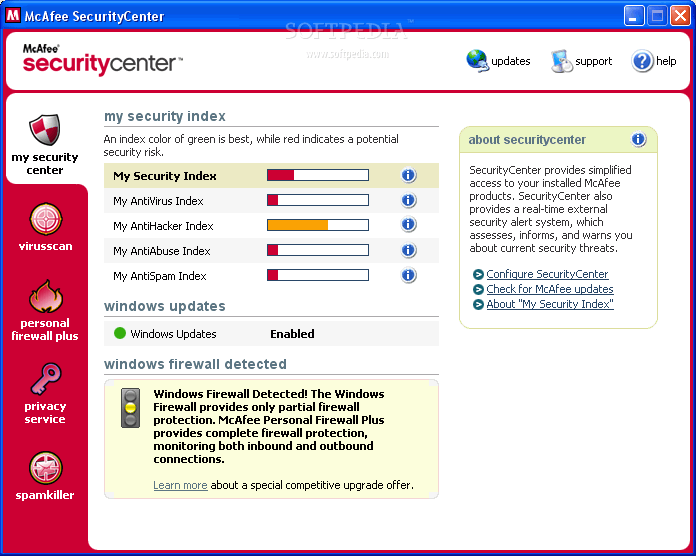
McAfee AntiSpyware Enterprise is a security suite which enables you to detect and remove any suspicious spyware that has infiltrated into your computer.
The installation can be either done in typical or custom mode, yet regardless of the one you choose, it can be finished in just a few minutes. Moreover during this process the program offers either standard or maximum protection (obviously, we recommend the second option).
The Security Center has an easy-to-follow interface, where you are presented with an overview of your computer (current status, recent events and monitoring), and the types of scans you can choose (complete or custom, with the option to detect tracking cookies).
The monitoring level on your system can be adjusted, and you can supervise changes made to Internet Explorer, Windows services, certificates and configuration files, dial-up connections and network protocol. In addition to that, you can manage and disable any programs which automatically launch at system startup.
In the settings panel you can configure scanning options, trusted programs (after scanning is complete, you can add programs to a “trusted” list), scheduled scans, as well as restore removed programs, erase online tracks (cookies, cache, history), and view event logs.
During our tests, McAfee AntiSpyware Enterprise took a long time to finish a job, and although it managed to find some pieces of spyware, it did not remove all of them. Moreover the amount of resources required was quite high and thus your system’s performance is going to be hampered.
To conclude McAfee AntiSpyware Enterprise is a pretty decent piece of software. Usage is not rocket science and the protection level it offers is decent.
Download Hubs
McAfee AntiSpyware Enterprise is part of these download collections: Pop-up Blockers
McAfee AntiSpyware Enterprise 8.6.0
add to watchlist add to download basket send us an update REPORT- runs on:
- Windows All
- file size:
- 11.6 MB
- filename:
- ASE85saEEN.Zip
- main category:
- Internet
- developer:
- visit homepage
Bitdefender Antivirus Free

7-Zip

IrfanView

4k Video Downloader

Windows Sandbox Launcher

Microsoft Teams

Context Menu Manager

Zoom Client

calibre

ShareX

- Zoom Client
- calibre
- ShareX
- Bitdefender Antivirus Free
- 7-Zip
- IrfanView
- 4k Video Downloader
- Windows Sandbox Launcher
- Microsoft Teams
- Context Menu Manager