Softpedia
 

WINDOWS CATEGORIES:


GLOBAL PAGES >>
SOFTPEDIA REVIEWS >>
MEET THE EDITORS >>
WEEK'S BEST
  • Sticky Password FR...
  • Parallels Workstat...
  • ESET NOD32 Antivir...
  • BitDefender Total ...
  • WinPatrol 24.6.201...
  • PerfectDisk Free D...
  • Adobe Photoshop CS...
  • PerfectDisk Profes...
  • Windows 8 Consumer...
  • Atlantis Word Proc...
  • Home > Windows > Internet > Remote Utils
     Report malware

    CrossLoop 2.82

    download button

    Downloads: 8,645  View global page  Tell us about an update
    User Rating:
    Rated by:
    Good (3.3/5)
    48 user(s)
    Developer:

    License / Price:

    Size / OS:

    Last Updated:

    Category:

    GPL / $0
    2.1 MB / Windows All
    [view history]
    C: \ Internet \ Remote Utils

     Read user reviews (0)  Send to friend   Follow (10 users)

    CrossLoop description

    A secure screen sharing utility designed for people of all technical skill levels

    CrossLoop simplifies the process of securely working with friends located in different physical locations and across different network environments. CrossLoop enables you to see the screen and control the mouse and keyboard on a remote computer. It is as if you are working side by side at the same PC.

    CrossLoop extends the boundaries of VNC's traditional screen sharing by enabling non-technical users to get connected from anywhere on the Internet in seconds without changing any firewall or router settings. It only takes a few minutes to setup and no signup is required.

    Explicit permission is required before any screen images are sent to a remote computer. CrossLoop is a secure tool to remotely assist any PC on the planet.

    CrossLoop's underlying technology was created to simplify the process of securely working with others located in different physical locations across diverse network environments.

    CrossLoop enables you to see the screen and control the mouse and keyboard on a remote computer. It is as if you are working side by side at the same PC. CrossLoop is a powerful productivity tool that enables you to quickly collaborate in with anyone in the world.

    CrossLoop is powered by the proprietary CrossLoop VIP Tunnel, a secure peer-to-peer data transmission system. CrossLoop will encrypt all files and messages exchanged on our network to ensure your privacy.

    Only you and your invited friends or family can view or share control of your computer. A CrossLoop session can only begin on your computer by explicitly inviting them to begin a session. All data sent over the CrossLoop network is encrypted at the endpoints using a 128-bit Blowfish encryption.

    We have gone to great lengths to ensure that CrossLoop is secure and have designed the application from the ground up with security in mind.

    Starting A Session
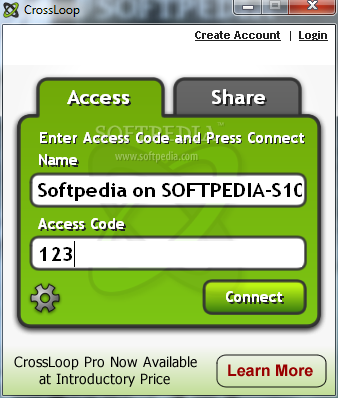
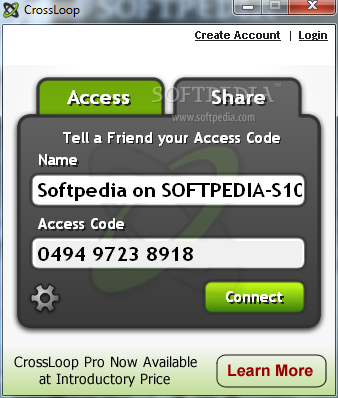
    After installing CrossLoop, you will see a welcome screen with two tabs. Select the Join tab if you would like to connect and control a friend's PC. Select the Host tab if you would like to temporarily share access to your PC.

    Is CrossLoop Secure?
    Security is built into all aspects of CrossLoop. Session data is encrypted at the end-points before being sent using a 128-bit encryption algorithm using a randomly generated 12-digit access code.

    Explicit permission is required before any screen images are sent to a remote computer. CrossLoop is a secure tool to remotely assist any PC on the planet.

    Here are some key features of "CrossLoop":

    · Connect Any Two PCs on Earth
    · Available in 21 Languages
    · File Transfer Capability
    · Switch control to make collaboration easier
    · View Only and Share Control modes

    Requirements:

    · Pentium 500MHz
    · 128 MB RAM or greater
    · 2 MB hard drive space
    · Broadband Internet Connection: DSL, cable, T1

    What's New in This Release: [ read full changelog ]

    Multi-Session support for remote access:
    · This feature is now available for all CrossLoop paid accounts (Pro and Remote Access). You can now launch multiple viewers from the "My Computers" and "Customers" tabs of the CrossLoop website. Each of the viewer sessions is identified by the name of the remote computer. Clicking on the Viewer icon in the tray allows the selection of a specific remote computer. Right clicking on the Viewer icon in the tray can be used to operate on all of the Viewer windows: Cascade, Show Windows Stacked, Show Windows Side by Side, Minimize Group and Close Group.

    Bug Fixes:
    · The client no longer restores minimized Viewers after 20 seconds, Viewer window will remain minimized
    · Caps lock is turn OFF on both the Share and Access computers when the "Connect" button is hit
    · Improved connection speed for Instant Share and Remote Access
    · Windows XP support for non-admin users
    · Added confirmation messages to the Logout and Quit requests
    · Additional "Remote Connec...

     Softpedia guarantees that CrossLoop 2.82 is 100% FREE, which means it does not contain any form of malware, including spyware, viruses, trojans and backdoors. [read more >]


    TAGS:

    remote connect | transfer file | screen share | remote | transfer | administrate


    HTML code for linking to this page:


    Go to top

    WindowsGamesDriversMacLinuxScriptsMobileHandheldNews

    SUBMIT PROGRAM   |   ADVERTISE   |   GET HELP   |   SEND US FEEDBACK   |   RSS FEEDS   |   UPDATE YOUR SOFTWARE   |   ROMANIAN FORUM