
A powerful application that aims to duplicate the video stream for multiple applications, bypassing the limitations that Windows puts on the webcam. #Duplicate video #Video capture #Webcam capture #Webcam #Capture #Recorder
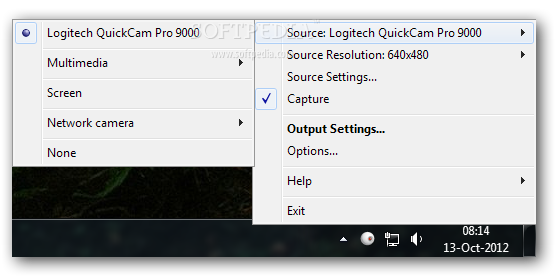
WebCamSplitter is a handy and reliable application whose main purpose is to make the stream from your webcam available to multiple applications at once.
Typically, Windows restricts the stream to one application, therefore the webcam cannot be shared amongst multiple third-party software. This limitation makes activities such as multiuser conferences and multichat webcam instances impossible.
However, the restriction can be bypassed with the aid of a program such as WebCamSplitter, which allows for the webcam to become available for an unlimited number of applications. On top of this, the utility can also manipulate the stream in several ways, allowing users to have full control over the content being transmitted.
Following a short installation process, WebCamSplitter can be started from the desktop shortcut it creates and can be operated using the system tray icon. From here, you can select the source webcam, be it a local or a network device, as well as to configure the Options of the program.
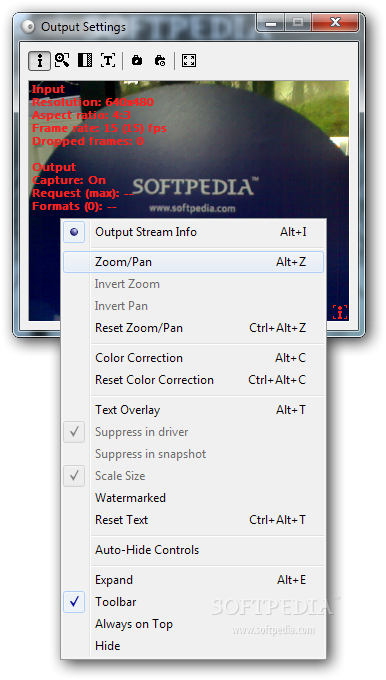
The stream from the webcam can be viewed in real time via the ‘Output Settings’ screen, from where you can also zoom, invert, pan and flip the image, as well as to perform color correction, place an image watermark or a text overlay and take snapshots.
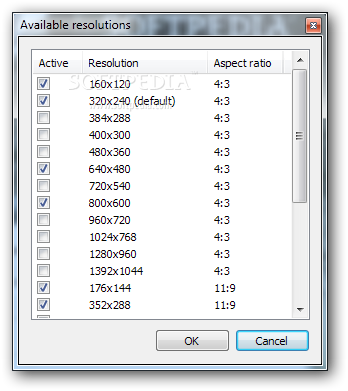
From the Options section, you will be able to set a global FPS limit, to customize the output resolution and to set the program to take snapshots automatically at a user-defined time interval.
WebCamSplitter is intuitive and reliable, able to remove the embargo that Windows automatically sets on webcam usage. The main functionality is complemented by several graphic manipulations that are offered to the end user in a friendly manner.
What's new in WebCamSplitter 1.6.351:
- 1024x576, 960x540 resolutions (16:9)
- UHD-1 output resolution 3840x2160 (4K resolution)
- Text overlay more customization parameters (font face name, color, transparency etc.)
- Text overlay date time substitution support (strftime formatting codes %d, %m etc.)
WebCamSplitter 1.6.351
add to watchlist add to download basket send us an update REPORT- runs on:
-
Windows 10 32/64 bit
Windows 8 32/64 bit
Windows 7 32/64 bit
Windows Vista 32/64 bit
Windows XP - file size:
- 2.9 MB
- filename:
- wcs_1.6.351_setup_en.exe

- main category:
- Internet
- developer:
- visit homepage
Zoom Client

Microsoft Teams

7-Zip

Bitdefender Antivirus Free

Windows Sandbox Launcher

IrfanView

4k Video Downloader

Context Menu Manager

ShareX

calibre

- Context Menu Manager
- ShareX
- calibre
- Zoom Client
- Microsoft Teams
- 7-Zip
- Bitdefender Antivirus Free
- Windows Sandbox Launcher
- IrfanView
- 4k Video Downloader
