Softpedia
 

WINDOWS CATEGORIES:


GLOBAL PAGES >>
SOFTPEDIA REVIEWS >>
MEET THE EDITORS >>

WEEK'S BEST

  • DAEMON Tools Pro (...
  • FlashFXP [ DISCOUN...
  • PowerISO 4.9
  • WebcamMax [DISCOUN...
  • Zemana AntiLogger ...
  • System Mechanic Pr...
  • Glary Utilities Pr...
  • All My Movies [DIS...
  • Ad-Aware Internet ...
  • Atlantis Word Proc...
  • Home > Windows > Multimedia > Audio > Audio CD Rippers & Encoders
     Report malware

    Medieval CUE Splitter 1.2

    download button

    Part of the Audio Splitters download hub
    Downloads: 25,747  View global page  Tell us about an update
    User Rating:
    Rated by:
    Good (3.6/5)
    44 user(s)
    Developer:

    License / Price:

    Size / OS:

    Last Updated:

    Category:

    Freeware / $0
    1.3 MB / Windows 2K / XP / 2003 / Vista
    [view history]
    C: \ Multimedia \ Audio \ Audio CD Rippers & Encoders

     Read user reviews (3)  Send to friend   Follow (8 users)

    EDITOR'S RATING

    Softpedia Editor's Review for Medieval CUE Splitter

    You can split audio track files without burning to CDR or decode/re-encode any audio data

    Written by Elena Opris on January 27th, 2012

    Medieval CUE Splitter is a small and simple application that enables you to split files in the CUE format.

    The interface of the tool is very plain. You can import CUEs by using the file browser or the "drag and drop" method (batch processing is supported).

    In the list you can view the artist, title, length and pregap for each source file.

    So, you can edit the comment, year and select the genre, as well as enable file masks and the option to replace spaces with underscores.

    But you can also set the file and tags settings (title case, upper case, lower case, sentence case), as well as add and invert gaps.

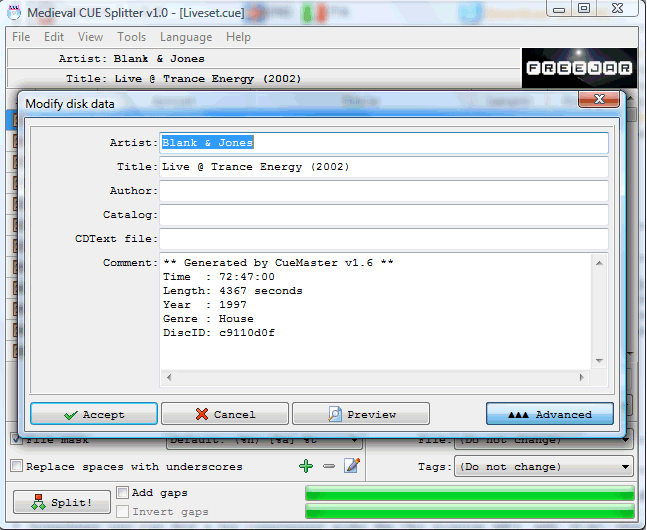
    If you open the "Edit" menu, you can modify disk or track data, swap the artist with the title for the entire disk or current track, as well as select and deselect tracks, and invert track selection.

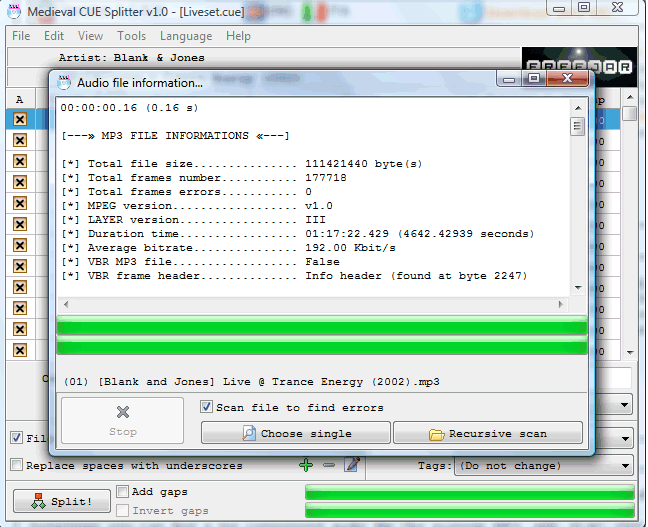
    Furthermore, you can view audio file information, add or edit genres, view a log window, select the interface language and text font, use a translating tool, and more.

    The program takes up a low amount of system resources and can guide you to an online help file with snapshots. Unfortunately, Medieval CUE Splitter froze a few times when we attempted to add some CUE files to the list, and we had to restart the application. Otherwise, the program is simple to use, even by rookies.

    Medieval CUE Splitter description

    Here are some key features of "Medieval CUE Splitter":

    · Supported audio file: uncompressed pcm WAVE, MP3, FLAC, APE, OGG, WMA, MPC, WV and TTA.
    · Accurate VBR MP3 processing.
    · Full support of DTS-WAV of DTS-Audio CD.
    · Supported audio tags: ID3v1, ID3v2, Lyrics, Vorbis comment e APE.
    · Complete support for Unicode, UTF8 and ANSI in every part of the program.
    · Can load .CUE files written in Unicode, UTF8 and ANSI (any codepage).
    · You can batch process a series of CUE sheet files at once
    · Hidden tracks and sub-indexes are automatically detected.
    · You can include the gap sound chunk (mostly silence) in splitted file.
    · Various file access method to improve performance across different systems.
    · Generated file names are automatically constructed using a user-defined "file mask" string (Press F1 or F6 for a "file mask" tutorial).
    · Generated file tags are automatically filled with informations extracted from "CUE" files (informations can be modified on-the-fly).
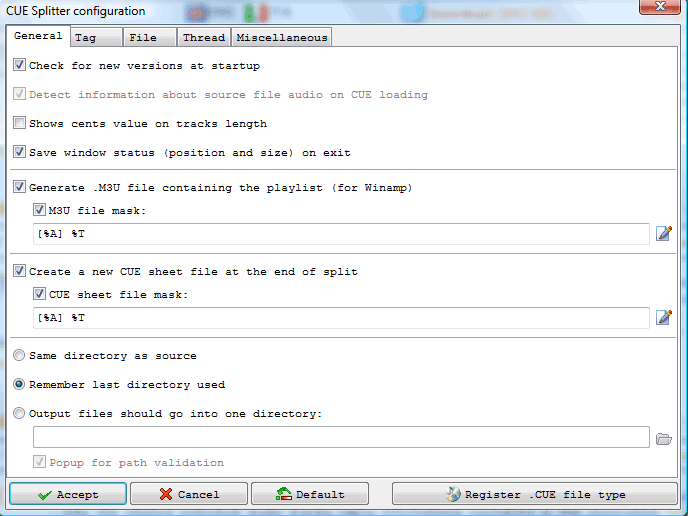
    · Automatically generates an M3U and M3U8 playlist file ready for Winamp (and others).
    · You can automatically generate a new CUE sheet file at the end of split process!
    · You can send all splitted fiiles into a common directory (press F6 to configure this feature).
    · CUE sheet and M3U generated files can use a file mask!
    · You can select only desired tracks for extraction.
    · You can associate .CUE extension with CUE Splitter (menu File->Configuration or press F6) and double-click on .CUE files from Windows explorer.
    · You can handle any number of custom "file mask" strings, as needed, directly from the user-interface (Press F1 or F6 for a "file mask" tutorial).
    · You can choose a character case changer, used in file names and tags, between: "title case", "upper case", "lower case" and "sentence case".
    · You can scan a single audio file or an entire directory recursively, to obtain file informations and detect audio errors (menu Tool->Audio file information).
    · You can edit artist and title values from the user-interface using pop-up menu or double-clicking above a track (changes will not saved back to CUE file).
    · You can create and handle your custom list of musical genres (used for tags).
    · You can choose your preferred font face to use in the user-interface form.
    · Multi-language interface: you can translate the software to your language using the built-in translating tool (menu Language -> Translate...).
    · Simple, light and straightforward user-interface.
    · Tray icon enabled

    Requirements:

    · Pentium II 2.0 Ghz
    · 256 Mb RAM

    Limitations:

    · MD5 checksum is not calculated for generated FLAC files.

    What's New in This Release: [ read full changelog ]

    · Fixed search problem on CUE load
    · Fixed strange menu bugs (vertical line)

     Softpedia guarantees that Medieval CUE Splitter 1.2 is 100% CLEAN, which means it does not contain any form of malware, including spyware, viruses, trojans and backdoors. [read more >]


    TAGS:

    split track | CUE splitter | audio splitter | split | editor | splitter


    HTML code for linking to this page:


    Go to top

    WindowsGamesDriversMacLinuxScriptsMobileHandheldNews

    SUBMIT PROGRAM   |   ADVERTISE   |   GET HELP   |   SEND US FEEDBACK   |   RSS FEEDS   |   UPDATE YOUR SOFTWARE   |   ROMANIAN FORUM