
Play, record and convert your favorite tracks to MP3 and WAV file formats without too much hassle with this user-friendly software solution. #MP3 converter #Audio converter #Convert audio #Converter #Renamer #Convert

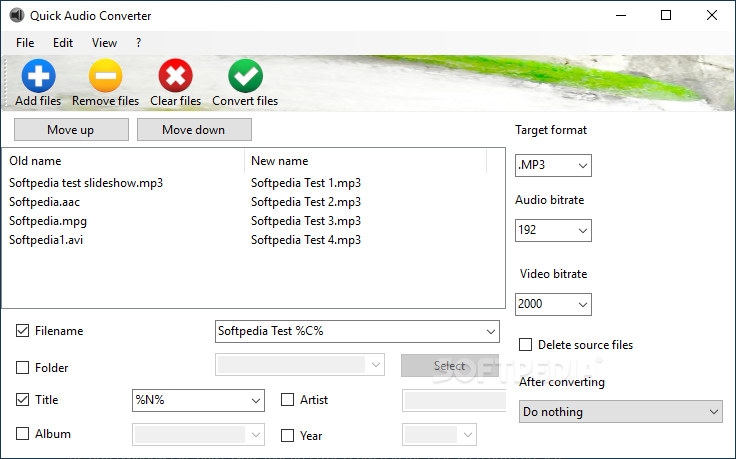
In case you are regularly making music CDs and DVDs to listen to while walking to work, jogging or making a long bus trip more pleasant, you probably could use a simple utility to make the recording and processing of these files faster.
Alternate Quick Audio is a tool designed to help you record MP3 and WAV files as quickly and easily as possible.
Even though it is clean and straightforward, the interface is slightly monotonous and dull. Considering that it comes with a resizable UI and it has a lot of free space, the main window could some animation or at least a visualization panel while you are playing the audio files.
In the bottom section, the program displays the icon of the current action and it looks similar to the active buttons in the upper section of the window. The element can lead to the impression that this is an active function, but the button is buggy.
It is worth mentioning that the interface allows you to view the files that are processed at the same time, as cascade or tiles.
Alternate Quick Audio allows you to convert the recorded tracks to various file formats, such as MP2, MPG, MP4, OGG, FLAC, FLV, AAC or AIF. You need to have the dedicated codecs installed for this feature to work properly.
The app could use a function that enables you to convert tracks to file formats supported by mobile phone and tablets.
Leaving the interface's looks and the fact that you need to have codecs installed to convert files aside, the utility is indeed fast and smooth when it comes to recording MP3 and WAV files.
The program uses the volume settings from your sound card. If you are trying to process audio files that could use some adjustments, the app is not of much help.
If you are constantly on the run and you mainly listen to music on devices that support MP3 and WAV file formats, Alternate Quick Audio can be a good choice.
What's new in Alternate Quick Audio 2.210:
- Internal correction for icon
Alternate Quick Audio 2.210
add to watchlist add to download basket send us an update REPORT- PRICE: Free
- runs on:
-
Windows 11
Windows 10 32/64 bit
Windows 2008 32/64 bit
Windows 2003
Windows 8 32/64 bit
Windows 7 32/64 bit
Windows Vista 32/64 bit
Windows XP 32/64 bit - file size:
- 38 MB
- filename:
- QAudio.exe
- main category:
- Multimedia
- developer:
- visit homepage
Zoom Client

paint.net

Windows Sandbox Launcher

ShareX

Bitdefender Antivirus Free

Microsoft Teams

IrfanView

4k Video Downloader

7-Zip

calibre

- 4k Video Downloader
- 7-Zip
- calibre
- Zoom Client
- paint.net
- Windows Sandbox Launcher
- ShareX
- Bitdefender Antivirus Free
- Microsoft Teams
- IrfanView