
Cut out any favourite part from a song, add sound effect, save as mp3.. #MP3 Cutter #Cut MP3 #MP3 Editor #Cutter #Cut #Segment

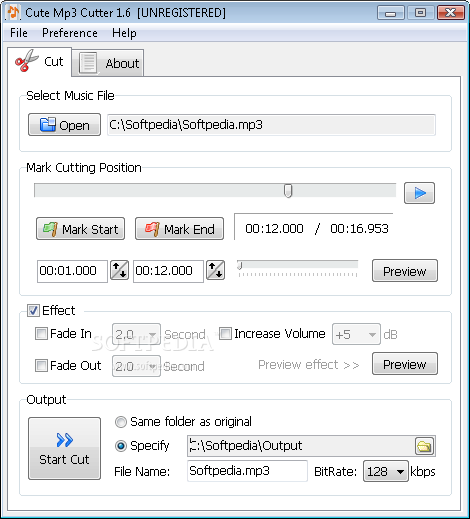
As the title of this software suggests, Cute Mp3 Cutter allows you to split audio tracks with the MP3 format. But it also supports other extensions, such as WMA, OGG, WAV and MID.
The interface of the application is clean and intuitive. You can open an audio track by using the file browser only, since the "drag and drop" method is not supported (and neither is batch processing).
You can play the track in a built-in media player, in order to mark the start and end time by moving a slider and pressing two buttons. You can adjust these values and preview results.
All you have to do is specify the output format and destination, and let Cute Mp3 Cutter take care of the rest.
You can apply a fade in or fade out effect, change the volume, tempo and bit rate, adjust an equalizer, as well as edit tags (e.g. title, artist, album, comment).
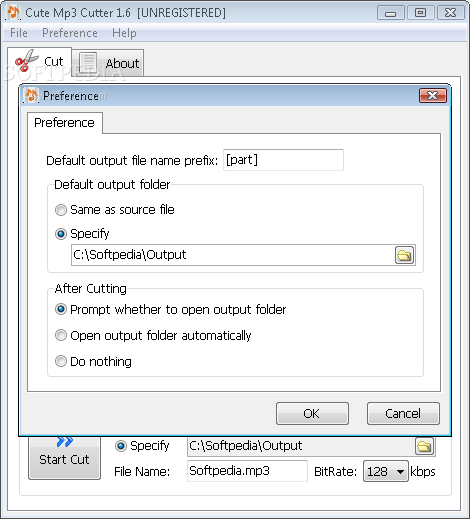
In the "Preference" area you can set the default output filename (prefix and suffix) and destination, along with the post-task action (e.g. open output folder). Plus, you can change the soundfont for MIDI files.
The simple-to-use application takes up a low-to-moderate amount of system resources, includes a step-by-step guide with snapshots, has a good response time, quickly finishes a task and didn't freeze or crash during our tests. Apart from the fact that you cannot cut multiple pieces from a track at once, we strongly recommend Cute Mp3 Cutter to all users.
What's new in Cute Mp3 Cutter 1.8:
- Supports MIDI file
Cute Mp3 Cutter 1.8
add to watchlist add to download basket send us an update REPORT- runs on:
-
Windows 2003
Windows Vista
Windows XP
Windows 2K - file size:
- 5.4 MB
- main category:
- Multimedia
- developer:
- visit homepage
Context Menu Manager

Bitdefender Antivirus Free

7-Zip

Windows Sandbox Launcher

Zoom Client

Microsoft Teams

ShareX

calibre

4k Video Downloader

IrfanView

- calibre
- 4k Video Downloader
- IrfanView
- Context Menu Manager
- Bitdefender Antivirus Free
- 7-Zip
- Windows Sandbox Launcher
- Zoom Client
- Microsoft Teams
- ShareX