
DJ mixing program that integrates a powerful suite of features, such as two decks, video mixing, iTunes support, recording options, and audio file management functions. #Music Mixer #Mix Music #Music Synthesizer #Mix #Mixer #Synthesize

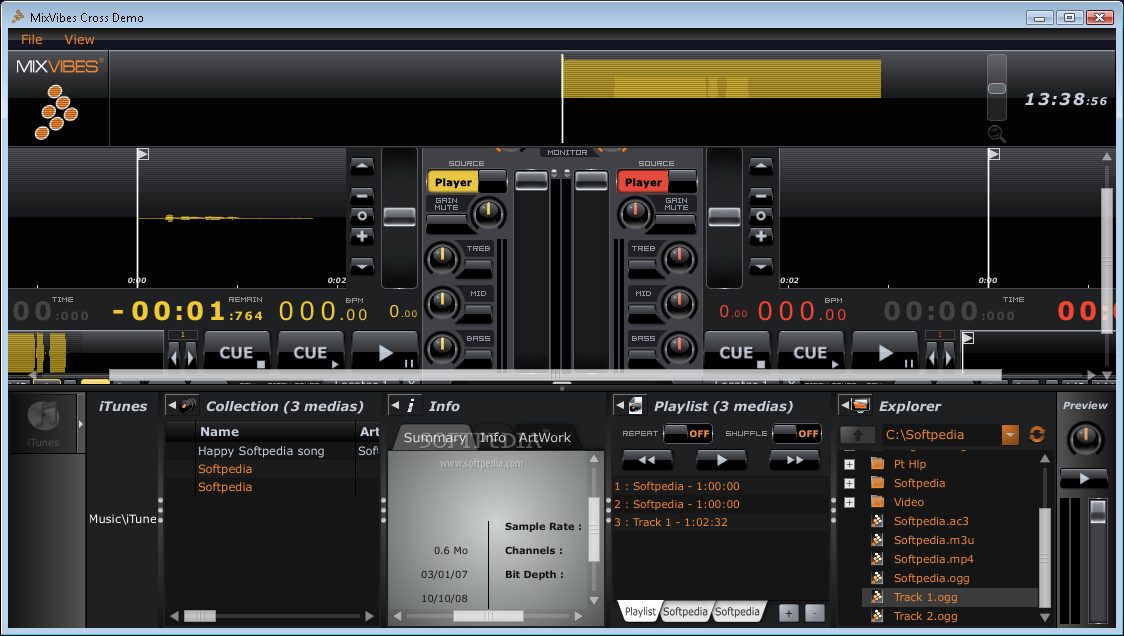
MixVibes Cross is a professional software application designed specifically for DJs in order to help them mix tracks. It comes with support for a powerful pack of features that allows iTunes integration, multiple tag editing options, media preview, manual and auto loops, and BPM analysis.
The GUI looks clean and provides a well-organized set of features. You get quick access to handy options for setting the master/cue volume, start the recording mode for your mix or audio stream provided by the players, and enable the Beatmatcher for visualizing the way tracks beat synchronized.
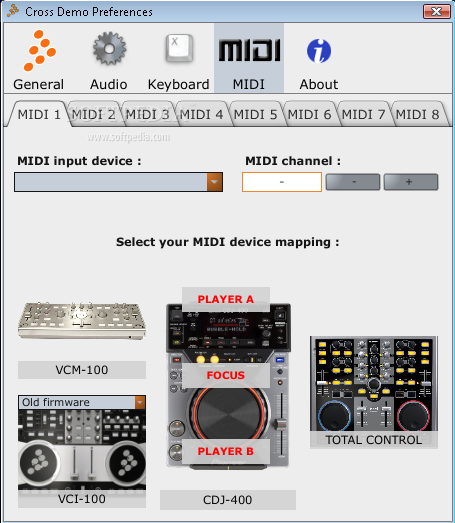
The program can be used with the mouse, keyboard or controllers from various manufacturers.
What’s more, you can enable the Sync Zone (that includes the Sync Meter for showing the playback position of the two tracks in the players) and check out the FX panel where you can control the two FX options to the players or samplers.
Most of the utility’s GUI is occupied by the two players where you can view the waveform and zoom in or out to reset the waveform. You can work with pitch faders, and view the name of the track and artist, current and remaining time, BPM and tempo.
MixVibes Cross gives you the possibility to create automatic and manual loops, use the smart seek buttons in order to jump forward/backward in a track and specify the jump length in beats or fractions of a beat.
The utility puts at your disposal two different views for the Mixer panel: one for the internal mixer mode and the other for external mixer mode. The internal one comes with most of the features that you’d expect to find in a classic DJ mixer, such as gain knob to set the gain level, mute button, band equalizer, bi-polar filter for each player/sampler, cue/monitor buttons for each player and sampler, as well as volume and crossfader controls.
The browser panel gives you quick access to the tracks in your collection and iTunes library. You can perform searches, preview the track that is currently selected in the browser, import folders with audio files from your computer (MP3, WAV, OGG, FLAC, AIFF, M4A and AAC) or from iTunes, as well as import collections and tracks from Traktor, Rekordbox or Virtual DJ.
Tracks are automatically analyzed when you load them into the players for showing the full track display and the transient view of the track in the Beatmatcher. The track analysis eats up CPU and memory, so the computer performance may be hampered. You can make the tool analyze all options or only beatgrid and BPM, gain or peek.
There’s support for sync mode that helps you perform a beat synchronization so both tracks are played at the same time, and you may also create playlists, organize and find your tracks using smartlists (you can apply filters), view and edit track metadata, locate missing tracks, and make use of different effects (e.g. low-pass, hi-pass, echo, delay, phaser, flanger, transform).
MixVibes Cross combines an intuitive environment with powerful features, such as two decks, video mixing and iTunes support for helping you mix audio files.
What's new in MixVibes Cross 1.6.0:
- User customizable node dock shortcuts for direct access to your media
- Treeview to manage all items of your collection: music, playlists, smart lists, history or to browse your hard drives
- Column filter for advanced search
- Album browser for visual search
MixVibes Cross 1.6.0
add to watchlist add to download basket send us an update REPORT- runs on:
-
Windows 7
Windows Vista
Windows XP - file size:
- 30.6 MB
- filename:
- CROSS_1.6_demo_0.zip
- main category:
- Multimedia
- developer:
- visit homepage
IrfanView

7-Zip

4k Video Downloader

Zoom Client

Windows Sandbox Launcher

calibre

ShareX

Bitdefender Antivirus Free

Microsoft Teams

Context Menu Manager

- Bitdefender Antivirus Free
- Microsoft Teams
- Context Menu Manager
- IrfanView
- 7-Zip
- 4k Video Downloader
- Zoom Client
- Windows Sandbox Launcher
- calibre
- ShareX