
Experience true high fidelity sound with your preferred audio player using this audio enhancer for Winamp, Windows Media Player, Spotify, and more. #Audio enhancement #3D surround sound #Spectrum analyzer #Plugin #Winamp #Surround
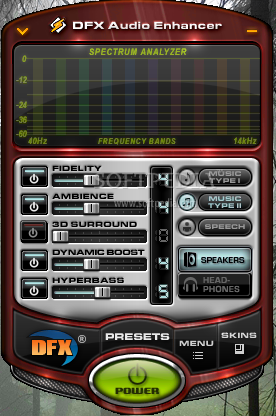
DFX Audio Enhancer contains a large collection of audio plugins from Fxsound. Designed to improve sound quality, the product is compatible with Winamp, J. River Media Center, DivX Player, MusicMatch, MediaMonkey and foobar2000. A special edition for Apple devices is also available. Addons used to be separately available for these products.
Regardless of the player you’re using, DFX Audio Enhancer boosts the quality of your favorite soundtracks in a professional, yet user-friendly manner. This plugin will greatly enhance your audio experience, providing HD sound in real-time, while actually listening to songs.
The application not only brings high fidelity to your local music collection, but it can also be used while playing Internet radio streams. The exquisite selection of controls and effects, together with the integrated presets manage to produce rich and deep sounds that are otherwise accomplishable with expensive stereo hardware.
Installation, as well as usage, is a breeze. Unlike other plugins that you have to locate yourself in an audio player, this one automatically launches when you open the media player. A compact, user-friendly GUI (that can be personalized via the built-in skin collection) hosts all the features you need to make songs sound more natural.
To sum up, controls include Fidelity (eliminates the effects caused by data compression in Internet radio), Ambience (boosts stereo depth), 3D Surround (adds depth and compensates for sonic losses), Dynamic Boost (increases the perceived loudness) and Hyperbass (inserts bass effects). All of these can be adjusted via sliders and the results are noticeable in real time.
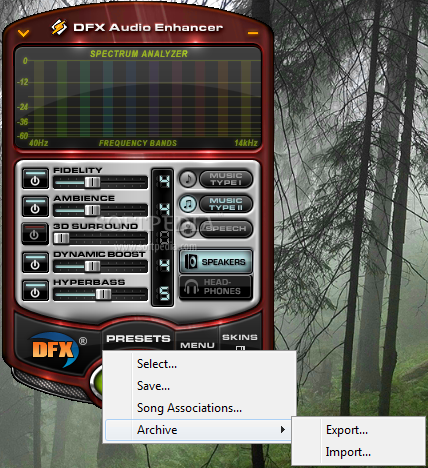
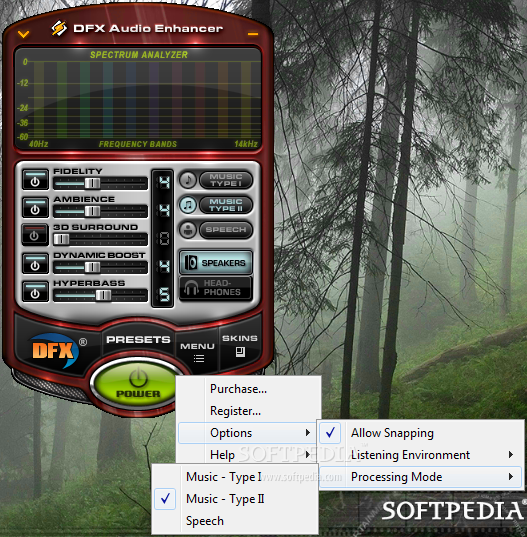
You can further enhance the media experience by selecting one of the predefined processing modes: Music Type I (a general control that works for most music types), Music Type 2 (for modern styles such as hip-hop or dance) and Speech (for movies, radio, audio books, etc.). Other genre-specific adjustments can be performed via the generous selection of audio presets.
In conclusion, DFX Audio Enhancer is a smart acquisition for both amateurs and professionals. By providing such a rich bouquet of audio contols and effects, it somehow compensates the need to purchase expensive audio hardware.
Download Hubs
DFX Audio Enhancer is part of these download collections: Winamp Tweaks
What's new in DFX Audio Enhancer 12.023:
- Fixed: performance improvements with iTunes integration
- Fixed: Other miscellaneous bug fixes
DFX Audio Enhancer 12.023
 Softpedia Editor's Pick
add to watchlist
add to download basket
send us an update
REPORT
Softpedia Editor's Pick
add to watchlist
add to download basket
send us an update
REPORT
- runs on:
-
Windows 10 32/64 bit
Windows 8 32/64 bit
Windows 7 32/64 bit
Windows Vista 32/64 bit
Windows XP - file size:
- 4.6 MB
- filename:
- dfx12Setup.exe
- main category:
- Multimedia
- developer:
- visit homepage
Zoom Client

Bitdefender Antivirus Free

7-Zip

4k Video Downloader

Windows Sandbox Launcher

ShareX

IrfanView

Microsoft Teams

calibre

Context Menu Manager

- Microsoft Teams
- calibre
- Context Menu Manager
- Zoom Client
- Bitdefender Antivirus Free
- 7-Zip
- 4k Video Downloader
- Windows Sandbox Launcher
- ShareX
- IrfanView