
A midi keyboard and a computer stored with VST instruments. #VST plugin #MIDI keyboard #VST instrument #VST #Plugin #MIDI
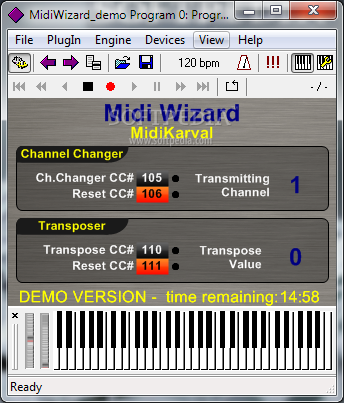
Midi Wizard was developed to be a VST midi processor made for all keyboardists whose gear is “simply” a midi keyboard and a computer stored with VST instruments.
With Midi Wizard you can change the transmitting midi channel of your keyboard and/or transpose it on the fly, simply pressing a button and a key.
Open it in your VST host application, connect the host midi input to the Midi Wizard's midi input and its midi output to the midi input of a VST instrument, then: - press and hold a button of your midi keyboard sending a CC message #105, set the desired transmitting channel pressing a key in the range C3 (channel 1) - D#4 (channel 16) and release the button: the chosen midi channel is shown in the Channel Changer's GUI. In order to come back to midi channel 1 (reset) simply press a button of your midi keyboard sending a CC message #106; - press and hold a button of your midi keyboard sending a CC message #110, set the desired transpose interval with reference to the C3 key (midi note number 60) pressing the corresponding (upper or lower) key and release the button: the chosen transpose interval is shown in the Midi Wizard's GUI in terms of upper (+) or lower (-) semitones. In order to cancel the transposition (reset) simply press a button of your midi keyboard sending a CC message #111.
Of course, you can use only two buttons of your midi keyboard, sending respectively CC messages #105 and #110 and reset the transmitting channel to "1" and/or the transpose interval to "0" by pressing the C3 key.
You can change the CC messages used by Midi Wizard through the relevant drop lists in its GUI.
Midi Wizard has a "no hanging notes" function in case you accidentally play one or more notes while you are changing channel or transposing.
System requirements
Limitations in the unregistered version
- The demo version is fully functional for a 15 minutes period of time. It then expires and you have to remove and re-load it in your host to use it again
- runs on:
- Windows All
- file size:
- 1.1 MB
- filename:
- MidiWizard_1.2_Demo.zip
- main category:
- Multimedia
- developer:
- visit homepage
ShareX

Microsoft Teams

paint.net

IrfanView

calibre

Bitdefender Antivirus Free

Zoom Client

7-Zip

Windows Sandbox Launcher

4k Video Downloader

- 7-Zip
- Windows Sandbox Launcher
- 4k Video Downloader
- ShareX
- Microsoft Teams
- paint.net
- IrfanView
- calibre
- Bitdefender Antivirus Free
- Zoom Client