
Meet the Mother of All Audio Plug-Ins. #Audio enhancement #Enhance sound #Optimize audio #Enhance #Enhancement #Optimizer

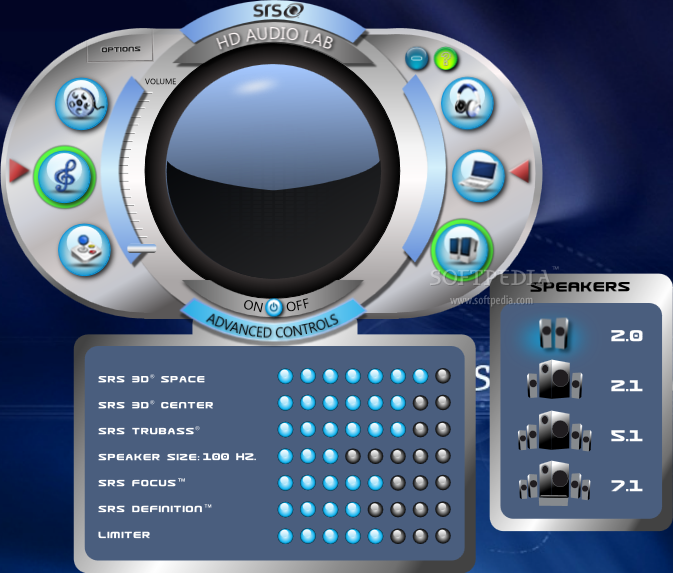
SRS HD Audio Lab acts as an audio plugin for your preferred audio / video player (whichever that is), enhancing the sound noticeably during the playback of media files. Its reputation is based on remaining faithful to powerful patented audio technologies that automatically build the optimal environment for the ultimate sound experience.
If you’re a Windows Media Player user, than you’ve tested the influence of SRS HD Audio Lab, because it’s bundled in Microsoft’s player by default. The combination of WOW and TruBass techonology improved your audio streams, whether you were aware of it or not.
As for the rest of the media players, SRS HD Audio Lab is not picky. Regardless of your software preferences, the plugin automatically adjusts the player to output the finest sound possibly. It’s safe to say that it acts just like a virtual sound card, processing the stream before it physically arrives in your speakers or headphones.
User efforts are reduced to selecting the type of content they wish to play (audio / video / games) and the speaker / headphone configuration.
Based on the type of stream you want to enhance, you can adjust controls such as 3D Space, 3D Center, Trubass, Speaker Size, Focus, SRS Definition, and Limiter (select between level 1 and 8).
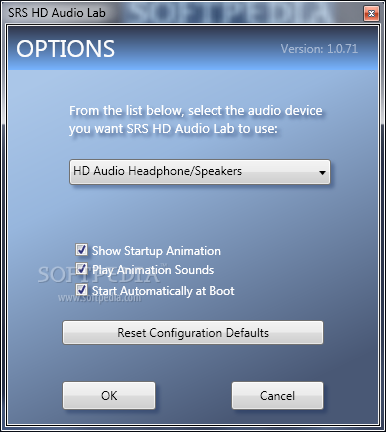
The Options section allows you to set the default audio device and additionally, to enable/disable startup animation, animation sounds, and automatic startup at boot.
In conclusion, SRS HD Audio Lab adds bass, depth and clarity to sounds in all media players and in gaming environments. It runs in the background, while delivering a remarkably improved surround sound experience.
Download Hubs
SRS HD Audio Lab (formerly SRS Audio Sandbox) is part of these download collections: Audio Plugins
SRS HD Audio Lab (formerly SRS Audio Sandbox) 1.0.71
 Softpedia Editor's Pick
add to watchlist
add to download basket
send us an update
REPORT
Softpedia Editor's Pick
add to watchlist
add to download basket
send us an update
REPORT
- runs on:
-
Windows 7 32/64 bit
Windows Vista 32/64 bit
Windows XP - file size:
- 55.6 MB
- filename:
- SRS_HD_Audio_Lab_Gold.zip
- main category:
- Multimedia
- developer:
- visit homepage
Zoom Client

ShareX

calibre

paint.net

IrfanView

Bitdefender Antivirus Free

Windows Sandbox Launcher

4k Video Downloader

Microsoft Teams

7-Zip

- 4k Video Downloader
- Microsoft Teams
- 7-Zip
- Zoom Client
- ShareX
- calibre
- paint.net
- IrfanView
- Bitdefender Antivirus Free
- Windows Sandbox Launcher