
Create a customizable ringtone for your mobile phone out of nearly any video or audio file format with the help of this application. #Ringtone maker #Create ringtone #Make ringtone #Ringtone #Maker #Make
Even though your mobile phone comes equipped with various tunes you can use as a ringtone, most of the times you want to use a custom sound. Luckily, applications like AVCWare Ringtone Maker give you the possibility to load nearly any audio file and convert it so that it perfectly covers the time your are announced of an incoming call.
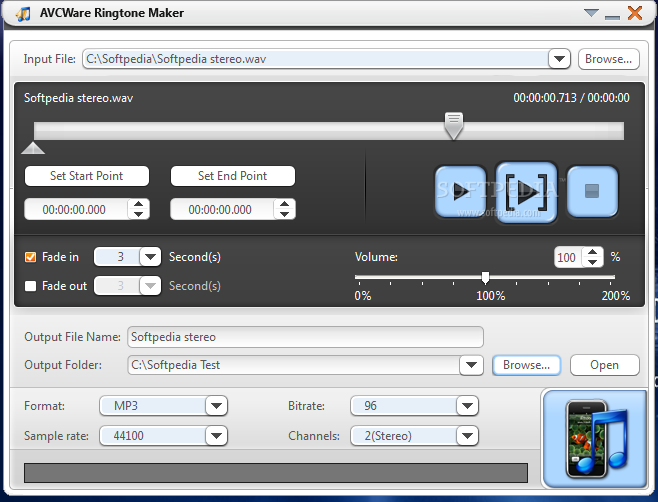
Running the application brings up the main window which puts all available features at your fingertips. A decent progress slider lets you skip through the loaded song while offering info on the exact time you might want to make use of for start and end points.
The output folder can be specified, and once details mentioned above are set, hitting the “Start converting” button puts the process in motion. It only takes a matter of seconds to have the newly created file ready.
Playback buttons are available either for the whole song or for the selected a part. A start and end point can be set by manually writing down corresponding time values.
The application gives you the possibility to load a breathtaking amount of media. You are not limited to audio files, but also a decent amount of video formats. However, you are only able to export to some of the most commonly used audio file types.
Moreover, the bitrate can be set, as well as number of channels and sample rate. This comes in handy, as it helps you adjust settings to reduce file size as much as possible.
To sum it up, AVCWare Ringtone Maker is an extremely easy solution to personalizing the way you are announced of an incoming call. The user interface gets you instantly up and running due to the intuitive design, while the abundance of supported input as well as output formats make sure you stumble upon no restrictions.
AVCWare Ringtone Maker 2.0.5.20120712
add to watchlist add to download basket send us an update REPORT- runs on:
-
Windows 10 32/64 bit
Windows 8 32/64 bit
Windows 7 32/64 bit
Windows Vista 32/64 bit
Windows XP - file size:
- 20.1 MB
- filename:
- avc-ringtone-maker.exe
- main category:
- Multimedia
- developer:
- visit homepage
4k Video Downloader

Bitdefender Antivirus Free

Microsoft Teams

7-Zip

Windows Sandbox Launcher

Context Menu Manager

ShareX

IrfanView

Zoom Client

calibre

- IrfanView
- Zoom Client
- calibre
- 4k Video Downloader
- Bitdefender Antivirus Free
- Microsoft Teams
- 7-Zip
- Windows Sandbox Launcher
- Context Menu Manager
- ShareX