
Simple app that automatically tunes music files to bring them to the same frequency, enabling users to modify the sample rate, depth and channels too. #Audio sample tuner #Sample sound analyzer #Auto tune #Tuner #Tune #Analyze

AutoTune is a Windows application that simplifies the user's job when it comes to tuning audio samples. It immediately brings them to the same frequency by following a simple set of user-defined rules and does not require heavy experience with audio processing software to work with.
Installing the tool does not take a long time. However, since it is ad-supported, AnalogX AutoTune offers to download and install third-party components that it does not really need to work properly. With a little attention, they can be excluded from setup, though.
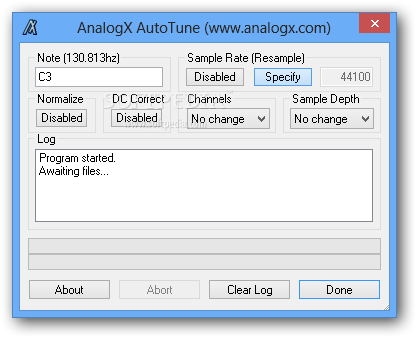
The GUI is simple, made of a regular window with an organized layout, where audio files can be added for processing using the drag-and-drop method. They are automatically tuned when dropped to the frame, so the configuration must be made beforehand.
It is possible to set the desired note and preview its frequency, normalize volume and correct DC to avoid distortions, as well as to modify the original sample rate, channel mode and sample depth. Apart from the fact that log information can be cleared, there are no other noteworthy features available here.
The application has minimal impact on PC performance, using low CPU and memory. It quickly processes the source files (does not offer to create new ones with new settings) and delivers very good results. We have not come across any problems in our tests since it did not hang, crash or pop up error messages.
All things considered, AnalogX AutoTune is really a handy tool that will certainly help anyone who needs to adjust sound quality and correct deviations in audio files. Very easy to use and effective in processing, this program can be handled by anyone.
What's new in AnalogX AutoTune 2.31:
- Rebuilt and fixed Vista issues
AnalogX AutoTune 2.31
add to watchlist add to download basket send us an update REPORT- runs on:
- Windows All
- file size:
- 381 KB
- filename:
- autoi.exe
- main category:
- Multimedia
- developer:
- visit homepage
IrfanView

Bitdefender Antivirus Free

ShareX

calibre

Microsoft Teams

4k Video Downloader

Windows Sandbox Launcher

7-Zip

Context Menu Manager

Zoom Client

- 7-Zip
- Context Menu Manager
- Zoom Client
- IrfanView
- Bitdefender Antivirus Free
- ShareX
- calibre
- Microsoft Teams
- 4k Video Downloader
- Windows Sandbox Launcher