WINDOWS CATEGORIES:


NEWS ARCHIVE >>
SOFTPEDIA REVIEWS >>

WEEKLY HIGHLIGHTS

DVD Cloner45
Spyware Doctor40
1Click DVD Copy40
Apollo DVD Copy40
ABC Amber BlackBer...45
Protected Music Co...40

7-DAY TOP DOWNLOAD

#
Program
Avira AntiVir
Personal - Free
Antivirus 8.1.0.331

140,030
Windows Live
Messenger 2009
14.0.5027.908

79,749
Windows Live
Messenger
8.5.1302.1018

66,305
Internet Download
Manager 5.14 Build 5

45,485
DVD Shrink 3.2.0.15
43,912
Y! Multi Messenger
8.x and 9.x

41,970
Microsoft Office
2007

39,134
Vista Transformation
Pack 8.0.1

38,152
Nero 7 Premium
7.11.10.0

32,982
Adobe PhotoShop CS3
32,238

WEEK'S BEST

  • DAEMON Tools Pro (...
  • Opera 9.60 Build 1...
  • Maxthon Standard 1...
  • DAEMON Tools Pro B...
  • Advanced X Video C...
  • WinRAR 3.80 Stable
  • Nero 9 9.0.9.4
  • Net Transport 2.64...
  • Advanced SystemCar...
  • Windows Live Messe...
  • Acronis True Image...
  • ImTOO DVD Ripper S...
  • Combined Community...
  • Fastream IQ Web/FT...
  • VirtualDub 1.8.6 B...
  • Super DVD Creator ...
  • Deluge 1.0.0.32
  • Adobe Flash Player...
  • WinPatrol 15.9.200...
  • Trend Micro Intern...
  • COMODO Internet Se...
  • WinZip 12.0 Build ...
  • Real Alternative 1...
  • Camfrog Video Chat...
  • iTunes 8.0.1.11
  • QuickTime 7.55.90.70
  • SiSoftware Sandra ...
  • EVEREST Ultimate E...
  • Google Chrome 0.3....
  • BS.Player 2.31 Bui...
  • Home / Windows / Multimedia / Audio / Other AUDIO Tools
     Report spyware

    CLAmp 0.0.10


    Downloads: 3,430  Add to download basket  Tell us about an update
    User Rating:
    Rated by:
    Fair (2.1/5)
    21 user(s)
    Developer:

    License / Price:

    Size / OS:

    Last Updated:

    Category:
    Tools | More programs
    Freeware / FREE
    61 KB / Windows All
    February 8th, 2007, 16:22 GMT
    C: \ Multimedia \ Audio \ Other AUDIO Tools

     Read user reviews (0)  Add a review  Refer to a friend  Subscribe


    CLAmp description


    CLAmp - Drive Winamp through command line in a simple way

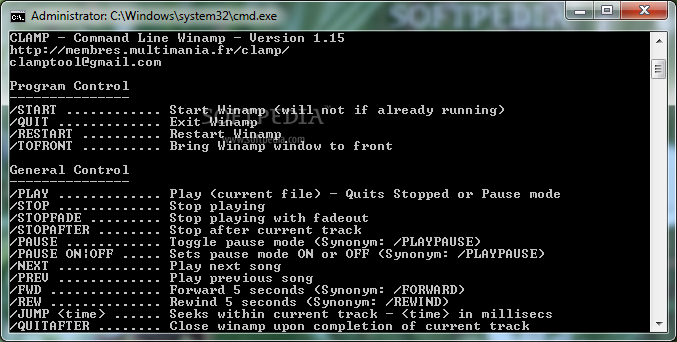
    CLAmp is a small application that has the main purpose to drive Winamp through command line in a simple way.

    This program is standalone :
    · no external piece of software required (DLL, Winamp Plug-in etc.)
    · no install procedure : just download it and run

    This program is safe :
    · does not write to disk,
    · does not access registry
    · does not access network (local or Internet),
    · does not interacts with other programs running (except Winamp of course...)so no special priviledges are required to use it.

    This program requires very small amount of resources.

    Usage

    CLAMP {Options}

    It is possible perform more than one task at a time by adding multiple options on the same line.
    Each option must be preceeded by /

    Upon success, program will quit with an exit code of 0.
    Upon failure, exit code will be set to 1.


    Program Control
    START ............ Start Winamp
    QUIT ............ Exit Winamp

    Note : any following option will automatically start winamp if necessary - No need to use /START as first option.


    General Control
    PLAY ............ Play (current file) - Quits Stopped or Pause mode
    STOP ............ Stop playing
    STOPFADE ............ Stop playing with fadout
    STOPAFTER ............ Stop playing after current track (returns now, stops later)
    PAUSE ............ Toggle pause mode
    PLAYPAUSE ............ Same as above
    NEXT ............ Play next song
    PREV ............ Play previous song
    FWD ............ Forward 5 seconds
    FORWARD ............ Same as above
    REW ............ Rewind 5 seconds
    REWIND ............ Same as above
    RESTART ............ Restart current track from beginning (not working with Winamp 2)


    Winamp Modes
    REPEAT ............ Toggle Repeat mode
    SWREPEAT ............ Same as above
    REPEAT ON ............ Set Repeat mode ON
    REPEAT=1 ............ Same as above
    REPEAT OFF ............ Set Repeat mode OFF
    REPEAT=0 ............ Same as above
    RANDOM ............ Toggle Random mode
    RANDOM ON ............ Set Random mode ON
    RANDOM=1 ............ Same as above
    RANDOM OFF ............ Set Random mode OFF
    RANDOM=0 ............ Same as above


    PlayList Control
    PLADD ............ Add file(s) to end of playlist (like drag-n-drop)
    LOAD ............ Same as above
    PLCLEAR ............ Clear Playlist
    CLEAR ............ Same as above
    PL ............ Show/Hide Winamp Playlist window
    PLWIN ............ Same as above
    PLPOS ............ Query Playlist position
    PLFIRST ............ Play first item of playlist
    PLLAST ............ Play last item of playlist


    Volume Control
    VOLUP ............ Volume up
    VOLDN ............ Volume down
    VOLSET ............ Volume set (scale 0-255)
    VOLMAX ............ Volume max
    VOLMIN ............ Volume min (mute)


    Infos
    POS ............ Query current position in file and track length
    POSITION ............ Query current position in file only
    STATE ............ Query current state (PLAYING;PAUSED;STOPPED;NOT RUNNING)
    STATUS ............ Synonym for STATE
    TITLE ............ Query current track title
    VER ............ Query Winamp version


    Winamp Interactive Windows
    ABOUT ............ Display Winamp About window
    PREFS ............ Display Winamp Preferences window
    OPEN ............ Display Winamp Open File window


    Equalizer Control
    EQWIN ............ Toggle Eq window (Works with Classic skins only)
    EQINFO ............ Query Eq parameters (10 bands, Preamp, Status, Autoload)
    EQSET ............ Set Eq parameters (Same format as EQINFO)
    EQSTATUS ............ Toggle Eq status (ON / OFF)
    EQSTATUS ON ............ Set Eq status ON
    EQSTATUS OFF ............ Set Eq status OFF


    Winamp Display
    ONTOP ............ Toggle Always On Top option
    MAINWIN ............ Toggle Main Window (Show / Hide)
    MINIMIZE ............ Minimize Winamp


    Misc
    CDPLAY ............ Play CD


    Examples


    CLAMP /PLAY
    CLAMP /PLCLEAR /PLADD "MySong1.mp3" /PLADD "MySong2.mp3" /PLAY

     Softpedia guarantees that CLAmp 0.0.10 is 100% FREE, which means it does not contain any form of malware, including spyware, viruses, trojans and backdoors. [read more >]


    TAGS:

    drive winamp | command line | winamp add-on | drive | winamp | command

    Related downloads IT News Popular downloads New additions   Latest reviews  
    jmxterm 0.2
    A command line based interactive JMX client software.
    PNG LX 1.0.0 Build 12
    A small command line tool that will help you return the width of an PNG image
    Thumbpage 1
    A simple to use command line application that allows you to create a web gallery.
    PNG Cut 1.0.0 Build 29
    A small command line tool that will help you cut a piece from a PNG file with alpha
    Wintee 1.0
    Tee command for Windows


    HTML code for linking to this page:


    Go to top


    SUBMIT PROGRAM   |   ADVERTISE   |   GET HELP   |   SEND US FEEDBACK   |   RSS FEEDS   |   ENTER NEWS SITE   |   ENGLISH BOARD   |   ROMANIAN FORUM