
An intuitive and user-friendly software solution for verifying your entire music collection effectively for quality and discrepancies. #MP3 Check #MP3 Checker #Check MP3 #Checker #Check #Verify

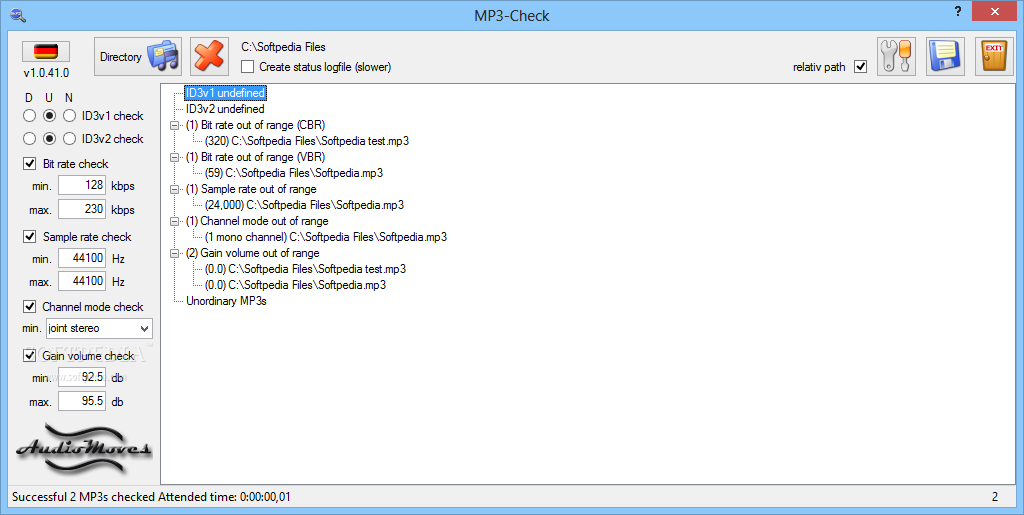
MP3-Check is an application that provides you with tools for verifying the quality of your MP3 files.
The interface of the program consists of a standard window which may seem a little cluttered at first but it's actually very easy to navigate within it.
You can import a folder by using the file browser (the "drag and drop" method is not supported).
Right after this, a window pops up in which you can view the total number of successful checked MP3s, playing time and size.
You can check the defined or undefined ID3v1 and ID3v2 tags, as well as set the minimum and maximum values for the bit rate, sample frequency rate, channel mode and gain volume checkups.
You can play MP3 files in the default media player, as well as save them as a temporary playlist and create a status log file. Plus, you can move and delete MP3s.
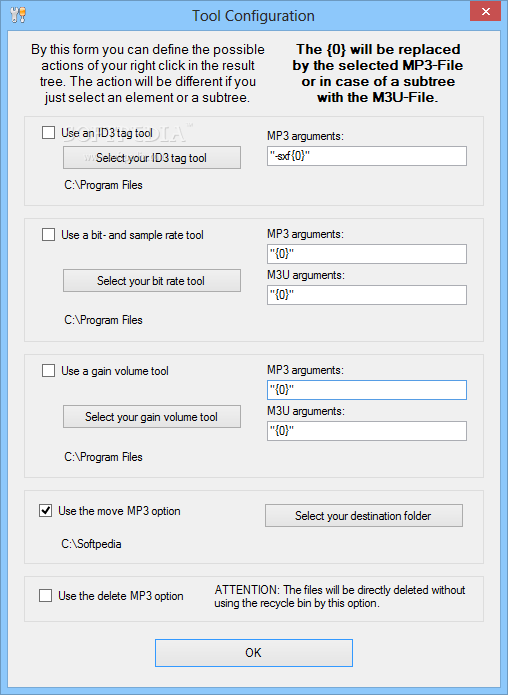
In the "Configuration" menu, you can enable the program to use tools for ID3 tags, bit rate and sample rate, gain volume, and others. Also, you can input MP3 arguments.
The program takes up a low amount of system CPU and memory. It didn't freeze, crash or pop up errors during our tests. Unfortunately, it doesn't include a help file and this is a downside to first-time users. Nevertheless, we suggest you test MP3-Check for yourself.
MP3-Check 1.0.41.0
add to watchlist add to download basket send us an update REPORT- runs on:
- Windows All
- file size:
- 624 KB
- filename:
- MP3-Check-Setup-v1.0.41.0.exe
- main category:
- Multimedia
- developer:
- visit homepage
Windows Sandbox Launcher

IrfanView

Context Menu Manager

Microsoft Teams

ShareX

Zoom Client

Bitdefender Antivirus Free

7-Zip

4k Video Downloader

calibre

- 7-Zip
- 4k Video Downloader
- calibre
- Windows Sandbox Launcher
- IrfanView
- Context Menu Manager
- Microsoft Teams
- ShareX
- Zoom Client
- Bitdefender Antivirus Free