
Free and easy-to-use MP3 merger with support for editing tags and previewing tracks in a built-in player, catering to all user levels. #MP3 joiner #MP3 merger #Join MP3 #Joiner #Joiner #Merger

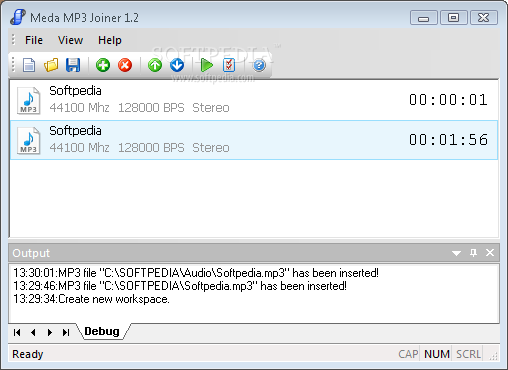
Meda MP3 Joiner is a small-sized and simple-to-use application designed for merging two or more MP3 files. It comes in handy if you want to listen to one huge MP3 file that contains all your favorite songs, instead of creating a playlist with separate tracks, for instance. It offers support for MP3 format only.
The setup part is fast and easy, since there are no configuration options involved here. When it comes to the interface, Meda MP3 Joiner keeps a clean look and does not put emphasis on visual appeal, thus enabling users to immediately dive into the MP3 merging procedure.
MP3s can be added to the task list using either the file browser or drag-and-drop support. A simpler method would've been to drop an entire folder with tracks to the list, but this feature is not supported. Moreover, the app froze when we attempted to drop a selection of about 10 normal-length tracks.
The audio files can be previewed in a built-in player that contains only basic commands. It is possible to edit ID3 tags when it comes to the album, artist, title, year and comment of each source track, as well as to ask Meda MP3 Joiner to embed them in the merged MP3 file as well.
The program does not put a strain on computer performance and takes small time to finish a merging task, delivering quality audio tracks. Although it is not feature-rich, Meda MP3 Joiner offers a straightforward solution to joining together two or more audio files with the MP3 format. However, it has not been updated for a pretty long time, and users are likely to experience various stability issues as we did.
Meda MP3 Joiner 1.2
add to watchlist add to download basket send us an update REPORT- PRICE: Free
- runs on:
-
Windows 2003
Windows Vista
Windows XP
Windows 2K - file size:
- 1.5 MB
- filename:
- MEDA-MP3-JOINER-INSTALL.exe
- main category:
- Multimedia
- developer:
Context Menu Manager

Zoom Client

Windows Sandbox Launcher

Bitdefender Antivirus Free

ShareX

calibre

7-Zip

4k Video Downloader

IrfanView

Microsoft Teams

- 4k Video Downloader
- IrfanView
- Microsoft Teams
- Context Menu Manager
- Zoom Client
- Windows Sandbox Launcher
- Bitdefender Antivirus Free
- ShareX
- calibre
- 7-Zip