
Intuitive program that helps you sync your Android phone to iTunes (including playlists), perform searches for finding out iTunes audio files, disable iTunes services, remove broken tracks from iTunes, as well as convert audio files to MP3 file format. #Sync iTunes playlist #ITunes playlist sync #Android synchronization #Sync #Playlist #Android

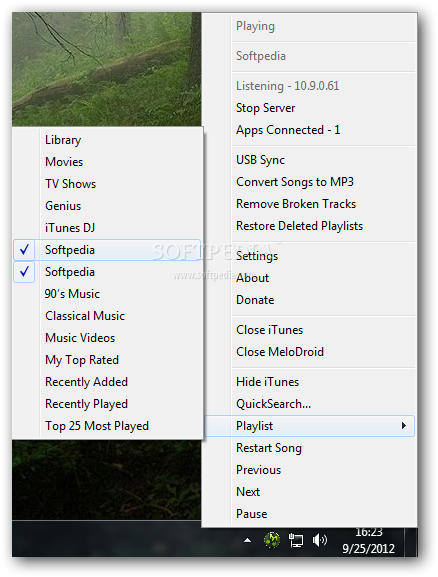
MeloDroid is a lightweight audio tool that is specialized in synchronizing your iTunes music to your device using Wi-Fi or USB connections.
You can sync your Android phone with iTunes (including playlists), perform searches for finding out iTunes audio files, disable iTunes services, remove broken tracks from iTunes, as well as convert audio files to MP3 file format.
You can found the utility placed in the system tray, and you may perform a simple click on its icon in order to open up the set of available features.
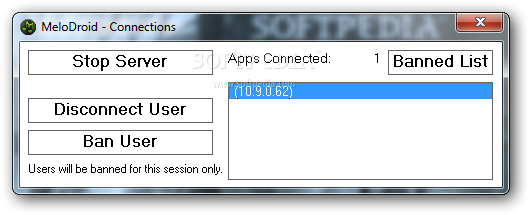
iTunes is automatically opened when you run the program. Popup notifications are shown in the system tray area each time a new song is played in iTunes. The notifications reveal the artist/band name and song title.
You can make the application close or hide iTunes, perform searches in your iTunes library without having to open up the iTunes panel, select the desired playlist from several categories (e.g. Library, Classical Music, My Top Rated, Top 25 Most Played), play the song or restart it, as well as go to the next or previous track from iTunes.
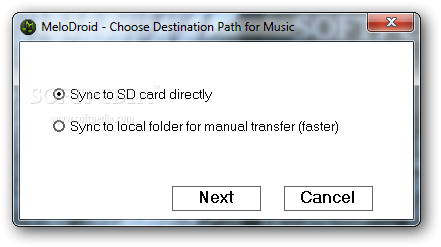
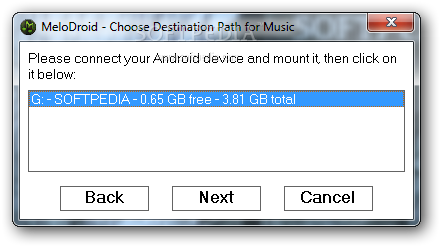
MeloDroid gives you the possibility to sync your USB device with the aid of a built-in wizard that offers step-by-step guidance throughout the entire process. You can opt for synchronizing data to SD card directly or local folder for manual transfers (this one is faster).
During the SD card connection you are required to plug in your Android device and mount it while the local folder mode enables you to pick the target directory where you can move the music on your Android. You don’t have to create a new folder as the app is able to automatically generate it for you.
What’s more, you can choose between several sync options, such as sync only MP3 files or checked songs, delete old songs, and sync all content or one or more playlists. A popup message is revealed at the end of the task assuring you that the process was carried out successfully.
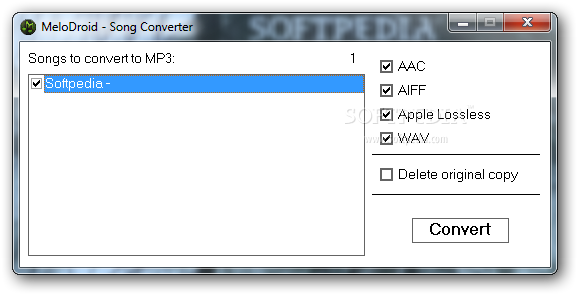
The built-in convertor allows you to encode audio files, such as AAC, AIFF, WAV or Apple Lossless, to MP3 file format. Plus, you can make the app delete the original copy.
Last but not least, you can remove broken tracks (the app is able to automatically identify them), restore deleted playlists, as well as download songs from YouTube, preview the files and add the audio items to your iTunes library.
You can make the application automatically run at Windows startup, enable song notifications, activate the Quite mode when the tool becomes idle (this mode shuts down iTunes and starts it up again when you need it), hide iTunes when minimized, disable iTunes Helper and Bonjour service, deactivate iPod/iPhone/iPad services, as well as provide the port to listen to and view the internal and external IP addresses.
To sum it up, MeloDroid delivers a user-friendly environment and comes with a useful set of features for helping you manage the content of your iTunes library and sync your iTunes tracks with your Android phone.
Download Hubs
MeloDroid is part of these download collections: Synchronize Android
What's new in MeloDroid 5.1.4:
- Attempts to fix freezing issues with new version of iTunes
MeloDroid 5.1.4
add to watchlist add to download basket send us an update REPORT- runs on:
-
Windows 7 32/64 bit
Windows Vista 32/64 bit
Windows XP - file size:
- 496 KB
- filename:
- melodroid_5_1_4.zip


- main category:
- Multimedia
- developer:
- visit homepage
paint.net

7-Zip

Microsoft Teams

IrfanView

Zoom Client

ShareX

Windows Sandbox Launcher

calibre

4k Video Downloader

Bitdefender Antivirus Free

- calibre
- 4k Video Downloader
- Bitdefender Antivirus Free
- paint.net
- 7-Zip
- Microsoft Teams
- IrfanView
- Zoom Client
- ShareX
- Windows Sandbox Launcher