
Generate playlists from audio, video and archive files using this portable application that lets you configure many output settings. #Create Playlist #Generate Playlist #Playlist Maker #Playlist #Scan #Scanner

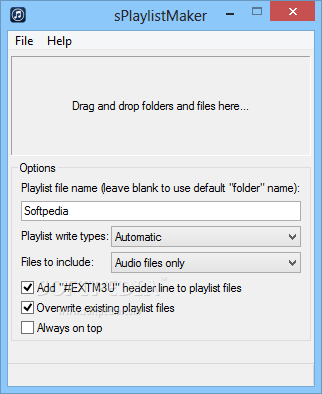
Geared toward all user levels, sPlaylistMaker is a lightweight and portable software program that gives you the possibility to quickly put together musical playlists and customize several settings before doing so.
Since there is no setup pack involved, you can drop the app's executable file anywhere on the disk and just click it to launch sPlaylistMaker. Another option is to keep it stored on a USB flash drive, in order to directly run it on any computer with minimum effort and no previous installers. Plus, unlike most installers, it doesn't modify Windows registry settings.
The GUI is made from a standard window with a neatly organized structure, where you can drop files and folders in order to compile them into a new playlist.
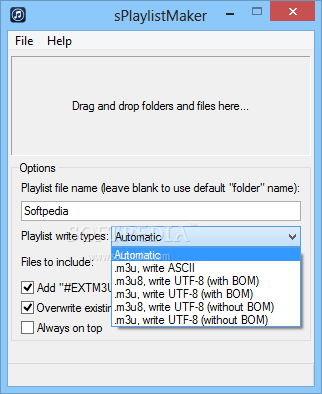
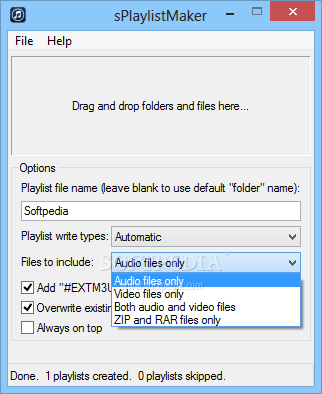
As far as output settings are concerned, sPlaylistMaker lets you enter the playlist name and select write location (each folder or root directory only), write type (e.g. automatic, .m3u with ASCII, .m3u8 with UTF-8 without BOM), and files to include. Apart from audio tracks, the tool support several video formats, along with ZIP and RAR archives.
What's more, you can enable recursive subfolder mode, add a header line to the playlist files, overwrite any existing items, make the frame stay on top of other windows, and exit the tool automatically on task completion.
No error dialogs popped up and the software utility didn't freeze or crash. As expected, it had minimal impact on computer performance, running on low CPU and RAM. Playlists were generated swiftly.
SPlaylistMaker delivers a straightforward software solution for creating audio playlists, and it can be seamlessly handled by anyone, even less experienced users.
What's new in sPlaylistMaker 1.1.0 Build 1:
- Added option to prepend a string to the generated playlist filenames.
sPlaylistMaker 1.1.0 Build 1
add to watchlist add to download basket send us an update REPORT- runs on:
-
Windows 10 32/64 bit
Windows 8 32/64 bit
Windows 7 32/64 bit
Windows Vista
Windows XP - file size:
- 524 KB
- filename:
- sPlaylistMaker.zip
- main category:
- Multimedia
- developer:
- visit homepage
Windows Sandbox Launcher

7-Zip

IrfanView

4k Video Downloader

ShareX

Zoom Client

Microsoft Teams

calibre

paint.net

Bitdefender Antivirus Free

- calibre
- paint.net
- Bitdefender Antivirus Free
- Windows Sandbox Launcher
- 7-Zip
- IrfanView
- 4k Video Downloader
- ShareX
- Zoom Client
- Microsoft Teams