Search Perform an advanced search query SOFTPEDIA
 
SOFTPEDIA
Updated one minute ago
HomeSubmit a program for being reviewedAdvertise on our websiteGet help on surfing our websitesSend us your feedbackGet information about our XML/RSS backend and how to use itBrowse the news archiveVisit our discussion forumVizitati forumul in limba romana


Program Finder NormalFreeware onlyShareware only

Jaikoz 2.5.0 Beta Build 1047 Report spyware 

Click to download Jaikoz for Windows
View more Jaikoz screenshots (6)
 Downloads: 2,083
Rating: Good (3.2/5) | Rated by: 29 user(s)
Add to download basket     Send us update information
 Developer: Jthink | More programs by this producer
 License: Trial , 30 $ to buy 
 Size / OS: 26.3 MB, Windows All
 Last Updated: July 15th, 2008, 06:38 GMT
 Category: C: \ Multimedia \ Audio \ Tag Editors
 Read user reviews (1) Add a review Refer to friend Subscribe
    Download Jaikoz for Windows

Jaikoz for Windows description
This software has been specifically designed for managing large music collections

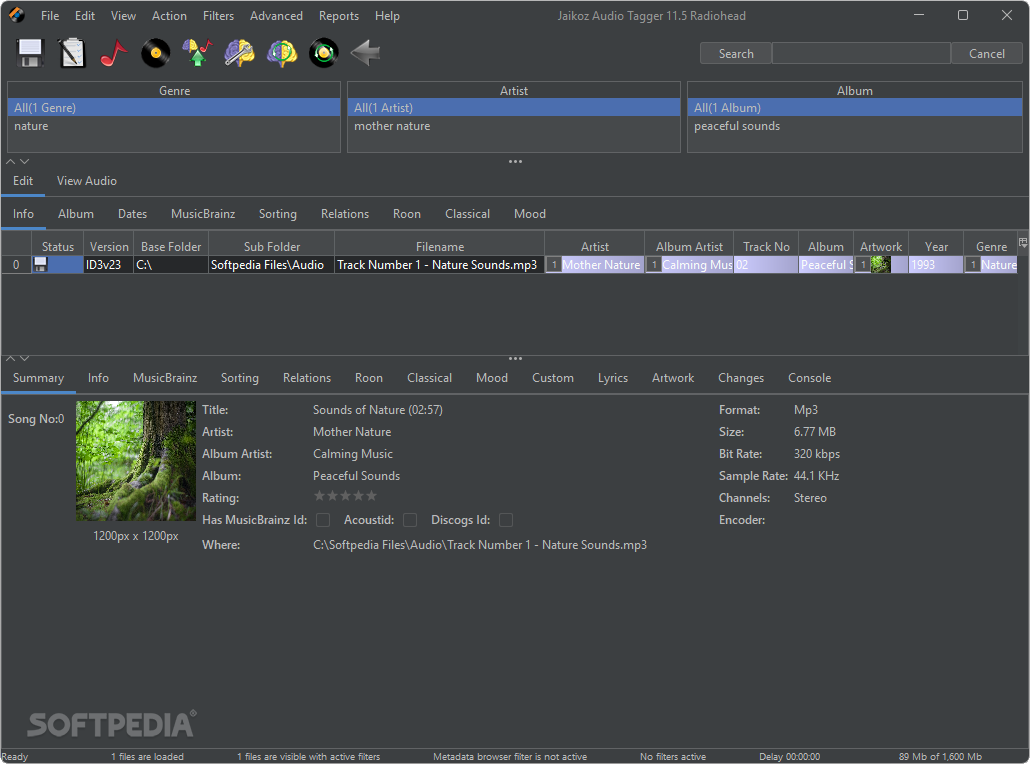
Jaikoz has been specifically created for managing large music collections. It aims to give you full control of your editing and provide as much automation as possible. Jaikoz is easy to use straight away and the AutoCorrect task can perform a batch of tasks automatically.

Jaikoz uses a spreadsheet view to allow you to edit information more quickly than other applications and provides many autoformatting tasks which do most of the work for you.

For example, it compares your MP3s to each other and using this information it can correct missing information and spelling mistakes, we know of no other tagger that does this! Jaikoz can extract information from a filename into the tag without you having to specify the format for the filename.

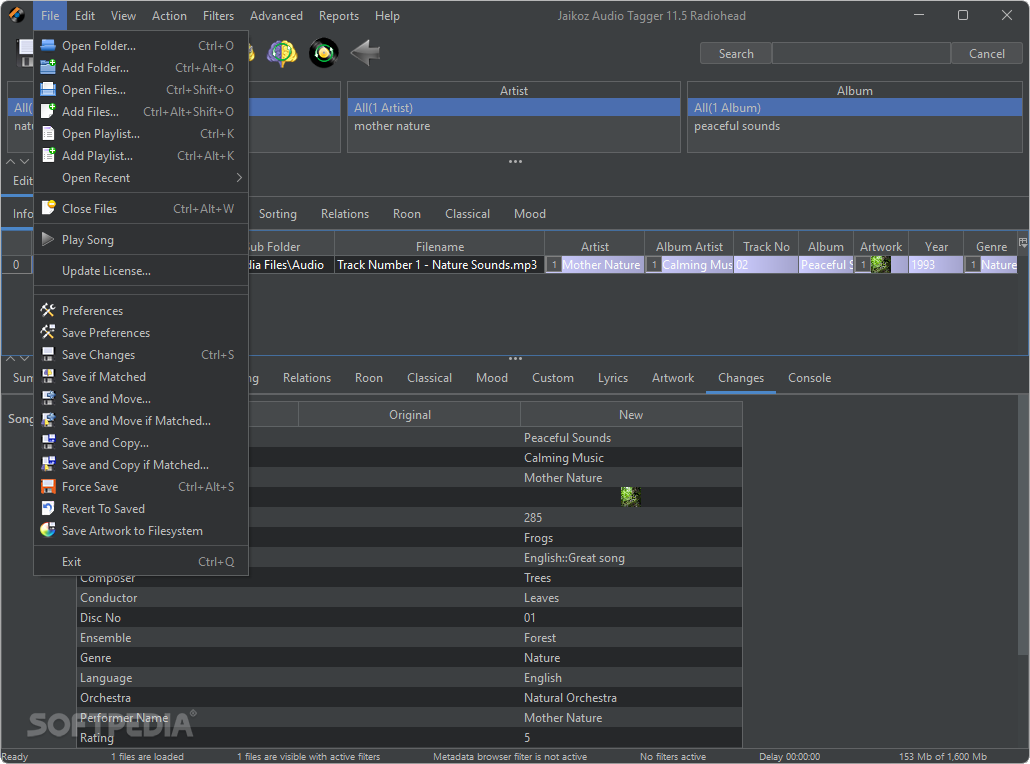
The screen is split horizontally to show the original record and the changes you have made so you compare both at the same time. Some applications hide multi-complex fields away but Jaikoz allows you to access the first field of every one from the main view. For example if you have an album cover tag
in one mp3 and you want to copy it to other MP3s just copy and paste it.

Jaikoz currently supports tagging of MP3 files with ID3v1, ID3v2, ID3v2.2, ID3v2.3 and ID3v2.4 tags. In future versions we aim to add other formats such as Ogg Vorbis and Lyrics3

Here are some key features of "Jaikoz for Windows":

· Acoustic matching using MusicBrainz and MusicIP to match tracks based on the actual music
· MetaData matching using MusicBrainz to match tracks from the metadata in your files
· Detail Panel, allows easy editing of the current record with support for extra iTunes and MusicBrainz fields
· Automatically retrieve artwork from Internet
· Tag Browser to filter your Audio files
· Powerful Find and Replace feature for any data
· Intelligent AutoMatch compares different Audio files and finds field matches and then allows all similar fields to be formatted the same
· Intelligent AutoFormat provides automatic capitalization, conversion of special words and removal of invalid and punctuation characters
· Intelligent FileName to Tagger can extract information from the filename into the tag without having to know the format of the field
· Rename filenames and folders from your metadata in your chosen format
· AutoCorrect can be used to perform automatic formatting of your chosen columns in a single click
· Provides full support of all text fields and easy tagging of large number of audio files
· The innovative split screen spreadsheet view allows easy comparison of changes during editing
· Automatically keeps v1 and v2 tags synchronised
· Full Unicode support allow any character from any language to be used
· Easy conversion of tags between version
· Displays what is actually contained in the tag allowing the user full control
· Jaikoz is Internationalized, currently supports English, Spanish and German


Requirements:

· Java 1.5


Limitations:

· 30 days trial
· Only 50 files can be fixed during one use


What's New in This Release:

· Retrieval of Acoustic Ids now utilizes multiple cpus if your computer has them to process multiple tracks in parallel
· The Genre field can now be fixed from Musicbrainz Folksonomy Tags. Jaikoz prefers to use tags that match the standard ID3 genre list, in case of a tie the tag used by most users to tag a release or track is preferred. Jaikoz also includes a configurable blacklist of tags that should not be used as genres when receiving from or submitting to folksonomy tags, you can use '*' as a wildcard match.
· Folksonomy Tags is a relatively new addition to Musicbrainz so tags are not available for many of the releases yet but one of the advantages of this system is that genres can also be submitted back from Jaikoz as Musicbrainz Folksonomy Tags. This is an open system that is even being supported by the BBC. If everybody that used Jaikoz submits their tags back to Musicbrainz the quality of Folksonomy tags should increase rapidly.
· Jaikoz now uses an embedded Database to store details of every release and artist downloaded from Musicbrainz, that is preserved between invocations of Jaikoz. Because this information is held in the database rather than memory this reduces memory usage. Jaikoz uses this locally stored release data so that it doesn't actually have to a lookup for every track if it can find a good match by looking at already downloaded and used releases. Consider the usual case of all tracks in a release being looked up if the metadata is good enough the new system will only require one track, artist and release lookup for the first track, all the other tracks can be matched using the downloaded release info so more tracks can be corrected more quickly.
· The Capitalizers have now been renamed to better reflect what they do, and the Title Case Capitalizer has been improved so it more accurately matches the conventions used within Musicbrainz. There is now an exception list for capitalizers, so certain words preserve formatting i.e. U2 or UB40.
· When using Rename Folder From Tags or Rename File from Tags the number of fields that can be used has been increased to support most of the Jaikoz Meta fields available, to better support this the fieldname formats have been changed from %A, %B... to %artist%, %title%....
· A simple IF statement is now supported for Rename Folder From Tags or Rename File from Tags, allowing you to check if a field has a value. For example $if(%album%,%album%-) would write the value of abum and a hyphen character only if album has a value. Full scripting will be added in a later version of Jaikoz.
· Tag from Filename now expects you to specify the format of the filenames when extracting the filename information into tag fields, because it was not always possible for Jaikoz to correctly guess a filenames components without a hint. But Jaikoz still uses heuristics to get the best match when a filename could match the mask in multiple ways.
· Added Create Support Files to make it easy to submit bug reports to Jthink
· Added Empty Cache to empty the database if you want to force Jaikoz to make all its check against Musicbrainz rather the embedded Database
· Improvements to memory usage and memory management.
· There have been a number of fixes to the Correct Tags Musicbrainz, although some of these will not take effect until Musicbrainz Search Server Update has been released.
· Special field %bestartist% has been added to Rename Folder From Tags and Rename File from Tags. This uses the Album Artist if exists and if it doesn't it uses the Artist field.
· The field %year% always returns only the year portion even if it holds a complete date, this is more useful to Rename Folder From Tags and Rename File from Tags tyhan returning the whole date.
· Tag from Filename has an additional option Only Populate Fields if Empty that is enabled by default.
· Maximum and minimum heap memory shown in console at startup.
· Added What should Year Contain option to the Year formatter so that all years can be converted to year or full date format.
· Now by default Musicbrainz does not overwrite existing artwork or genres.
· Save and some other tasks sometimes hang at the end of the task instead of completing properly.
· Clustering matching was case sensitive preventing clustering doing as well as it could.
· Out Of Memory error can occur when reading large cover art in PNG format is fixed.
· Not showing loading mp4s with invalid genre ids is now fixed.
· Not showing ID3 fields because attached picture has no picture type field is fixed.
· Unexpected error on deleting an image,ArrayOutOfBoundsException now fixed.
· Occasional IndexOutOfBoundsException when had editing a field then opening folder without completing the edit is now fixed.... [ read full changelog ]


Softpedia guarantees that Jaikoz 2.5.0 Beta Build 1047 is 100% CLEAN, which means it does not contain any form of malware, including but not limited to: spyware, viruses, trojans and backdoors.

This software product was tested thoroughly and was found absolutely clean, therefore it can be installed with no concern by any computer user.

However, it should be noted that this product will be retested periodically and the award may be withdrawn, so you should check back on this page from time to time. (click here for more information)


Related downloads IT News Popular downloads New additions   Latest reviews  
WinCatalog Standard 2.4
WinCatalog Standard - takes cataloging to the next level
TreePad PLUS 7.4
An award-winning software designed to be an Organizer, PIM / Database, Personal Information Manager and Word Processor.
J-Music 1.0
J-Music can be used for your music / movies collection
VisiTrax Lite 2.10.3.257
DJ-friendly organizer for CDs, tapes, etc. Imports CD titles from Internet
Music collections 1.1
Music collections - Search drives and make your own collection of music
KCatalog 1.0
KCatalog is an Multimedia catalog utility which allows you to organize huge collection of MP3/Movie files in your hard disks
LiteCd 0.1.3
LiteCd was designed to manage your personal media collection(CDs, DVDs, VHS' etc.).
MusShell 3.1.1
Gives you the possibility to enhance your audio CDs or music files with shells of information and pictures.
Village Music 1.21
Village Music keeps track of your music collection.
Software Collection Manager 1.3
An application that can help you manage your cd collection.

go to top Use the following code to link to this page:


Welcome!
Hello, Guest

Login if you have a Softpedia.com account.

Otherwise, register for one.

Main categories:
  • Antivirus
  • Compression tools
  • CD/DVD Tools
  • Office tools
  • Programming
  • Authoring tools
  • File managers
  • Desktop Enhancements
  • Internet
  • Network Tools
  • IPOD TOOLS
  • Mobile Phone Tools
  • Multimedia
  • Tweak
  • System
  • Security
  • Others
  • Science / CAD
  • UNIX
  • Windows Widgets
  • PORTABLE SOFTWARE

  • Week's best:
  • Adobe Media Player 1...
  • Registry Mechanic 8....
  • BitSpirit 3.3.2.263
  • AnyDVD 6.4.5.6
  • Firefox 3.0.1 / 2.0....
  • AutoCAD 2009
  • Norton AntiVirus 200...
  • Norton Internet Secu...
  • The Bat! Professiona...
  • WinRAR 3.80 Beta 3 /...
  • GMail Drive shell ex...
  • DAEMON Tools Lite 4....
  • UBCD4WIN 3.2.0
  • Adobe Reader 9.0.0 /...
  • Total Commander Ulti...
  • System Mechanic 8.0....
  • Adobe Acrobat Profes...
  • iPhone PC Suite 1.0....
  • Portable Firefox 3.0...
  • MPlayer for Windows ...
  • Vista Codec Package ...
  • Windows Live Messeng...
  • WinBubble 1.73
  • Kaspersky Anti-Virus...
  • Malware Removal Tool...
  • Royale Noir Theme fo...
  • IBM Lotus Symphony 1...
  • Adobe Dreamweaver 10...
  • Adobe Fireworks 10.0...
  • BitDefender Total Se...
  • © 2001 - 2008 Softpedia. All rights reserved.
    Softpedia™ and Softpedia™ logo are registered trademarks of SoftNews NET SRL.
    Copyright Information | Privacy Policy | Terms of Use | Contact Softpedia | Update your software | Archive