
Seamlessly convert images to slideshows and videos to share on your blog or with your closest friends using this straightforward tool. #Photos converter #Video converter #Convert tool #Convert #Converter #Convertor

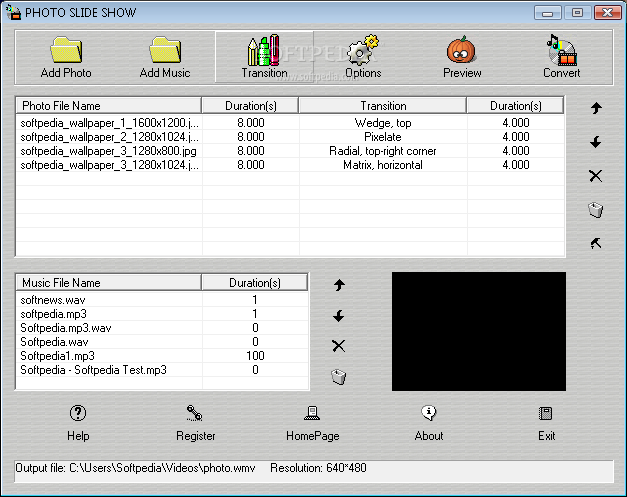
Photo Slide Show is a simple-to-use application designed to help you create video slideshows from images.
The interface of the program is very plain and simple to work with. Images can be imported into the list via the file browser only, because the "drag and drop" method is unsupported.
In the image list you can check out the name, transition, as well as photo and transition duration of each image.
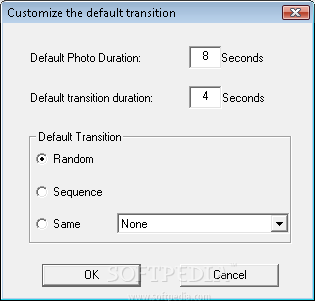
You can add a soundtrack to your clip by importing a sound file, preview results and customize the default transition (random, sequence, same).
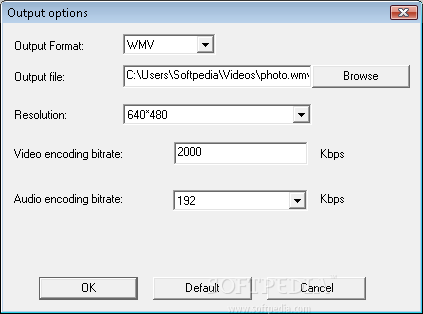
In the "Options" area you can specify the output destination, format (AVI, WMV or MKV) and resolution, along with audio and video compressor and bit rate. Settings can be restored to their default values at any time.
Photo Slide Show requires a moderate amount of system resources and quickly creates a slideshow. However, we have encountered one too many errors during our tests. We ran the tool on both Windows 7 and XP. On 7 it failed to maintain the image resolution in the output video.
It didn't have this problem on XP but it didn't manage to convert the images at all on the latter operating system. Plus, there is no way of disabling the annoying sound effect that can be heard when hovering over buttons. We strongly recommend you look for a more powerful tool than Photo Slide Show.
Photo Slide Show 3.3
add to watchlist add to download basket send us an update REPORT- runs on:
- Windows All
- file size:
- 969 KB
- filename:
- slideshow.zip
- main category:
- Multimedia
- developer:
- visit homepage
Bitdefender Antivirus Free

Zoom Client

calibre

7-Zip

paint.net

IrfanView

4k Video Downloader

Windows Sandbox Launcher

Microsoft Teams

ShareX

- Windows Sandbox Launcher
- Microsoft Teams
- ShareX
- Bitdefender Antivirus Free
- Zoom Client
- calibre
- 7-Zip
- paint.net
- IrfanView
- 4k Video Downloader