
With support for several extensions, this tool lets you take snapshots of the entire screen, a window or a custom area, upload results to an FTP server and automatically save them to a selected location. #Capture screen #Take snapshot #Screenshot maker #Capture #Screenshot #Snapshot

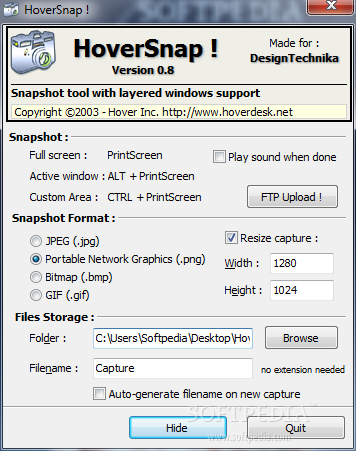
Taking a screenshot is not at all a difficult job, there is even a dedicated utility built-in Windows that can help, namely Snipping Tool. In case you want something a bit more powerful and easier to use, though, you can try HoverSnap.
The application sits quietly in the system tray, so you can safely use the key combinations to take a snapshot of the entire screen, the active window or just of a custom area.
HoverSnap works with a total of 4 graphical formats, the most common these days: JPEG, PNG, BMP and GIF. Also, the utility gives you the option to resize the capture to any dimensions you need.
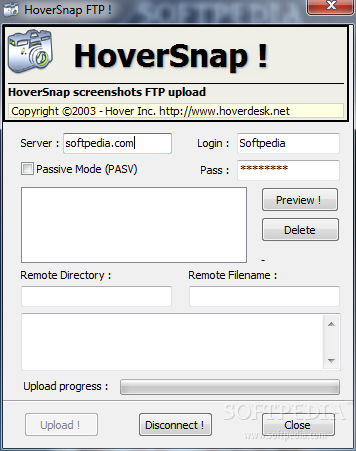
Two of the most interesting features in this program are the automatic saving tool and the FTP Upload utility. While the first one is capable of saving the screenshot in a location you specify, the second allows the user to upload the photos to a configured server with just a few clicks.
When capturing a custom area of the desktop, the application displays the dimensions of the selected area. However, you can only use the mouse to make the selection larger or smaller, so accuracy depends mostly on the steadiness of your hand.
There is no dedicated interface to work with the capture you have just made, so using the auto-saving tool is a must.
The program is not going to slow down the computer at all, as CPU and memory usage is quite low, and did not pop errors or hang in our tests.
To wrap it up, HoverSnap is not the most powerful snapping tool on the market, yet it is not the most disappointing either. It is actually very easy to use and has a decent set of features, so it is worth a try.
HoverSnap 0.8
add to watchlist add to download basket send us an update REPORT- runs on:
- Windows All
- file size:
- 328 KB
- filename:
- HoverSnap_v08.zip
- main category:
- Multimedia
- developer:
- visit homepage
calibre

IrfanView

Windows Sandbox Launcher

Zoom Client

4k Video Downloader

Microsoft Teams

ShareX

7-Zip

Bitdefender Antivirus Free

Context Menu Manager

- 7-Zip
- Bitdefender Antivirus Free
- Context Menu Manager
- calibre
- IrfanView
- Windows Sandbox Launcher
- Zoom Client
- 4k Video Downloader
- Microsoft Teams
- ShareX