
An obtrusive program that allows you to take screenshots, export them to PNG, JPEG, GIF, or BMP file format, copy them to the clipboard, or generate links. #Screen Capture #Take Screenshot #Take Snapshot #Screenshot #Snapshot #Printscreen

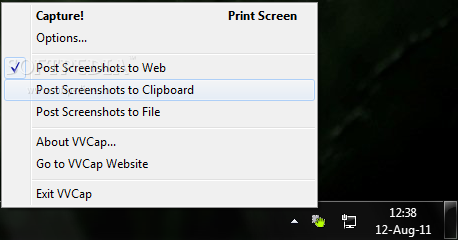
VVCap is a lightweight graphic capture tool built specifically for helping you take snapshots in only a few steps.
Since this is a portable program, it is important to mention that it doesn’t leave any traces in the Windows Registry.
You can copy it on any USB flash drive or other devices, and take it with you whenever you need to take screenshots on the breeze, without having to go through installation steps.
VVCap runs quietly in the system tray without affecting your work. The configuration settings embedded in this tool can be activated with a right-click mouse operation on the utility’s icon from the system tray. It also keeps a history with the taken images and lets you access them on the fly.
The app gives you the possibility to save the images to a file, copy the photos to the clipboard, so you can easily paste them into other third-party tools, or upload the pictures on the web. You are allowed to capture the desired area of the screen by selecting it with your mouse or use the Print screen button.
When opting for uploading images to the web, it automatically creates URLs which are copied to the clipboard, so you can easily share the links with your friends.
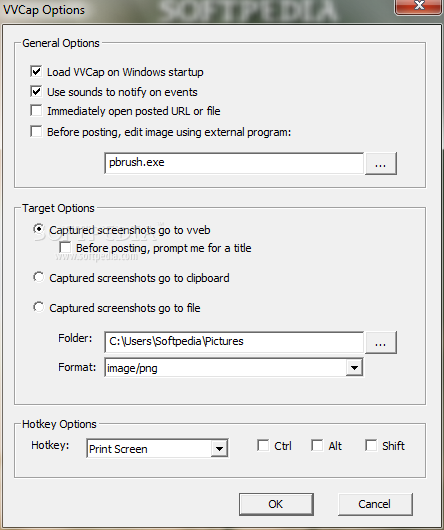
VVCap provides some basic features for helping you accomplish the process, as you can make the utility run at Windows startup, enable sound notifications, automatically open the posted URL or file, specify the saving directory, and pick the image format, namely PNG, JPEG, GIF, or BMP.
It is important to mention that there’s support for hotkeys, so most of the operations can be triggered very quickly. VVCap runs on low system resources without hampering the computer performance and provides very good output results.
To sum it up, VVCap proves to be a simple-to-use graphic capture application that bundles basic features for helping you take screenshots. It cannot compete with other powerful tools on the market, as it lacks support for post-editing operations (e.g. crop, resize, apply special effects) and different capturing modes (e.g. full screen, active window, fixed region).
VVCap 1.7.135 Beta / 1.6.131
add to watchlist add to download basket send us an update REPORT- runs on:
-
Windows NT
Windows 7 32/64 bit
Windows Vista 32/64 bit
Windows XP 32/64 bit
Windows 2K - file size:
- 1.9 MB
- main category:
- Multimedia
- developer:
- visit homepage
IrfanView

7-Zip

ShareX

Windows Sandbox Launcher

calibre

Zoom Client

Bitdefender Antivirus Free

Context Menu Manager

4k Video Downloader

Microsoft Teams

- Context Menu Manager
- 4k Video Downloader
- Microsoft Teams
- IrfanView
- 7-Zip
- ShareX
- Windows Sandbox Launcher
- calibre
- Zoom Client
- Bitdefender Antivirus Free
