
X-Shot is an application built as a capture utility. #Graphic capture #Image capture #Screen capture #Graphic #Capture #Image

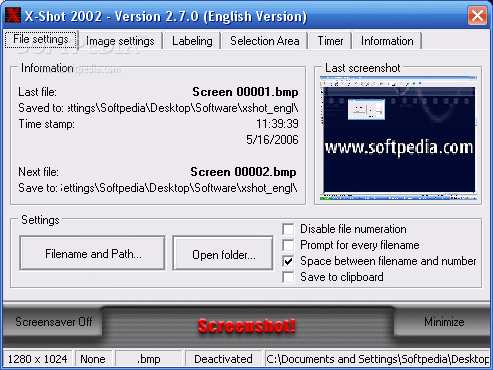
X-Shot is an application that you can use to take snapshots in several methods.
This is a portable software, so installing X-Shot is not necessary. You can simply place the tool on a removable drive and directly run its executable file. What's more important is that your Windows registry entries will not be affected.
The program comes with a user-friendly interface in which you can specify the file name and path, disable file numeration, as well as enable to prompt for every file name and to save to clipboard.
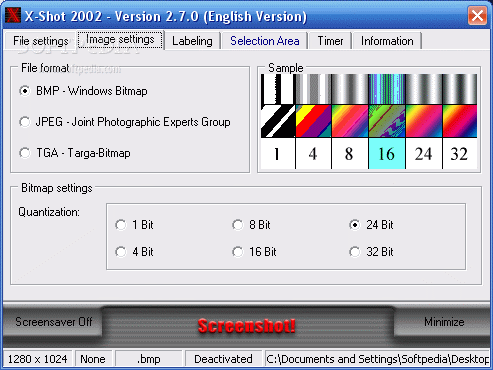
You can select the output format (BMP, JPEG or TGA) and configure their settings, such as quantization and compression method.
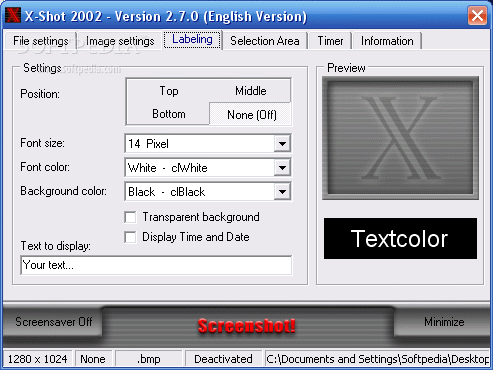
You can configure labeling settings when it comes to position, font size and color, background color and text to display (optionally make the background transparent and display the time and date).
On top of that, you can enable a timer, enable loop and autostart (settings can be restored to their default values at any time), as well as minimize X-Shot to system tray. The software requires a low amount of system resources and has a very good response time. No errors have popped up during our tests and X-Shot did not freeze or crash.
On the other hand, there is no help file available, you cannot capture the active window or include the mouse cursor in the pictures, and the interface is pretty outdated. Even so, X-Shot can be easily used by all levels and we recommend it.
X-Shot 2002 2.7.0
add to watchlist add to download basket send us an update REPORT- PRICE: Free
- runs on:
- Windows All
- file size:
- 686 KB
- filename:
- xshot_engl.zip
- main category:
- Multimedia
- developer:
IrfanView

7-Zip

4k Video Downloader

Windows Sandbox Launcher

Microsoft Teams

Zoom Client

calibre

ShareX

Bitdefender Antivirus Free

Context Menu Manager

- ShareX
- Bitdefender Antivirus Free
- Context Menu Manager
- IrfanView
- 7-Zip
- 4k Video Downloader
- Windows Sandbox Launcher
- Microsoft Teams
- Zoom Client
- calibre