
Now your photos will look even better with this app that helps you get great prints since it ensures easy editing, printing, sharing and creative features. #Edit image #Print photo #Share picture #Photosmart #Print #Picture
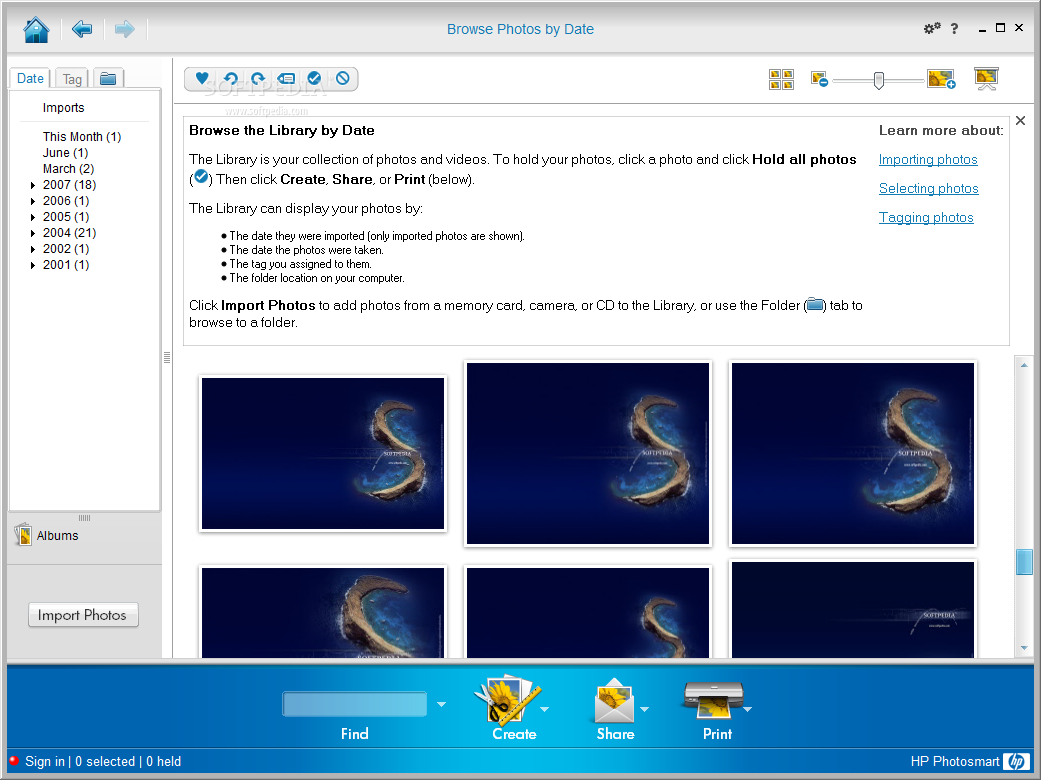
HP Photosmart Essential is designed to help the user edit, print, import, tag, share and organize pictures and videos on a computer. This is all done with the help of the user-friendly wizard-styled interface.
Photos are easily editable, and you have at your disposal functions such as rotate, crop, flip, resize or red eye removal. More than that, it brings to the table settings for adjusting the color temperature of a picture or modifying the adaptive lighting. “Black and White” or “Sepia” effects are also present in the list of options.
It is also possible to enhance the resolution of a photo. This is done in order to reduce the pixelated appearance of low-resolution pictures.
It is very easy to print photos. First of all you can select between two types of print sizes, namely, Simple Print and Photo Template. After that, you are able to zoom, move, rotate or position your images the way you want. JPEG, BMP, PNG and GIF image formats can be printed.
Your friends and family can also enjoy your photo albums with the help of HP Photosmart Essential. Images can be shared as attachments via an e-mail client or published on a secure website.
The software is an excellent photo and video organizer. You can use it to view media files, create albums, search for new items and tag photos, for faster search. Also, you can choose to import photos from cameras, phones, removable drives, CDs, scanners or folders in order to enlarge your multimedia collection.
HP Photosmart Essential is an app that's able to create CD/DVD labels so that you can decorate your discs. More than that, you can also use it to create professional looking Photo Books.
HP Photosmart Essential is an accessible tool that gives you the possibility to print your photos with ease and organizes all your media with style.
What's new in HP Photosmart Essential 3.5:
- Get dozens of new Photo Book artwork styles, featuring rich designer colors and patterns
- Get full control of your Photo Book fonts including type, size and color
- Print up to three 4"x6" photos on a letter size page
- Get the option to print a draft version of your Photo Book
HP Photosmart Essential 3.5
add to watchlist add to download basket send us an update REPORT- runs on:
- Windows All
- file size:
- 18.9 MB
- filename:
- pse_350_enu.exe


- main category:
- Multimedia
- developer:
Microsoft Teams

Context Menu Manager

7-Zip

IrfanView

Windows Sandbox Launcher

calibre

Bitdefender Antivirus Free

4k Video Downloader

ShareX

Zoom Client

- 4k Video Downloader
- ShareX
- Zoom Client
- Microsoft Teams
- Context Menu Manager
- 7-Zip
- IrfanView
- Windows Sandbox Launcher
- calibre
- Bitdefender Antivirus Free