
Easily convert several video file formats to cleverly fit on a CD or DVD, as well as having image quality set using this comprehensive tool. #AutoGK #Dvd to Avi #Free DVD to avi #AutoGK #DVD #CD
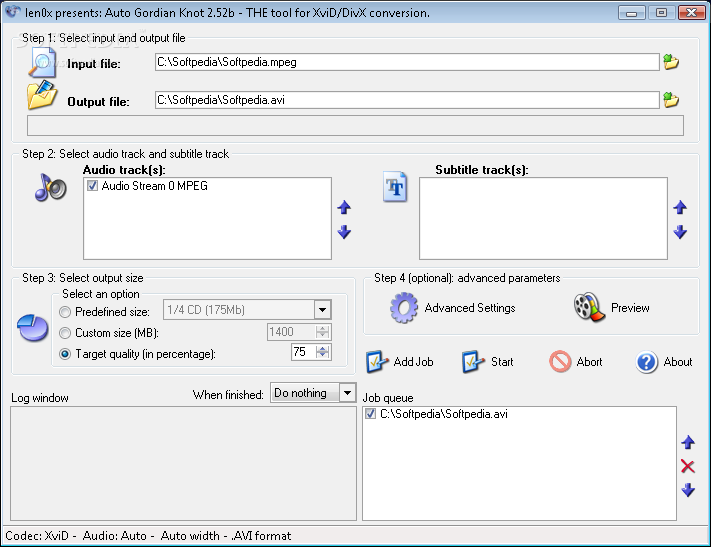
Auto Gordian Knot (or AutoGK, in short) is a toll especially created for those who want to convert their videos to CD or DVD sizes but have little to no knowledge about the codecs or apps they require. Users simply need to download and run the installer then use the app.
The setup package offers to install some additional applications, such as XviD Encoder, AviSynth and VobSub – if you already have them installed onto your PC, you can skip them. If, however, you do not, it is advisable to install them as they are required for successful encoding.
Since it is targeted at novices, the interface of AutoGK is intuitive and user-friendly, so that you can easily choose the source video then select a location and name for the output file.
Next, you can choose the audio and subtitle tracks you want to associate with the generated video (this is useful especially when the source file comes with several subtitles and only a single one needs to be retained in the converted clip).
When selecting the output size, there are several options available: you can choose one of the predefined sizes (so that the video can be stored onto a CD or a DVD), manually specify the size in MB or adjust the target quality in percentage.
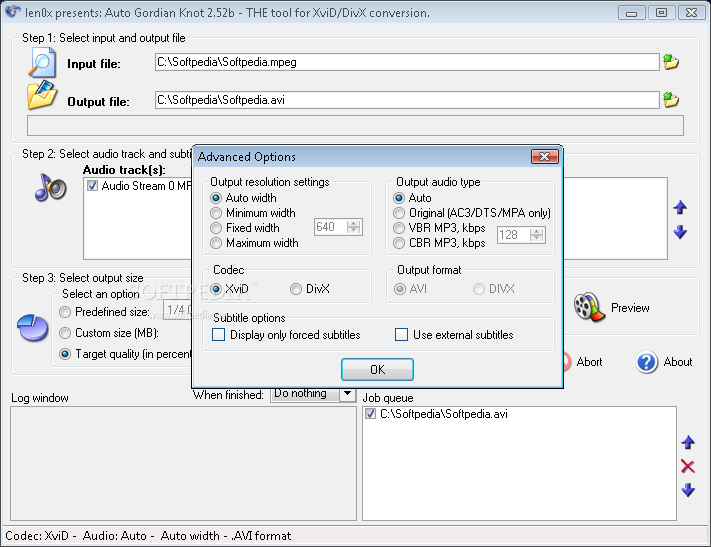
AutoGK comes with several optional parameters that can be modified before completing the conversion, such as the resolution width, the audio type or the codec (either XviD or DivX). If WinRAR is installed on the PC, you can even use external subtitles with the videos.
To round it up, AutoGK puts several tools at your disposal which you might need when encoding your videos in order to successfully store them on CDs or DVDs. It lets you quickly accommodate due to the intuitive interface and the output result is delivered flawlessly, ready to be burned to a disk.
AutoGK (Auto Gordian Knot) 2.55
 Softpedia Editor's Pick
add to watchlist
add to download basket
send us an update
REPORT
Softpedia Editor's Pick
add to watchlist
add to download basket
send us an update
REPORT
- PRICE: Free
- runs on:
- Windows 10 32/64 bit
- file size:
- 11.7 MB
- filename:
- HiddenOptions_0.81.zip
- main category:
- Multimedia
- developer:
- visit homepage
IrfanView

ShareX

7-Zip

Microsoft Teams

paint.net

calibre

Zoom Client

Windows Sandbox Launcher

4k Video Downloader

Bitdefender Antivirus Free

- Windows Sandbox Launcher
- 4k Video Downloader
- Bitdefender Antivirus Free
- IrfanView
- ShareX
- 7-Zip
- Microsoft Teams
- paint.net
- calibre
- Zoom Client