
User-friendly program that helps you convert popular media files to RM / RMVB file format using batch operations, while offering support for a rich suite of configuration settings. #Video to RealMedia #RealMedia encoder #Video converter #Converter #Convert #Video2RM


Easy RealMedia Producer is a nifty tool designed to convert popular media formats to RM/RMVB files. It can process files in batches with individual conversion settings for each of them.
RM/RMVB is a RealMedia proprietary container, designed for publishing video files, and it is particularly popular among Anime and Asian movies. It has a smaller size and lower bitrate, but amazing quality in comparison with DivX, for example.
The installation process is easy to follow; the full package includes a subtitle tool, a video splitter, and various codecs, but you can deselect any of those third-party tools if you don’t fancy them.
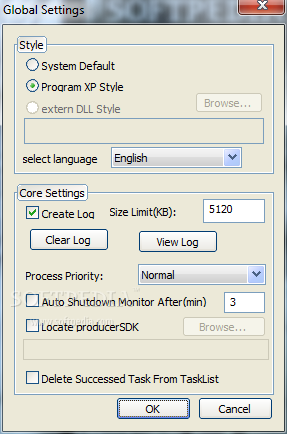
When you initiate the program, you are prompted to configure global settings (language, log creation, style). The user interface is simple, standard, but highly intuitive. In the main window you simply add the file(s) you wish to convert, and then hit the start button.
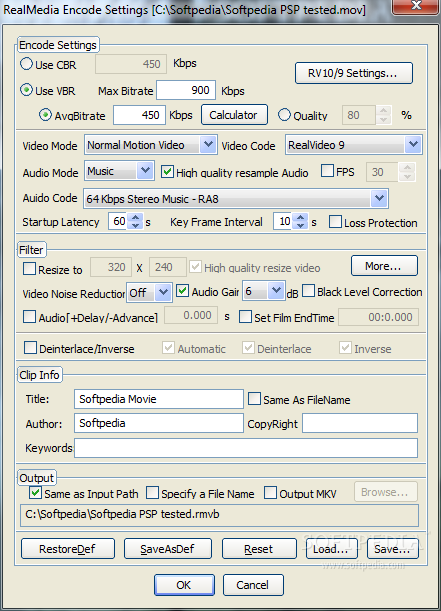
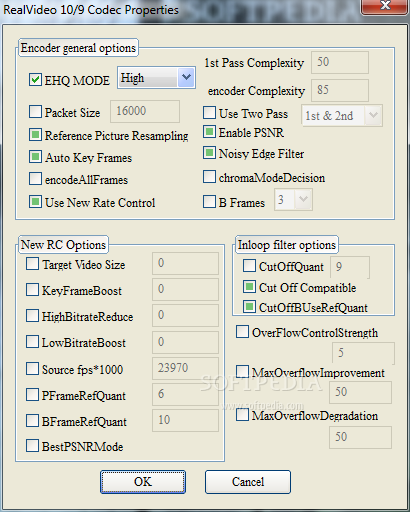
From the Settings window, you can configure audio and video code / mode, filters (e.g. video noise reduction), clip info, and output destination.
During our tests, the application got stuck several times when we attempted to drag and drop files to be converted, and we had to restart it. But other than that, it worked well and conversion was performed in a timely fashion.
In conclusion, if you don't mind the not-so-impressive user interface but are excited about a fast conversion tool for RM/RMVB output files, Easy RealMedia Producer might be the perfect fit for you.
Download Hubs
Easy RealMedia Producer is part of these download collections: Create RMVB, Make RMVB, Edit RM
What's new in Easy RealMedia Producer 1.94:
- Updated kernel to the the Real11 official version.
- Modify the tray icon is missing.
- Interface elements position adjustment.
Easy RealMedia Producer 1.94
add to watchlist add to download basket send us an update REPORT- runs on:
- Windows All
- file size:
- 8.2 MB
- filename:
- ermp194_full.zip
- main category:
- Multimedia
- developer:
IrfanView

Windows Sandbox Launcher

4k Video Downloader

Zoom Client

7-Zip

calibre

ShareX

Microsoft Teams

Bitdefender Antivirus Free

paint.net

- Microsoft Teams
- Bitdefender Antivirus Free
- paint.net
- IrfanView
- Windows Sandbox Launcher
- 4k Video Downloader
- Zoom Client
- 7-Zip
- calibre
- ShareX