
Free convert SWF to AVI, SWF to MPEG with best quality.. #SWF Converter #SWF Player #SWF to AVI #Converter #SWF2MPEG #SWF2AVI

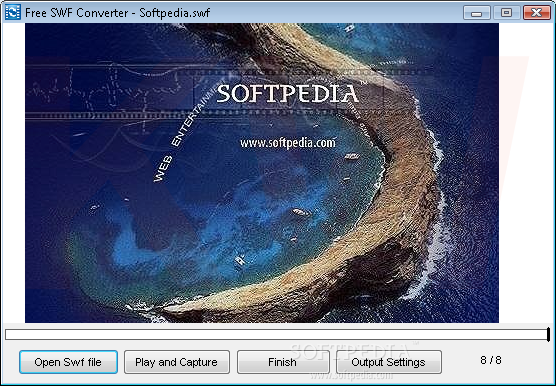
Free SWF Converter is a tool that enables you to encode SWF video files into the AVI and MPEG formats.
The user interface consists of a window in which you can start by opening a SWF file, by using the file browser or via the "drag and drop" function.
In the next step, you can configure output settings. Thus, you can select the output destination and format, video size (original or custom), video format (frame rate, bitrate, AVI codec) and audio format (channels, bitrate).
In order to convert the SWF file, you have to play the entire length of the video, after which the software initiates the encoding process. If you press the "Finish" button while the video is still playing, only footage shown till that point will be converted.
Once the task is completed, the output directory is automatically opened and you can view the video in the new format.
The program uses a moderate amount of memory, but doesn't have a help file or manage to keep a good image and sound quality in all cases. During our tests, we converted an SWF to AVI and noticed the video didn't play as smooth as the original, and sound was accompanied by a faded white noise. However, the SWF-to-MPEG conversion didn't have these problems.
Since you are obligated to play the entire video in order to convert the whole file, a task can take a very long time to complete, especially if you plan on encoding full-blown movies.
Free SWF Converter does a very good job in most cases, but it can take a couple of hours to encode videos of long length.
Free SWF Converter 2.0
add to watchlist add to download basket send us an update REPORT- runs on:
- Windows All
- file size:
- 4.3 MB
- filename:
- freeswfconverter.exe

- main category:
- Multimedia
- developer:
- visit homepage
calibre

IrfanView

4k Video Downloader

ShareX

Zoom Client

paint.net

Windows Sandbox Launcher

7-Zip

Bitdefender Antivirus Free

Microsoft Teams

- 7-Zip
- Bitdefender Antivirus Free
- Microsoft Teams
- calibre
- IrfanView
- 4k Video Downloader
- ShareX
- Zoom Client
- paint.net
- Windows Sandbox Launcher